
描述
Note: A publicly accessible HTTPS domain is required. Localhost and local development environments are not supported.
AI Chatbot for WordPress & WooCommerce adds an AI-powered chat assistant to your website using Retrieval-Augmented Generation (RAG).
The plugin allows site owners to train a chatbot on their own WordPress data — including FAQs, pages, posts, and WooCommerce products — and provide accurate, contextual answers to visitor questions using Gemini or OpenAI models.
Content is securely sent to an external AI processing service for embedding generation and chat responses.
An API token is required to enable AI functionality.
Key Features
- Frontend chatbot widget with configurable position
- Supports Gemini and OpenAI AI models
- Retrieval-Augmented Generation (RAG) based answers
- Learn from FAQs, pages, posts, and WooCommerce products
- Manual content sync and embedding generation
- Email notification when AI training is completed
- HTTPS-only communication with the external service
How It Works
- Install and activate the plugin
- Configure the chatbot position on the frontend
- Enter AI provider details (Gemini or OpenAI API key and model)
- Choose which content types to send for learning
- Submit selected content for processing
- Receive an email once embeddings are ready
- Enable the chatbot on the frontend
Supported Content Types
You can choose which data to send for AI learning:
- FAQs (required)
- Pages
- Posts
- WooCommerce products
Each content item is automatically truncated to a maximum of 1000 words before processing.
Usage Limits
The free service tier includes the following limits:
- Up to 1500 chat requests per day
- Maximum 100 FAQs
- Maximum 100 posts
- Maximum 100 pages
- Maximum 100 WooCommerce products
- Total data size limited to 2 MB
All limits are enforced by the external AI service.
External Services
This plugin connects to an external service to process content, generate embeddings, and provide AI responses.
Service Endpoint
https://ragai.phpsoftsolutions.in
Purpose
* Store selected WordPress content
* Generate embeddings
* Process chat queries using AI models
Data Sent
* FAQ questions and answers
* Selected page, post, and product content
* Site identifier
* Selected AI provider and model
AI provider API keys are used only for request processing and are not exposed publicly.
Service Provider
PHPSOFT SOLUTIONS
https://www.phpsoftsolutions.in/privacy-policy
屏幕截图

The AI chatbot widget active on the website frontend, ready to engage with visitors. 
The Backend Registration screen where you connect your site to the AI gateway to receive your API key. 
The Widget Customization panel where you can toggle the chatbot on/off and set its screen position. 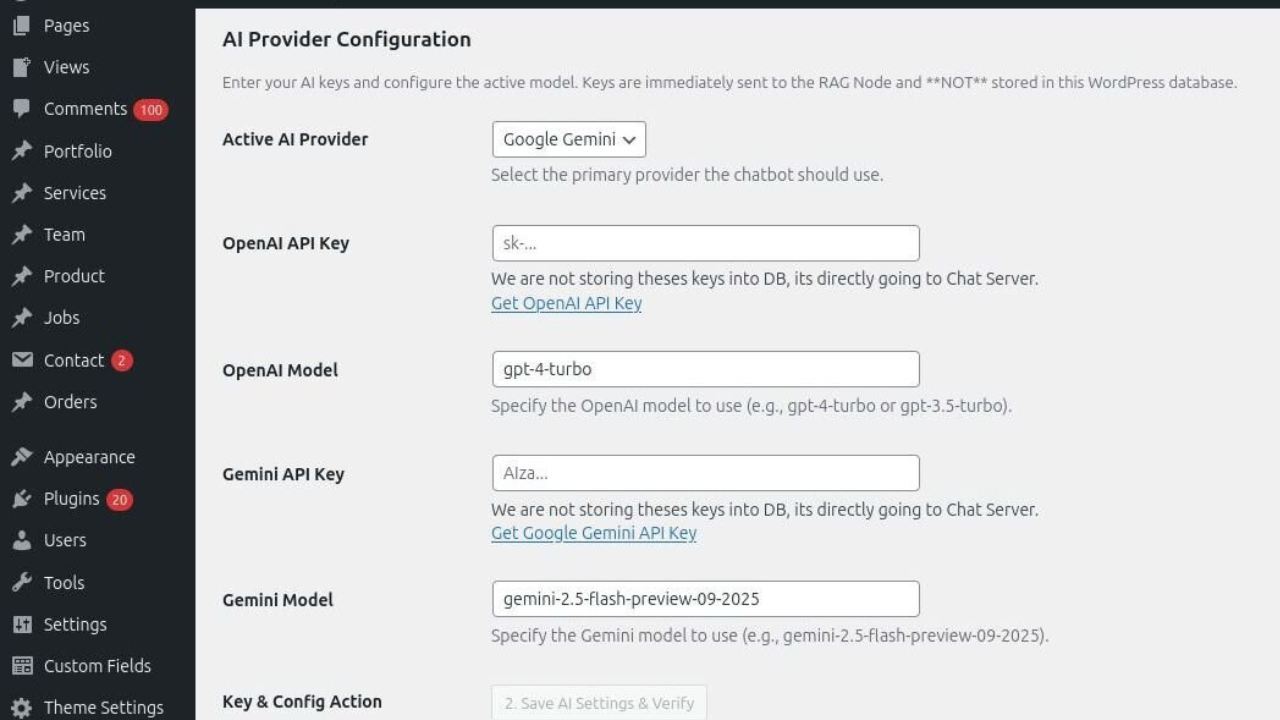
The AI Model Configuration screen for selecting the brain behind your chatbot’s responses. 
The Knowledge Base (RAG) selection screen where you choose which pages, products, and FAQs the AI should learn from.
安装
- Upload the plugin to the
/wp-content/plugins/directory - Activate the plugin through the Plugins menu
- Open the plugin settings page
- Configure AI provider credentials and chatbot options
- Select content and submit for learning
常见问题
-
Does this plugin require an API key?
-
Yes. A valid Gemini or OpenAI API key is required.
-
Does this plugin work on localhost or local development environments?
-
No. This plugin requires a publicly accessible domain with HTTPS enabled.
Localhost or local development URLs are not supported because the external AI service verifies the site domain during API registration. -
Can the chatbot work without sending content?
-
No. Content embeddings are required to generate meaningful answers.
-
Are there usage limits?
-
Yes. The free tier includes daily request and content limits.
-
Is WooCommerce supported?
-
Yes. WooCommerce products can be used as a knowledge source.
-
Is there a paid version?
-
Additional features and higher limits may be offered in future versions.
评价
此插件暂无评价。
贡献者及开发者

更新日志
1.0.3
- Security: Updated REST API permission_callback implementation to explicitly declare public chatbot endpoints in compliance with WordPress.org guidelines.
- Security: Restricted access to administrative REST endpoints (challenge token) to site administrators only.
- Security: Removed nonce-only authorization logic from public REST routes.
- Improvement: Refined anonymous session-based chat handling for public users.
- Fix: Aligned REST API implementation with plugin review feedback.
1.0.2
- Security: Implemented proper ‘permission_callback’ for all REST API endpoints to ensure authorized access.
- Security: Added strict nonce verification and ‘manage_options’ capability checks to all AJAX handlers.
- Security: Enhanced ‘register_setting’ definitions with explicit data types and sanitization callbacks.
- Security: Implemented allow-list validation for data push content types to prevent unauthorized data storage.
- Improvement: Added sanitization for custom request headers (x-session-id) and external API requests.
- Fix: Resolved PHPCS warnings regarding core hooks and optimized taxonomy queries for performance.
1.0.1
- Improved naming and unique identifier for plgin variables and functions.
1.0.0
- Initial public release.