

描述
Why are your downloads dropping — and you have no idea why?
You published your plugin on WordPress.org. You’re getting some downloads. But you don’t know why people find you, who is beating you in search results, or what your real growth trend looks like.
You’re flying blind.
Repoevo changes that.
Repoevo is the dedicated analytics and monitoring dashboard built exclusively for WordPress plugin developers, agencies and indie makers. It tracks everything that matters — downloads, active installs, keyword rankings, conversion rates and competitor performance — directly inside your WordPress admin.
No spreadsheets. No manual work. No guessing.
The problem with WordPress.org plugin analytics
WordPress.org gives you almost nothing. A download count. A rough install number. That’s it.
You can’t see:
* Which keywords your plugin ranks for on WordPress.org
* Why your downloads spiked — or crashed — after an update
* Which competitors are stealing your installs
* What your real conversion rate is
* Whether your plugin is growing or slowly dying
Repoevo gives you all of this — for free.
📊 Plugin Analytics & Download Tracking
Finally understand your plugin’s real performance:
- Total downloads and daily download trends — visualized with beautiful charts
- Active installs tracking — see your real install base grow over time
- Conversion rate — how many people download your plugin actually install it?
- Version-based performance analysis — did your last update help or hurt?
- Growth spike and drop detection — never miss a trend again
- Rating and review tracking — monitor your plugin’s reputation over time
This is the WordPress plugin analytics dashboard you always needed — and never had.
🏆 Keyword Ranking & WordPress.org SEO
Most plugin developers have no idea how WordPress.org search works. Repoevo changes that.
- Track your WordPress.org tag rankings over time — see exactly where you rank for every keyword
- Full ranking history — watch your positions rise and fall across weeks and months
- Automatic keyword discovery — Repoevo finds keywords your plugin already ranks for, even if you never tracked them
- Custom keyword monitoring — add any keyword and track your ranking position daily
- Identify untapped ranking opportunities — find keywords you’re close to ranking for
- Trend visualization — see which keywords are moving up and which are fading
If you want more downloads, you need better keyword rankings on WordPress.org. Repoevo is the only tool that shows you exactly where you stand.
🤝 Competitor Analysis & Benchmarking
Your competitors are growing. Do you know how?
- See which plugins compete for your keywords — know your real competition
- Compare rankings, downloads and installs side by side — benchmark yourself against any plugin
- Monitor competitor growth over time — spot trends before they become threats
- Add any WordPress.org plugin to your dashboard with one click — not just your own
- Conversion rate comparison — find out if competitors convert better than you — and why
Stop ignoring your competition. Start learning from them.
📈 Version & Growth Tracking
Every update you ship changes your download trend. Most developers never know if it helped or hurt.
With Repoevo you can:
- Compare plugin performance across versions — see exactly what each update did to your numbers
- Detect the exact impact of changelogs on download and install trends
- Measure growth week by week and month by month
- Spot the moment things went wrong — and fix it fast
📄 PDF Export — Built for Agencies
Running WordPress plugins for clients? Repoevo’s PDF export turns your analytics into a professional client report in one click.
- Clean, branded PDF analytics report — ready to send to clients
- Includes download chart, keyword ranking chart and key stats
- Available on Pro and Business plans
No more copying numbers into spreadsheets. Just export and send.
⚡ Smart, Lightweight & Automatic
Repoevo works silently in the background — no setup, no manual data entry.
- Fully automatic data collection — Repoevo fetches fresh data daily, you do nothing
- Intelligent cache system — instant load times even with large datasets
- Lightweight and performance-optimized — zero impact on your site’s front end
- Clean, modern WordPress admin interface — feels like it belongs in WordPress
Who is Repoevo for?
Plugin developers who want to grow their WordPress.org presence, understand their keyword rankings and finally know why their download numbers go up — or down.
WordPress agencies who manage plugins for clients and need a professional way to report download trends, keyword rankings and growth metrics — without manual work.
Indie makers who publish plugins on WordPress.org and want to discover untapped keyword opportunities, track competitor performance and grow faster.
Competitor researchers who want to benchmark any plugin on WordPress.org — rankings, installs, conversion rates and growth trends.
What makes Repoevo different?
There is no other tool that combines WordPress.org plugin analytics, keyword ranking tracking, competitor monitoring and PDF export in a single WordPress plugin — installed directly in your admin dashboard, with automatic daily data collection and zero manual work.
Repoevo is built by a WordPress developer, for WordPress developers.
Features
- Monitor any WordPress.org plugin — your own or any competitor
- Daily download tracking with trend charts
- Active installs tracking over time
- Conversion rate monitoring (downloads vs. installs)
- Version-based performance analysis
- WordPress.org keyword and tag ranking tracking
- Full keyword ranking history and trend visualization
- Automatic keyword discovery — find rankings you didn’t know about
- Custom keyword monitoring with daily position updates
- Competitor plugin comparison and benchmarking
- Side-by-side ranking and install comparisons
- Rating and review tracking
- PDF export for analytics and client reports (Pro & Business)
- Intelligent cache system for fast load times
- Clean, modern and lightweight WordPress admin interface
- Available in English and German
External Services
This plugin connects to an external API to retrieve monitoring and analytics data.
Service provider: Webagentur BGL
Service URL: https://api.webagentur-bgl.com
Privacy Policy: https://repoevo.com/datenschutzerklaerung/
Terms of Service: https://repoevo.com/agb/
Data sent:
* Plugin slugs of monitored plugins
* Analysis timestamps (last known analysis time per plugin)
* Site URL (only when connecting an API key)
Data usage:
The transmitted data is used exclusively to provide analytics, monitoring and update detection features. No personal user data is collected or transmitted. The external API is required for the core functionality of this plugin.
Chart.js is loaded locally and used to render analytics charts within the plugin dashboard. No data is sent to Chart.js or any CDN.
Source Code
This plugin includes minified JavaScript files compiled from source files located in assets/js/admin/ within the plugin directory. The unminified source files are included in the plugin package.
Third-party libraries included locally:
* Chart.js (https://www.chartjs.org/) — MIT License
* chartjs-plugin-annotation (https://www.chartjs.org/chartjs-plugin-annotation/) — MIT License
* html2canvas (https://html2canvas.hertzen.com/) — MIT License
* jsPDF (https://github.com/parallax/jsPDF) — MIT License
License
This plugin is licensed under the GPLv2 or later.
https://www.gnu.org/licenses/gpl-2.0.html
屏幕截图
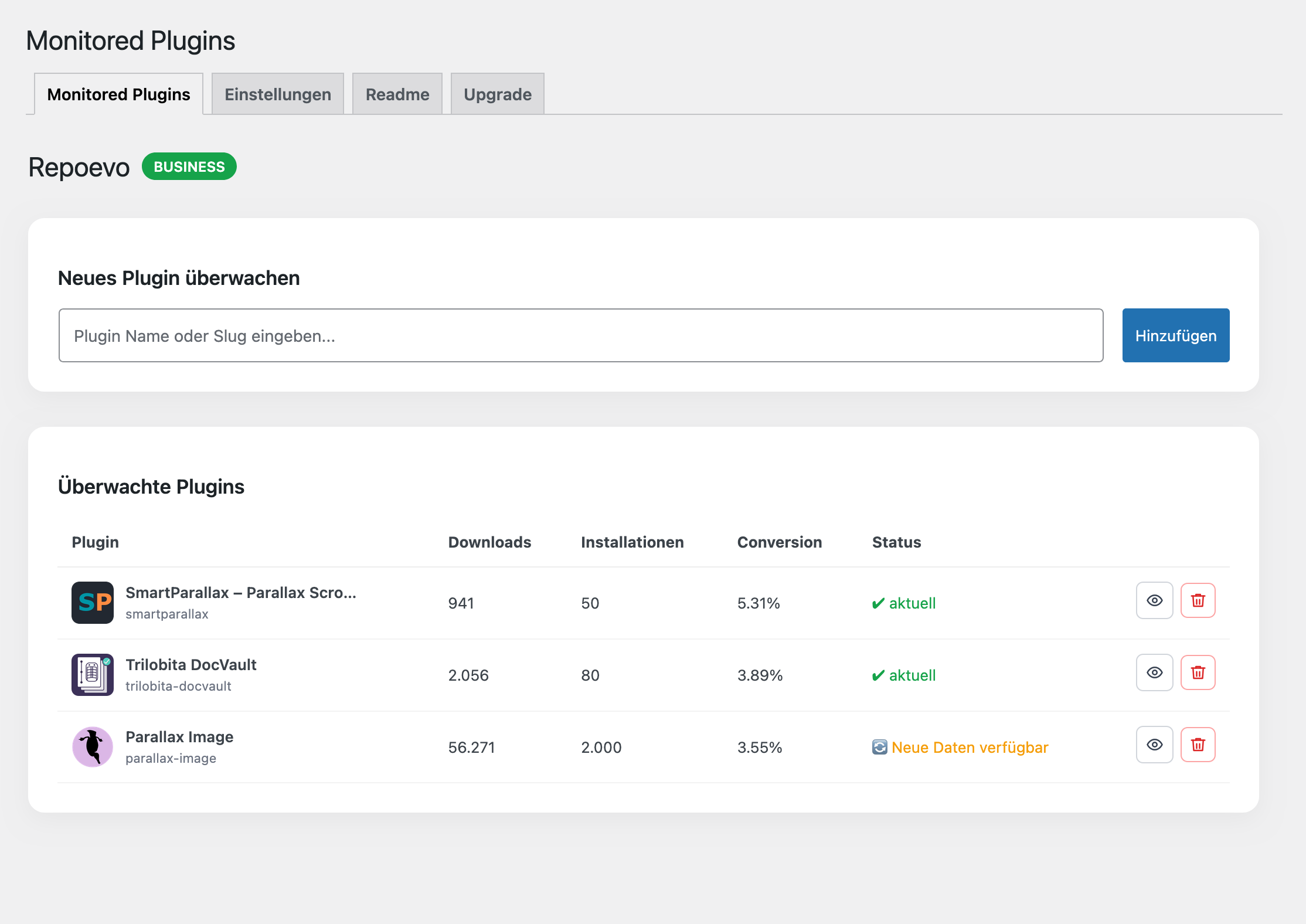
Dashboard overview with download trends, install tracking and conversion stats 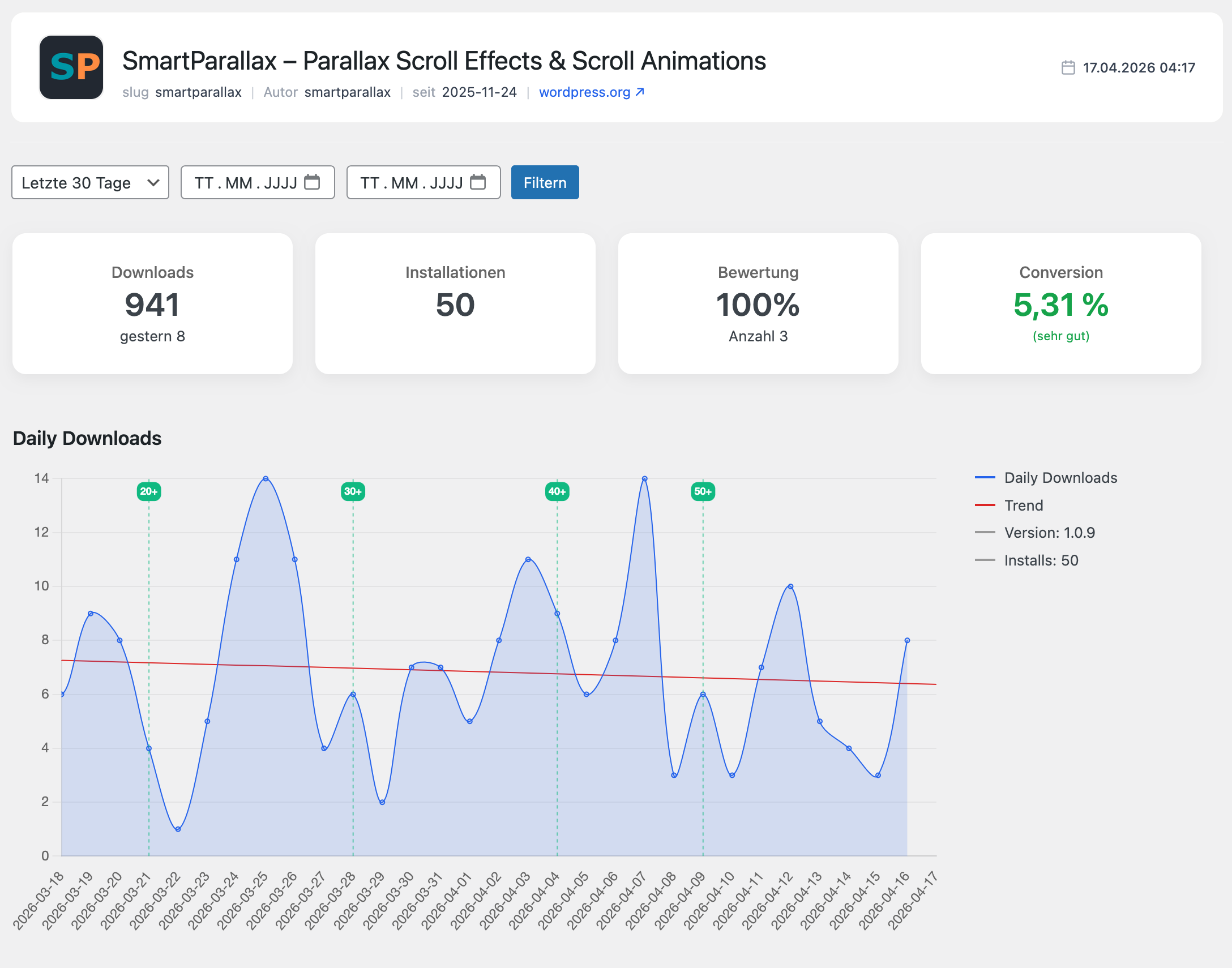
Keyword ranking chart with WordPress.org tag tracking and full ranking history 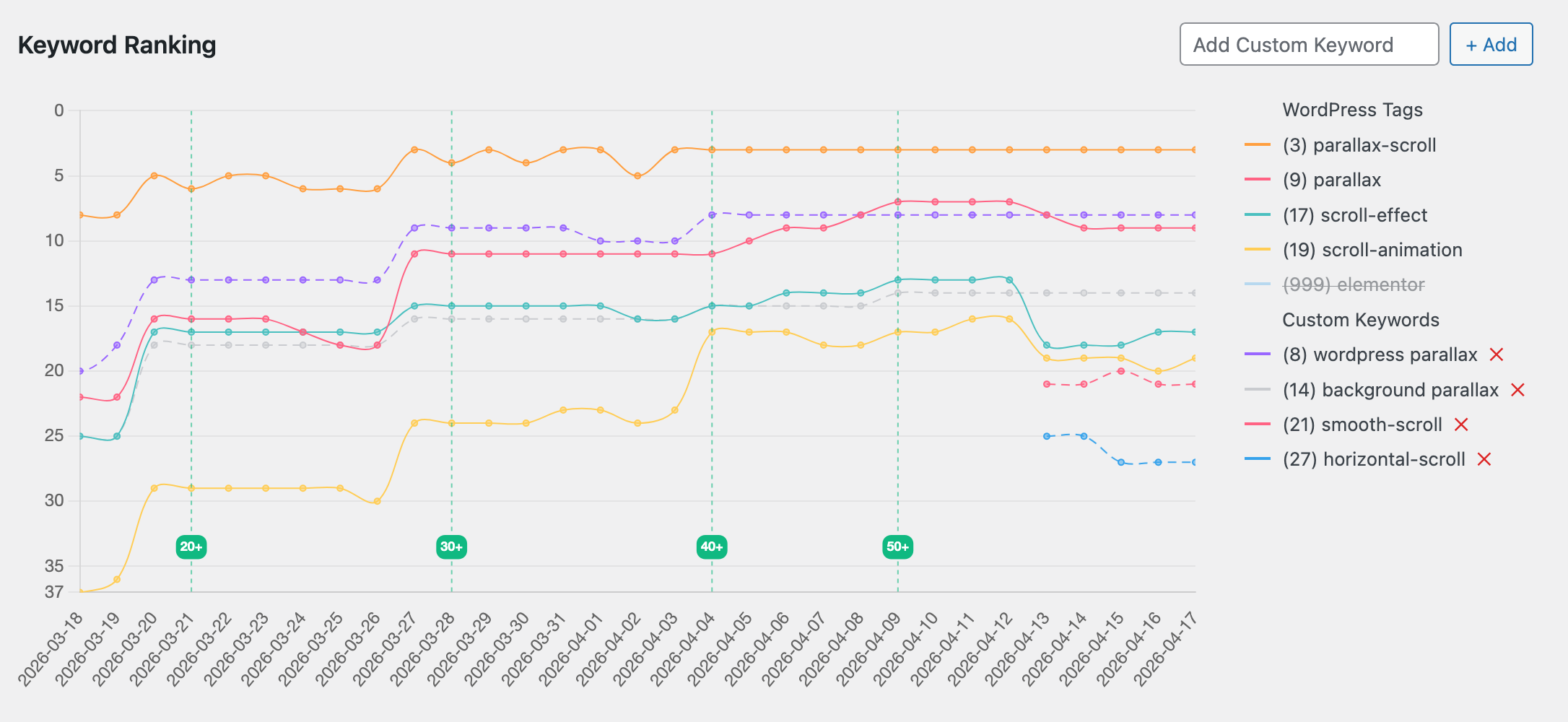
Competitor analysis — compare rankings, installs and conversion rates side by side 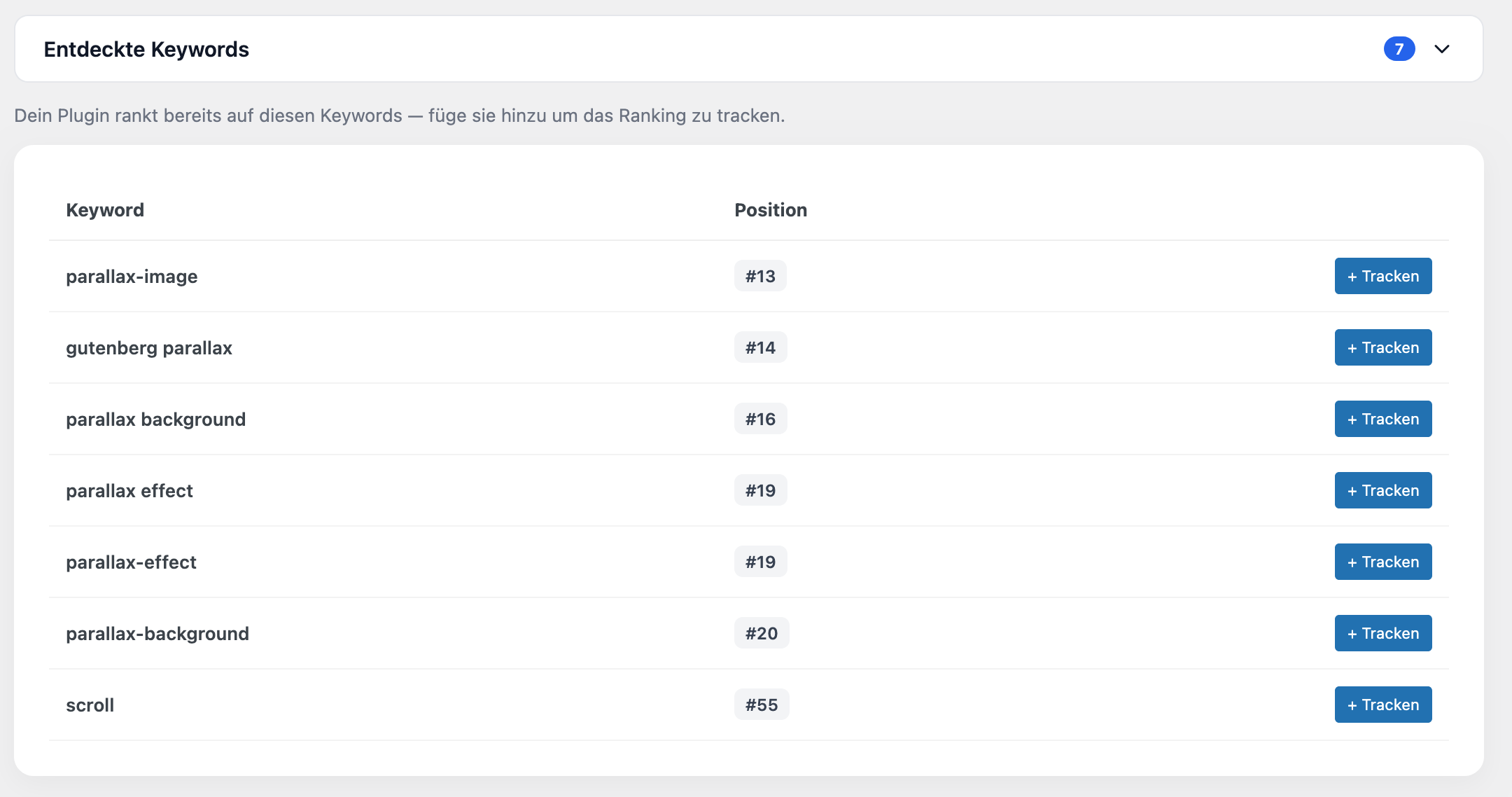
Discovered keywords — find rankings you didn’t know about and track them with Pro 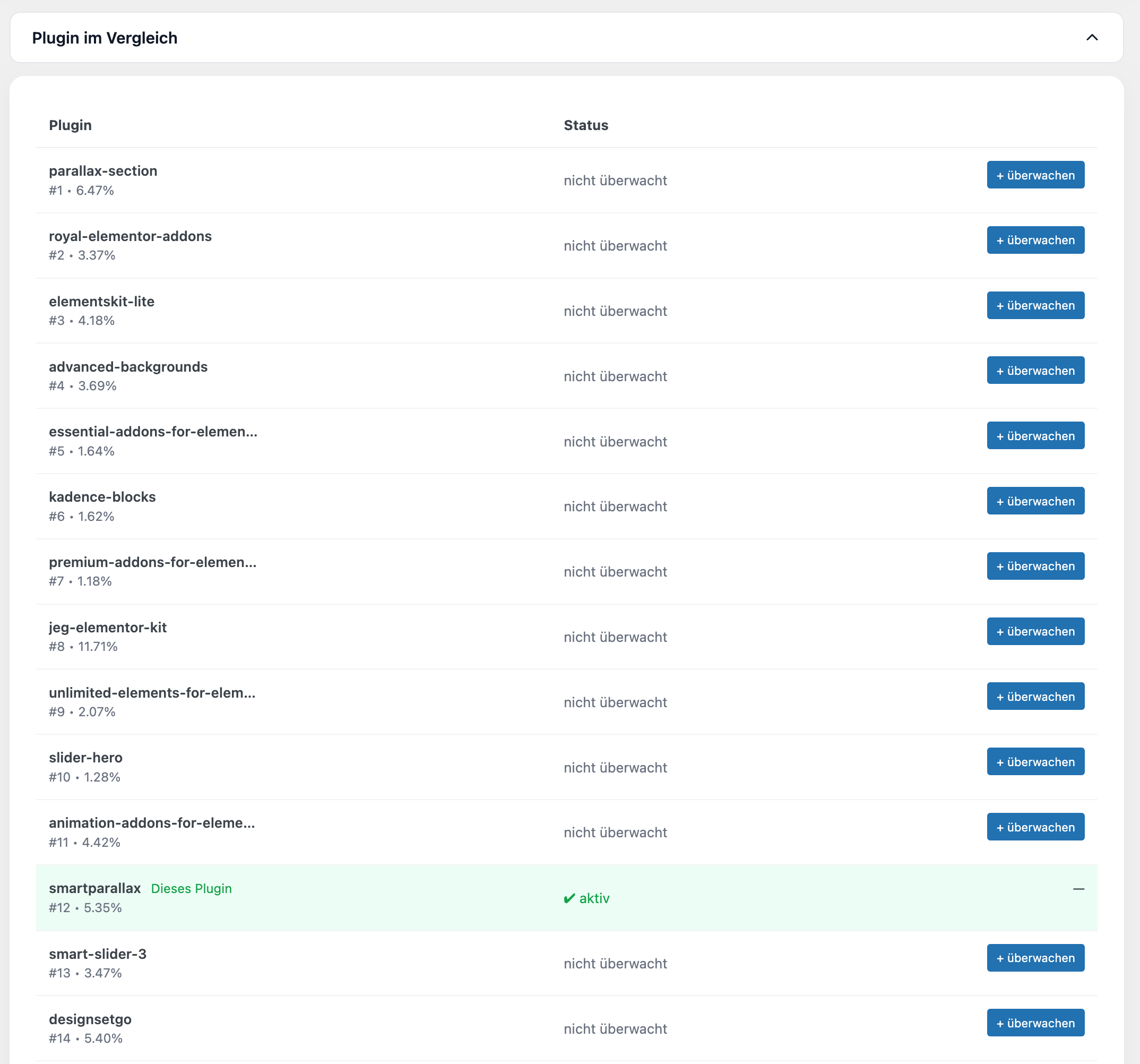
PDF export — clean analytics report ready for client reporting
安装
- Upload the plugin to
/wp-content/plugins/ - Activate the plugin through the WordPress plugin manager
- Open Repoevo in your WordPress admin sidebar
- Click Connect for free to get your API key
- Add any WordPress.org plugin slug and start monitoring immediately
No configuration needed. Data collection starts automatically.
常见问题
-
Is Repoevo free?
-
Yes. Core features including download tracking, install tracking, conversion rate and keyword ranking are completely free. Pro and Business plans unlock custom keyword tracking, PDF export and monitoring for more plugins.
-
What can I monitor with Repoevo?
-
Any plugin from the official WordPress.org repository — your own plugins or any competitor’s plugin. Just enter the plugin slug and Repoevo starts collecting data automatically.
-
How does keyword ranking tracking work?
-
Repoevo tracks your plugin’s position in WordPress.org search results for your tags and custom keywords — daily. You can see your full ranking history, spot trends and discover keywords you didn’t even know you ranked for.
-
Does Repoevo show keywords I am not tracking yet?
-
Yes. Repoevo automatically discovers keywords your plugin already ranks for in the WordPress.org search results — even if you never added them manually. Pro users see the exact ranking positions for all discovered keywords.
-
Can I track competitor plugins?
-
Yes. You can add any public WordPress.org plugin to your Repoevo dashboard and monitor its downloads, installs, keyword rankings and conversion rate — side by side with your own plugins.
-
Can I export my analytics as a PDF?
-
Yes. Pro and Business users can export a complete analytics report as a clean PDF directly from the dashboard — including the download chart, keyword ranking chart and key statistics. Perfect for client reporting.
-
How often is data updated?
-
Repoevo collects fresh data daily. The intelligent cache system ensures instant load times while keeping your data up to date.
-
Does this affect my site’s performance?
-
No. All data processing happens in the background. The plugin has zero impact on your site’s front-end performance.
-
Where can I find the documentation?
-
Full documentation is available at https://repoevo.com/docs/
评价
此插件暂无评价。
贡献者及开发者
「Repoevo – Plugin Analytics, Keyword Tracking & Competitor Monitoring」是开源软件。 以下人员对此插件做出了贡献。
贡献者
更新日志
1.3.0
- New: Full internationalization (i18n) — plugin now available in English and German
- New: German (de_DE) translation included
- New: English set as default language for international users
1.2.1
- Fix: Unique install ID introduced — localhost installations no longer share the same license
1.2.0
- New: PDF Export — export full analytics report as PDF (Pro & Business)
- New: Upgrade page — redesigned plan comparison with full feature overview
- Fix: Chart height no longer overflows into next section on wider viewports
1.1.4
- Fix: Keyword ranking legend now correctly displays “>100” when plugin is not ranked in Top 100
- Fix: Download trend line no longer extends into negative values
1.1.3
- Fix: Plan changes (upgrade/downgrade) now instantly reflected in detail view
- Fix: Range filter (3 months, 6 months) no longer triggers security error
- Fix: Plan always loaded fresh from API — cache no longer serves stale plan data
1.1.2
- Security: Nonce verification added for detail view
- Security: All echoed variables properly escaped
- Code: Unique repoevo_ prefix applied throughout
- Fix: Plan changes now correctly reflected in detail view
1.1.1
- Fix: Plugins with status “not monitored” (plan limit) can now be reconnected directly from the dashboard with one click
1.1.0
- New: Discovered Keywords — automatically detects keywords your plugin ranks for
- New: Collapsible sections for Discovered Keywords and Plugin Comparison
- New: Pro feature — unlock exact ranking positions for discovered keywords
- Improvement: Cache system optimized with ranking-based expiry times
1.0.1
- Security: Nonce verification enforced for keyword actions
- Fix: Nonce passed correctly via JavaScript form submission
1.0.0
- Initial release