

描述
Postalion is a newsletter plugin that runs entirely on your own site. It collects subscribers, sends your newsletters in the background and keeps a record of every email. Your list stays in your WordPress database and the mail goes out through wp_mail(), so it uses whatever SMTP plugin or mail service you already have.
There are no limits on subscribers or on how often you send, no account to create, and the plugin makes no requests to outside servers.
Write
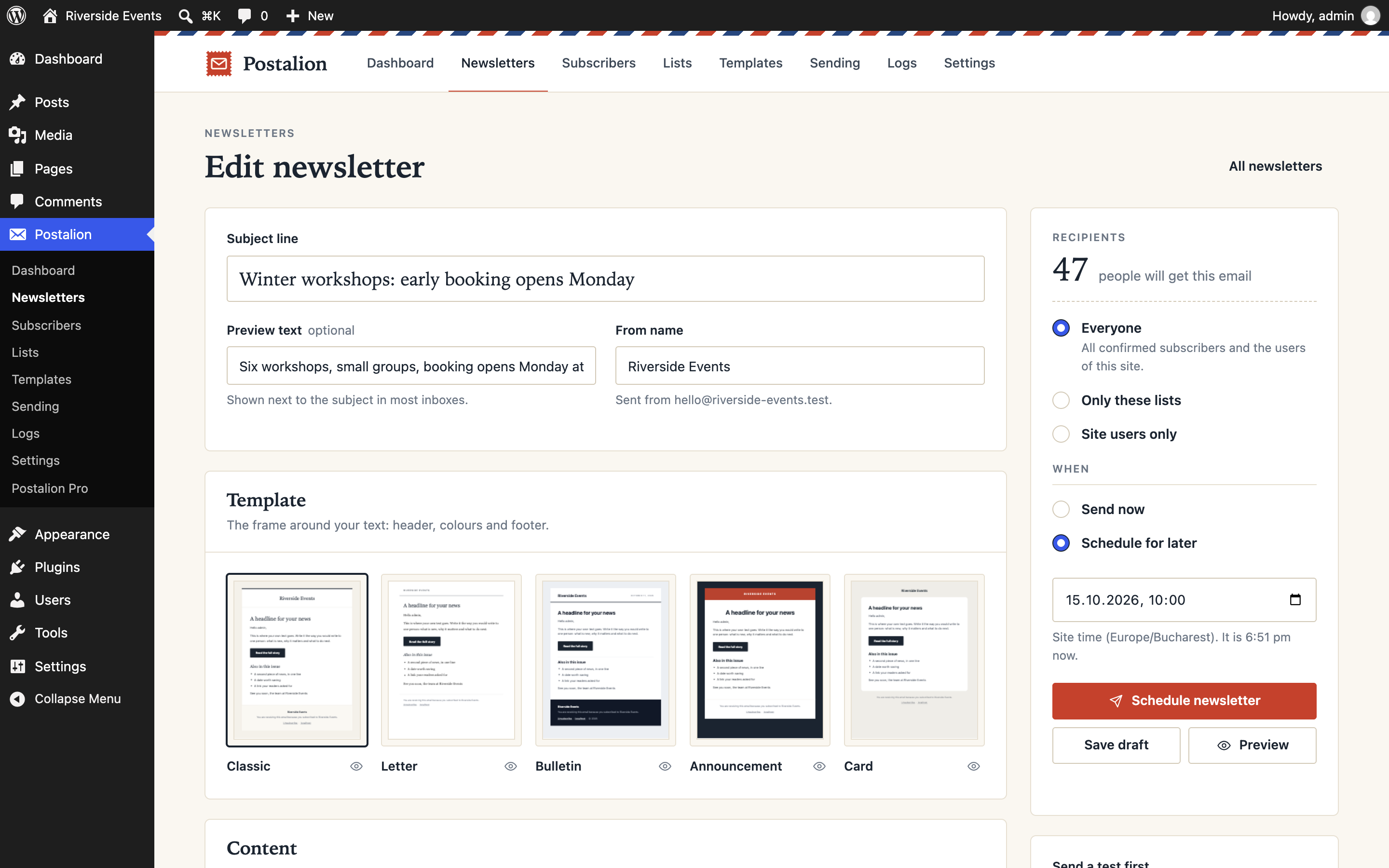
- Newsletter composer with five email templates: Classic, Letter, Bulletin, Announcement and Card
- Content blocks made for email: headline, button, two columns, image and text, note, divider, spacer, social links
- Personalisation: subscriber name and email, site name and address
- Preview for desktop and phone, and a test email to yourself
- The templates show your site logo, or the site name when there is no logo
Send
- Background sending in batches: the first batch goes out at once, the rest through WP-Cron
- Batch size and pause between batches are yours to set (default: 10 emails every 5 seconds)
- Send now, or schedule a date and time
- Live progress, with stop and resume
- An interrupted send continues where it stopped; nobody gets the same email twice
Mail server (optional)
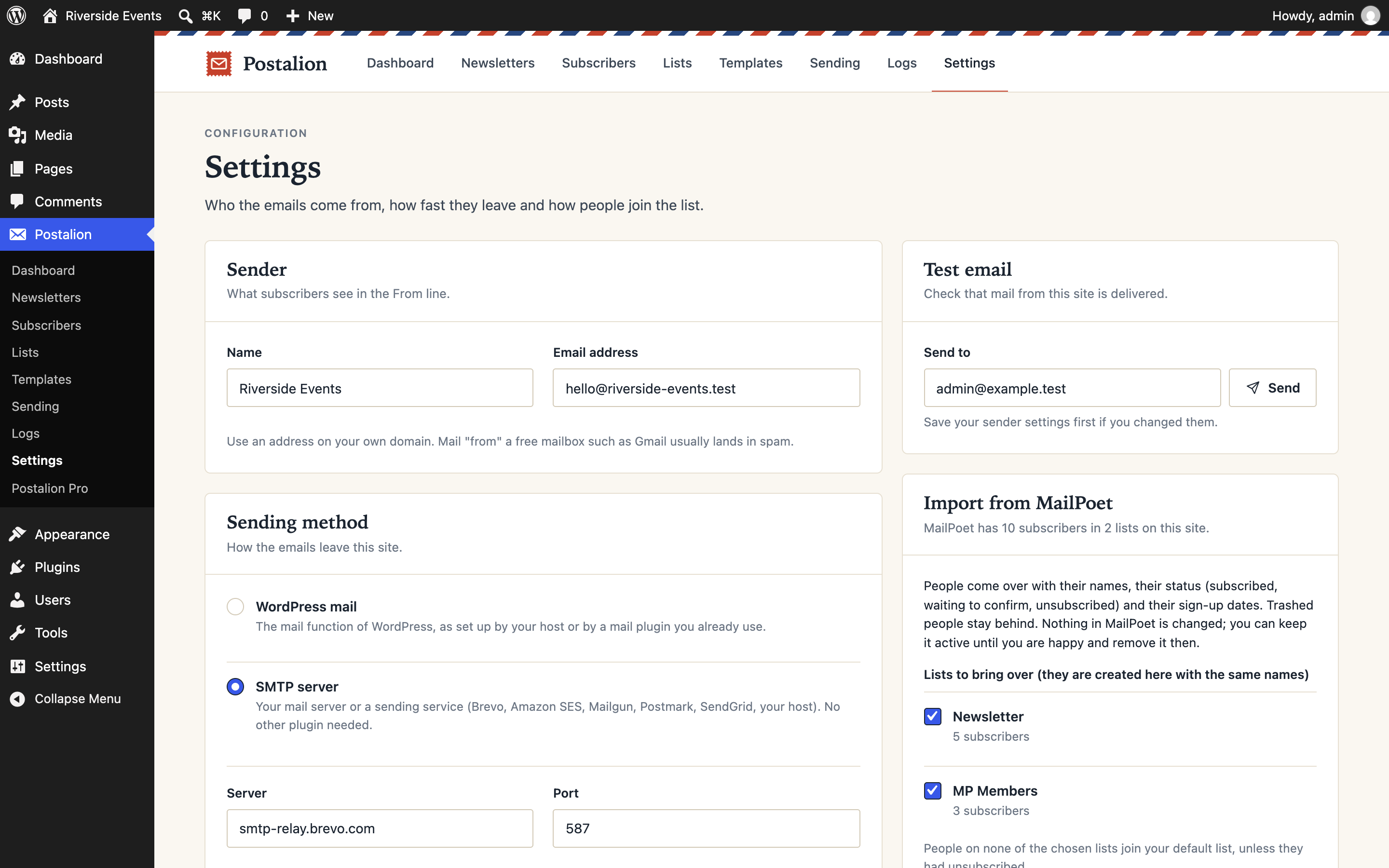
Out of the box the emails go through the mail function of WordPress, so whatever your host or your mail plugin set up keeps working. If nothing is set up, enter an SMTP server under Settings: your own, or a sending service such as Brevo, Amazon SES, Mailgun, Postmark or SendGrid. A button tries the settings before you save them, the password is stored encrypted, and a switch can route all the mail of the site through the same server. No second plugin needed.
Grow
- Sign-up form as a block or a shortcode, with double opt-in
- An optional sign-up popup: appears once per visit, stays away once closed
- Sign-up checkboxes in forms you already have: registration, comments, the WooCommerce checkout, Contact Form 7
- Lists: group subscribers, let each form fill a list, send to the lists you pick
- CSV import and export, into and out of lists
- Import from MailPoet: people, lists and statuses come over in one go
- The users of your site are subscribers too, and can opt out from their profile
- Search, filters and bulk actions
Automatic emails (optional)
- A welcome email to people who sign up, once they are confirmed
- New post notification: a published post goes out as a newsletter, to everyone or to chosen lists
Statistics (optional, off by default)
- Opens and clicks per newsletter, with the links that were clicked
- Counted on your own site; nothing is sent anywhere else
Keep track
- Email log: every email with its recipient, date and result, and a preview of the email as that person received it
- Activity log: sign-ups, confirmations, unsubscribes, imports and sends
- System log for errors and warnings
- Log entries are deleted automatically after a period you choose (90 days by default)
Respect
- Unsubscribe link in every email, plus one-click unsubscribe for mail clients that support it (List-Unsubscribe-Post)
- No tracking pixels and no rewritten links unless you turn statistics on
- Supports the WordPress tools for exporting and erasing personal data
- No telemetry and no external requests
Shortcodes
[postalion_form]– sign-up form. Attributes:title,description,button_text,show_name="false",list="slug",class. In the block editor, use the “Postalion sign-up form” block instead.[postalion_unsubscribe]– unsubscribe form.[postalion_subscriber_count]– number of people on your list.
For developers
postalion_subscribe( $email, $args ) subscribes an address from your own code, the way the form does. Filters and actions for add-ons: `postalion_templates`, `postalion_logo_url`, `postalion_newsletter_recipients`, `postalion_email_content`, `postalion_email_sent`, `postalion_subscriber_confirmed`, `postalion_subscriber_subscribed`, `postalion_notify_post`, `postalion_post_newsletter_content`, `postalion_show_popup`, `postalion_admin_menu`.
Pro
A Pro add-on is being built for larger lists and more advanced work: a drag-and-drop builder, email sequences, segments by behaviour, A/B testing and WooCommerce automations. The free plugin is complete on its own and has no limits to remove. More at postalion.fantasythemes.net.
屏幕截图





区块
该插件提供了 1 个区块.
- Postalion sign-up form A newsletter sign-up form. Visitors who subscribe join the list you choose.
安装
- Install Postalion from the Plugins screen, or upload the
postalionfolder to/wp-content/plugins/. - Activate it.
- Open Postalion Settings, check the sender name and address, and send yourself a test email.
- Put
[postalion_form]on a page so visitors can sign up, or import your list under Postalion Subscribers. - Write your first newsletter under Postalion Newsletters.
For reliable delivery, enter an SMTP server or a sending service under Postalion Settings Sending method and press “Send test”. If you already use a mail plugin (WP Mail SMTP, FluentSMTP, Post SMTP), keep it: Postalion goes through it automatically.
常见问题
-
How are the emails sent?
-
Through the standard
wp_mail()function, or through an SMTP server you enter under Settings Sending method. On most hosts the mail function works for a small list; for reliable delivery use a sending service such as Brevo, Amazon SES, Mailgun or Postmark, since the mail servers of shared hosting are often blocklisted. A mail plugin you already have keeps working: Postalion goes through it. -
How many emails can I send?
-
As many as your host or mail service allows. Postalion does not count. Set the batch size and the pause between batches under Postalion Settings to stay inside their limits.
-
Do I need a cron job?
-
No. Sending runs on WP-Cron, which WordPress triggers when someone visits the site. On a site with very little traffic, a real cron job for
wp-cron.phpkeeps batches and scheduled newsletters on time. -
What happens when someone clicks the unsubscribe link?
-
They see a short page asking them to confirm, and one click on the button unsubscribes them. The link itself does not unsubscribe, so mail scanners that open links cannot remove people by accident. Mail clients with a built-in unsubscribe button unsubscribe at once.
-
Does it help with GDPR?
-
It gives you the tools: double opt-in (on by default), an unsubscribe link in every email, support for the WordPress personal data export and erase requests, and automatic deletion of old log entries. Statistics are off by default; when you turn them on, opens and clicks are counted on your own site and the privacy policy guide tells you what to mention. No data leaves your site except the emails you send. What you send, and to whom, remains your responsibility.
-
Can I import my existing subscribers?
-
Yes. From a CSV file, under Postalion Subscribers Import CSV: the file needs an email column; first name and last name are optional. Addresses already on the list are skipped, and people who unsubscribed stay unsubscribed.
Coming from MailPoet? If it is installed on the same site, Postalion Settings Import from MailPoet brings its subscribers over with their names, lists, statuses and sign-up dates, in one go. Nothing in MailPoet is changed, so you can compare the two before removing it. Only import people who agreed to receive email from you.
-
Can I change the look of the sign-up form?
-
The form takes the font of your theme. Three CSS custom properties change the rest:
--postalion-accent,--postalion-accent-textand--postalion-radius, set on.postalion-subscription-form. -
Can I add my own email template?
-
Yes, with the
postalion_templatesfilter: register a name, a description and the path to an HTML file that contains{content}. -
Is it translation ready?
-
Yes. Every text in the plugin, including the footer of the emails, can be translated.
-
Can I have more than one list?
-
Yes. Create lists under Postalion Lists. Each sign-up form, block or checkbox can fill a particular list, and when you write a newsletter you choose everyone, some lists or only the users of the site. Unsubscribing always covers every list.
-
Where is the data stored, and how do I remove it?
-
In nine tables in your WordPress database. Deleting the plugin keeps the data unless you turn on Delete all data when the plugin is deleted under Settings.
评价

贡献者及开发者

更新日志
1.2.0
- Sending method: an SMTP server or a sending service can be set up in Settings, with a test button that tries the values before they are saved; the password is stored encrypted. Optionally the same server carries all the mail of the site.
- Import from MailPoet: subscribers, lists, statuses and sign-up dates come over in batches, without changing anything in MailPoet.
- After activation the dashboard opens and the first step sends the test email right there.
- The dashboard shows the sending method and links to the changelog.
1.1.0
- Lists: group subscribers, fill a list from a form, send to chosen lists or to site users only.
- Statistics, off by default: opens and clicks per newsletter, with the links clicked, counted on your own site.
- Welcome email and new post notification, both optional.
- The sign-up form as a block, with a live preview in the editor.
- An optional sign-up popup.
- Sign-up checkboxes for the registration form, comments, the WooCommerce checkout and Contact Form 7.
postalion_subscribe()for developers; new filters for the popup and the post notification.
1.0.0
- First release.