

描述
PublishRank is a free, open-source WordPress SEO plugin for site owners, bloggers, news publishers, newspapers, magazines and editorial teams. It brings core technical SEO workflows into one publisher-focused plugin and can be evaluated as an alternative to Yoast SEO, Rank Math and other WordPress SEO plugins. Compare the feature set with your current setup before switching; features and workflows are not identical across plugins.
Compatibility target: WordPress 7.1. The plugin remains installable on PHP 7.4+; complete staging checks before production use.
Copyright and project rights: Muhammad Umar Jabbar.
Features include:
- Features screen (formerly SEO Modules) with instant on/off toggle cards for sitemaps, schema, social metadata, the live SEO score, internal links, breadcrumbs, redirects, the 404 monitor, robots.txt, llms.txt and IndexNow.
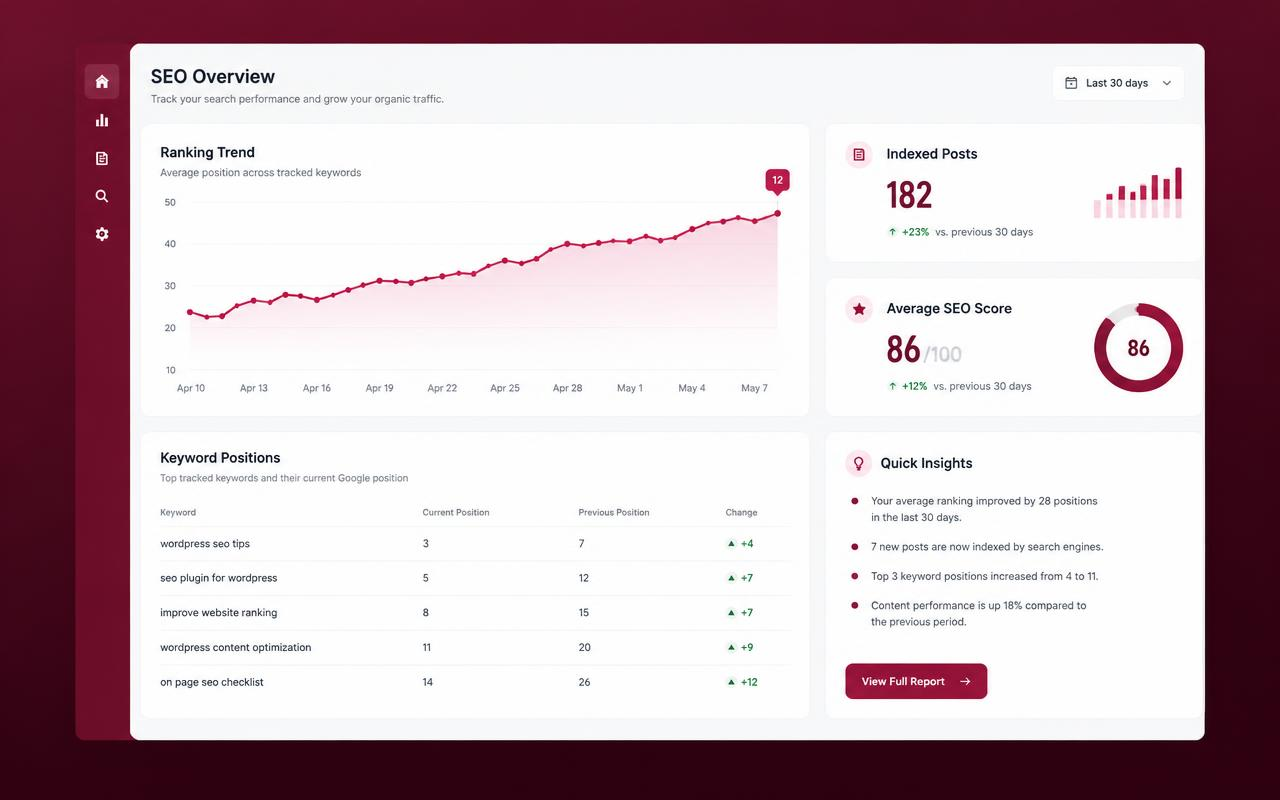
- Floating SEO Analysis panel in the editor with a live score ring out of 100, passed checks and items to improve, plus side-by-side Google, Facebook/LinkedIn and X previews.
- SEO titles, descriptions, canonicals, robots directives, Open Graph and X/Twitter metadata.
- Connected JSON-LD schema for organizations, people, webpages, articles, breadcrumbs and supported media/content types.
- XML sitemaps for posts, pages, taxonomies, authors, images and videos, including a Google News sitemap.
- Redirect management and a privacy-conscious local 404 monitor with normalized paths, grouped browser/mobile/crawler hits, referrer paths without query strings, noise suppression for assets and infrastructure probes, throttled and locked bounded writes, 90-day retention, searchable/sortable review, clearable logs, and same-site redirect creation.
- Per-article author schema overrides for author name, job title and image, plus selectable Article, NewsArticle and BlogPosting types.
- Migration & Portability workspace for Yoast SEO, Rank Math, All in One SEO, SEOPress and The SEO Framework, with preflight scans, safe merge/overwrite imports, preserved source metadata and normalized JSON exports.
- Global and per-content robots directives, including index/noindex and follow/nofollow controls, plus configurable robots.txt rules.
- Robots.txt controls, hreflang support and breadcrumbs.
- IndexNow notifications and manual URL submission (optional; sends eligible public URLs to the IndexNow service when enabled).
- Configurable llms.txt and optional llms-full.txt resources, with a public paginated schema-discovery endpoint linked from llms.txt.
- Editorial SEO analysis, internal-link recommendations, sitemap diagnostics and WP-CLI commands.
- Publisher Toolkit with permission-aware bulk SEO metadata editing, role-based access for the toolkit, and optional image alt-text assistance that preserves existing descriptions.
- Optional built-in WP Hide Login module with a custom login endpoint, configurable slug, administration URL rewriting where Apache rules are available, and 404 protection for direct default paths.
- Always-on technical source provenance markers in page source; they do not add a promotional link or visible footer credit.
PublishRank does not guarantee rankings, crawling, indexing, traffic, or inclusion in Google News. IndexNow is not supported by Google.
Source code
PublishRank includes reviewable PHP, JavaScript and CSS source. The maintained source repository is github.com/Umarjaum/PublishRank. First-party runtime assets in assets/ are shipped unminified and human-readable, with corresponding first-party sources in src/assets/. Font Awesome Free 7.3.1 is bundled locally under assets/vendor/fontawesome-free-7.3.1/ with its upstream license. There is no build step or third-party asset CDN request.
Documentation
- In WordPress: PublishRank Documentation & Help explains titles, variables, output controls, breadcrumbs, sitemaps, schema, robots, redirects, the robust 404 Monitor, IndexNow, Baidu, diagnostics, the admin menu and toolbar, the sitemap browser view, versions and troubleshooting.
- In the package:
docs/features/FEATURES.mdlists every dashboard feature and Technical Health check provided through version 2.10.1. Thedocs/folder also contains guides for sitemaps, branding, admin navigation, the 404 Monitor, troubleshooting, versioning and a WordPress 7.1.3 compatibility checklist. - Online: publishrankseo.vercel.app.
Privacy
PublishRank does not include visitor analytics or send publisher content to PublishRank. Core metadata and schema are generated locally. The technical source marker does not contain an external link. Optional integrations below make requests only when configured or explicitly enabled; remote services and OAuth providers may receive the originating server or browser IP address and standard connection metadata. Review the relevant provider policies and your own privacy obligations before enabling an integration.
Terms and Conditions
PublishRank is provided under the GPLv2-or-later license. The plugin does not guarantee rankings, crawling, indexing, traffic, or inclusion in Google News. Technical provenance markers are present in public HTML source by default and can be hidden under Crawl Optimization.
External Services
Google Search Console (optional, your own Google OAuth client). Nothing is sent to Google until an administrator saves their own Google OAuth client ID and secret on the Search Console screen and selects Sign in with Google. The administrator’s browser is then sent to Google’s OAuth page (accounts.google.com) and returns to this site’s callback URL; the authorization code is exchanged directly between this WordPress server and Google (oauth2.googleapis.com) using PKCE. PublishRank requests only the read-only webmasters.readonly scope. The client secret and the refresh token are stored encrypted with WordPress salts; no PublishRank-operated server is involved and no Google data is sent to PublishRank. On connection, then hourly (WP-Cron) and when an administrator clicks Refresh, the server asks the Google Search Console API (www.googleapis.com) for the verified property list and sends the selected property, date ranges and search type to retrieve daily, hourly, query, page, Discover and Google News totals. A URL Inspection action also sends the entered public page URL, property and WordPress locale. Returned metrics are cached locally. Disconnect asks Google to revoke the grant (oauth2.googleapis.com/revoke) and deletes the stored credentials and cached data. Google may also be opened in the administrator’s browser for the optional Rich Results Test, which receives the public URL the administrator chose to test. Google policies: Google API Services User Data Policy, Google APIs Terms, and Google Privacy Policy. PublishRank’s use of information received from Google APIs adheres to the Google API Services User Data Policy, including the Limited Use requirements.
IndexNow (optional). When enabled, eligible public URLs are submitted after supported publish/update/delete events, manual submission, or a retry. The request to https://api.indexnow.org/indexnow/ includes the site’s host, IndexNow key, public key-location URL and submitted URL list. The plugin keeps a bounded local submission history including URLs and response statuses. Acceptance is not proof of crawling or indexing, and Google does not participate in IndexNow. The official IndexNow Terms of Service identify Yandex, Seznam and Microsoft as sponsors. See their Yandex Privacy Policy, Seznam Privacy Policy and Microsoft Privacy Statement.
Baidu Search Resource Platform submission (optional). An administrator can submit up to 2,000 same-host public URLs manually, or explicitly enable automatic submission for newly published eligible posts. The request is sent over HTTPS to the Baidu endpoint configured by the publisher and includes the submitted URL list; the endpoint URL itself contains the publisher’s Baidu site identifier and token. The endpoint is encrypted in the WordPress database; Baidu receives the endpoint credentials and URLs to process the request. A bounded local history stores response counts/status, not the submitted URLs or response body. A submission is not an indexing guarantee. See the Baidu Search Resource Platform Agreement, Baidu Privacy Protection Statement, and Baidu Disclaimer.
Publisher diagnostics (optional, administrator-triggered). The live frontend scan requests the site’s own homepage, latest article, sitemap index and up to ten same-origin child sitemaps from the site’s server and analyzes the returned HTML/XML locally. It does not follow HTTP redirects, and sitemap child URLs on another origin are not requested. The IndexNow key check requests the site’s own public key file. Publisher Link Intelligence analyzes locally available site data. Only when an administrator ticks Also check external links and starts a scan, the site’s server sends HEAD/GET requests to the external URLs already linked in the site’s own content to read their HTTP status; nothing else is sent and no data is shared with PublishRank.
Traffic Guard (optional, local-only). When enabled, validated request IPs and configured IP/CIDR and country rules are compared locally. The plugin reads CF-Connecting-IP, X-Forwarded-For, or CF-IPCountry only when the direct network peer is inside an administrator-configured trusted-proxy CIDR. It makes no GeoIP API requests, stores no per-visitor IP address, and sends no Traffic Guard data to PublishRank or another service. Country rules require a trusted proxy that supplies a valid country header; missing or invalid country data is allowed through. Country geolocation is approximate, and this feature is not a WAF or DDoS defense. Administrator requests and key WordPress recovery, API, feed, robots, and sitemap routes are exempt. When a request would be blocked and its User-Agent claims to be a major search-engine crawler, the server performs a reverse DNS lookup of the visiting IP and a forward lookup of the returned host name to confirm it (the verdict is cached under a salted hash, not the IP). These are DNS lookups made by your server, not HTTP requests, and no data is sent to PublishRank.
Other website links in the administration interface (including the Schema.org vocabulary and links to provider documentation) are ordinary references, not background API integrations. PublishRank’s source-provenance markers are technical metadata only; the plugin does not insert a visible footer credit or promotional link.
屏幕截图



区块
该插件提供了 1 个区块.
- PublishRank Breadcrumbs
安装
- Upload the
publishrankfolder to/wp-content/plugins/, or install the ZIP through Plugins Add New Upload Plugin. - Activate PublishRank from the Plugins screen.
- Open PublishRank in the WordPress dashboard and complete the onboarding steps.
- Review metadata ownership, schema, sitemap and robots settings before using the plugin on a production site.
- Submit the sitemap index in your search engine webmaster tools when ready.
常见问题
-
Does PublishRank add anything to my page source?
-
Technical HTML-source provenance markers are always enabled on public HTML pages and cannot be disabled in settings. Source markers are not added to feeds, REST/AJAX responses or sitemaps. Separately, PublishRank displays a small branded link in the WordPress admin footer.
-
Which articles appear in the News sitemap?
-
Published, public, indexable articles from the configured post types whose original publish time is inside the publication window (48 hours by default). Drafts, scheduled, private and password-protected posts, noindex posts and posts you excluded are left out. An empty sitemap is valid.
-
How do I mark a live blog?
-
Edit the post, open the Schema box, choose “Live Blog Post” as the schema type, and add timestamped updates in the Live coverage panel. Ordinary posts are never marked up as live blogs automatically.
-
Which title and description variables are supported?
-
The same fifteen variables work in global title templates, per-post SEO titles and per-post meta descriptions: %%title%%, %%sitename%%, %%site_description%%, %%category%%, %%primary_category%%, %%author%%, %%date%%, %%modified%%, %%excerpt%%, %%sep%%, %%page%%, %%id%%, %%permalink%%, %%focus_keyword%% and %%focuskw%%. Unknown variables are removed.
-
Yes. Output controls (Settings) switch metadata, the JSON-LD graph, the Organization/WebSite entities, the visible breadcrumb trail and BreadcrumbList data independently. All are enabled on new installs; existing choices are kept on upgrade. PublishRank only changes its own output: a logo, title, breadcrumbs or meta tags hard-coded by your theme or another plugin are not rewritten. Choose “Structured data only” breadcrumb placement if your theme prints its own trail.
-
Known limitations
-
A classic theme that hard-codes a
-
What does the XML sitemap page in my browser show?
-
A readable view of the same sitemap search engines fetch as plain XML: totals, a content showcase bar with each type’s share, one card per content type, and URL tables with filtering for child sitemaps. Use View raw XML to see exactly what crawlers receive. The view never changes the XML.
-
How does the 404 Monitor work?
-
Enable Record a capped rolling 404 log in PublishRank Settings, then review entries at PublishRank 404 Monitor. The monitor aggregates normalized paths by browser, mobile or crawler category, records hit counts and first/last seen times, and keeps only the latest useful referrer path without storing IP addresses, cookies, request bodies or full query strings. It ignores admin, AJAX, cron, REST, non-GET/HEAD, common static-asset and infrastructure-probe requests. The log is rate-limited, protected against concurrent write loss, retained for 90 days and capped at 500 entries. Administrators can search paths, filter visitor categories, sort by hits or recency, dismiss entries, clear the log, or create validated same-site redirects. It is a bounded diagnostic aid, not a complete access log, analytics system, WAF or DDoS defense.
-
Where is the complete feature list?
-
The package guide
docs/features/FEATURES.mdis the complete dashboard inventory through version 2.10.1. It includes every card under Search & discovery, Content & publishing, Measure & maintain, and Settings & help, plus every Technical Health check: Schema studio, Sitemap health, IndexNow, Search Console, Search engines, Google Preferred Sources, Robots.txt, Crawl optimization, Breadcrumbs, Site verification, AI & llms.txt, Schema Aggregator, SEO score, SEO Overrides, Google Discover image, Author expertise, Local SEO, Image optimizer, Publisher toolkit, Newsroom, Planning board, Newsroom calendar, Newsroom activity, My notifications, Newsroom configuration, Newsroom roles, Internal links, Link intelligence, Publisher analytics, Insights, Redirects, 404 monitor, Traffic Guard, WP Hide Login, Configuration history, Diagnostics, Setup wizard, Settings, Titles & Meta, Import / Export, Documentation & help, SEO plugin conflicts, Search engine visibility, Pretty permalinks, HTTPS, News sitemap, Structured data coverage, Publisher logo, Default social image, Robots.txt and JNews compatibility. -
Which logo does PublishRank use?
-
One file,
assets/images/publishrank-brand-mark.png, shown in the admin sidebar, toolbar, screen headers, setup wizard and sitemap view. No SVG or alternate icon files are packaged. -
Why does the PublishRank admin dropdown have no custom background?
-
It uses WordPress’s native submenu colours so it matches every admin colour scheme.
-
Is PublishRank free?
-
Yes. PublishRank is released under the GPLv2-or-later license. The plugin does not require a paid AI API key for its core functionality. Optional integrations such as IndexNow require an administrator to enable them.
-
What happens when I activate PublishRank?
-
On first activation, an administrator sees a one-time PublishRank News prompt with Enable live News, No thanks — keep News off, and Not now options. Enabling the feed is the only choice that permits a News request. Declining or dismissing leaves News off; you can enable it later at PublishRank News. If an administrator had already enabled News, that saved choice is preserved.
-
Is PublishRank an alternative to Yoast SEO or Rank Math?
-
PublishRank is another free WordPress SEO plugin option, with a focus on technical SEO and publisher workflows such as News XML sitemaps, redirects, robots controls, schema, and link auditing. It is not a drop-in clone of Yoast SEO or Rank Math, and feature coverage differs. Review compatibility and avoid letting multiple plugins output duplicate titles, canonicals, robots directives or schema.
-
Is PublishRank only for news websites?
-
No. It is designed with publishers in mind but can also be used on blogs, business websites and other WordPress sites.
-
Does PublishRank require a paid API key?
-
No. The core plugin runs locally. IndexNow is optional and uses the public IndexNow service when enabled by an administrator.
-
Does IndexNow guarantee indexing or submit URLs to Google?
-
No. IndexNow requests are shared with participating search engines, but acceptance does not guarantee crawling or indexing. Google does not support IndexNow.
-
Can I use PublishRank with another SEO plugin?
-
The plugin can detect several SEO plugins, but two plugins outputting titles, canonicals, robots tags or schema at the same time can create duplicates. Configure only one plugin to own each output.
-
Does PublishRank add a visible public credit?
-
No. PublishRank adds no visible credit to your site footer. Technical source provenance is disclosed in PublishRank Settings and always remains enabled on public HTML pages.
-
Where can I find documentation and support?
-
Visit the PublishRank website for documentation and support information.
评价
此插件暂无评价。
贡献者及开发者

更新日志
2.18.4
- Maintenance release. Version markers and package metadata updated to 2.18.4; no functional changes.
2.18.3
- News sitemap completeness for busy publications. News candidates are scanned in bounded pages up to a larger safety ceiling, so noindex, password-protected, excluded, or malformed stories cannot crowd valid recent articles out of the sitemap.
- News-site setup clarity. The onboarding summary now reports the actual News sitemap post types.
- Styled Migration & Portability workspace. The import page now has detected-plugin cards, grouped controls, dry-run emphasis, upload guidance, rollback presentation, responsive layouts, and clearer export/preflight tools.
2.18.2
- Smarter migration from Yoast, Rank Math, AIOSEO, SEOPress and The SEO Framework. Title and description variables (e.g. Rank Math %title%, AIOSEO #site_title, SEOPress %%post_title%%) are converted to PublishRank variables; noindex and nofollow flags are combined correctly (Yoast “2 = index” no longer imported as a robots value); primary category and cornerstone/pillar flags are migrated; AIOSEO 4 data is read from its own table; The SEO Framework social fields are included.
- Translation-aware JSON import/export. Exports now include each post’s language and translation URLs; imports match by full URL first and use the language to tell apart translations that share a slug.
- Multilingual fixes. Language tags follow BCP 47 (zh-Hans-CN, es-419, sr-Latn); sitemaps add an x-default link to the default-language translation; TranslatePress and Weglot current language detected; invalid alternate URLs dropped; new publishrank_hreflang_alternates filter.
- Fix: the Migration & Portability screen caused a fatal error (missing Branding class import).
2.18.1
- Broad multilingual SEO catalog. Locale-specific SEO title, description, focus keyword, Open Graph and robots overrides now cover major LTR and RTL languages, including Urdu, Arabic, Persian, Hebrew, Bengali, Hindi, Chinese, Japanese, Korean, European languages and Southeast Asian languages. WPML, Polylang and custom hreflang locales are merged automatically.
2.17.0
- SEO Analysis 3.0: focus-keyword scoring restored. The live analysis now scores the focus keyword in the title, meta description, URL slug, opening paragraph, subheadings, image alt text, body density (0.5–3%) and distribution across the article. Plural/singular variants are matched.
2.16.0
- Job Posting pages. New “Job Posting” schema type with fields for hiring organization (name, website, logo), closing date, employment type, address or fully remote (with applicant country), salary range, currency and period, job reference and direct apply. The title is the job title and the post content the description. Markup is only output when the required details are complete, and stops automatically after the closing date.
- Automatic sitewide broken-link checker. Link Intelligence can now check every published article daily or weekly in the background (optionally including external links), and re-checks an article’s internal links as soon as it is published or updated. Shows when the last full check finished.
- Better multi-language support (Polylang and WPML). Sitemaps list each article’s translations (hreflang links); article schema uses the article’s own language and links its translations (workTranslation); publication name, descriptions, title templates and separators can be translated in Polylang Strings / WPML String Translation.
- Localized SEO handling. Each post can store language-specific SEO title, meta description, focus keyword, Open Graph title/description/image and robots directives. PublishRank selects the current language first, then its base language, then the normal post SEO value. The built-in catalog covers major LTR and RTL languages including English, Urdu, Arabic, Persian, Hebrew, Bengali, Hindi, Chinese, Japanese, Korean, German, Spanish, French, Portuguese, Italian, Dutch, Russian, Turkish, Ukrainian, Vietnamese, Indonesian and more. Any valid locale supplied by WPML, Polylang or the hreflang map is also accepted.
- An Urdu translation of the PublishRank interface is included. Set the WordPress site language to Urdu (
ur) or Urdu (Pakistan) (ur_PK) to use it; Urdu and all other RTL fields use the correct text direction.