
描述
Add 3 new menu locations to the WordPress toolbar so you can quickly and easily create your own custom toolbar menus using the built in WordPress menus page.
Supports multi level and works seamlessly with the existing toolbar menus.
Locations
- First menu location is under the ‘Site Name’ menu dropdown on the left side.
- Second menu location is along the main toolbar.
- Third menu location is under the ‘Howdy / My Account’ dropdown.
Super simple to use, just like building any other menu in WordPress using the menus page.
No settings, just ‘plug and play’.
Features
- Simple toolbar menu customization using WordPress menus
- Seamless integration with the existing WordPress menus
- No Settings, just ‘plug and play’
Feedback
- I am open to your suggestions and feedback – Thanks for checking out this plugin!
- Hit me up via the support forums or my website
- Follow @benbodhi on Twitter
Translations
- English – default, always included
- Your translation? – Just send it in
Note: This plugin is localized/translateable by default. This is very important for all users worldwide. So please contribute your language to the plugin to make it even more useful. For translating I recommend the awesome “Codestyling Localization” plugin and for validating the “Poedit Editor”.
Additional Info
Idea Behind / Philosophy: This is something that I have found super useful when it comes to customizing WordPress. I have been writing custom menus for quite a while and realised there is not much out there like this. No more code snippets, copy pasting or including files, simply install the plugin and away you go using the built in WordPress menus. A simple but powerful plugin to give you more customization powers over the admin toolbar.
Future Features
- More power over menu locations with options to pick which locations you want to use and the menu order in relation to existing WordPress menus.
- Options page to remove other standard toolbar menu items.
(you can uncomment these in the code now if you’re keen 😉 - Ability to change the WordPress “Howdy” welcome message
屏幕截图

3 new toolbar menu locations added to your existing locations. 
You can see the new locations below when creating your menus. 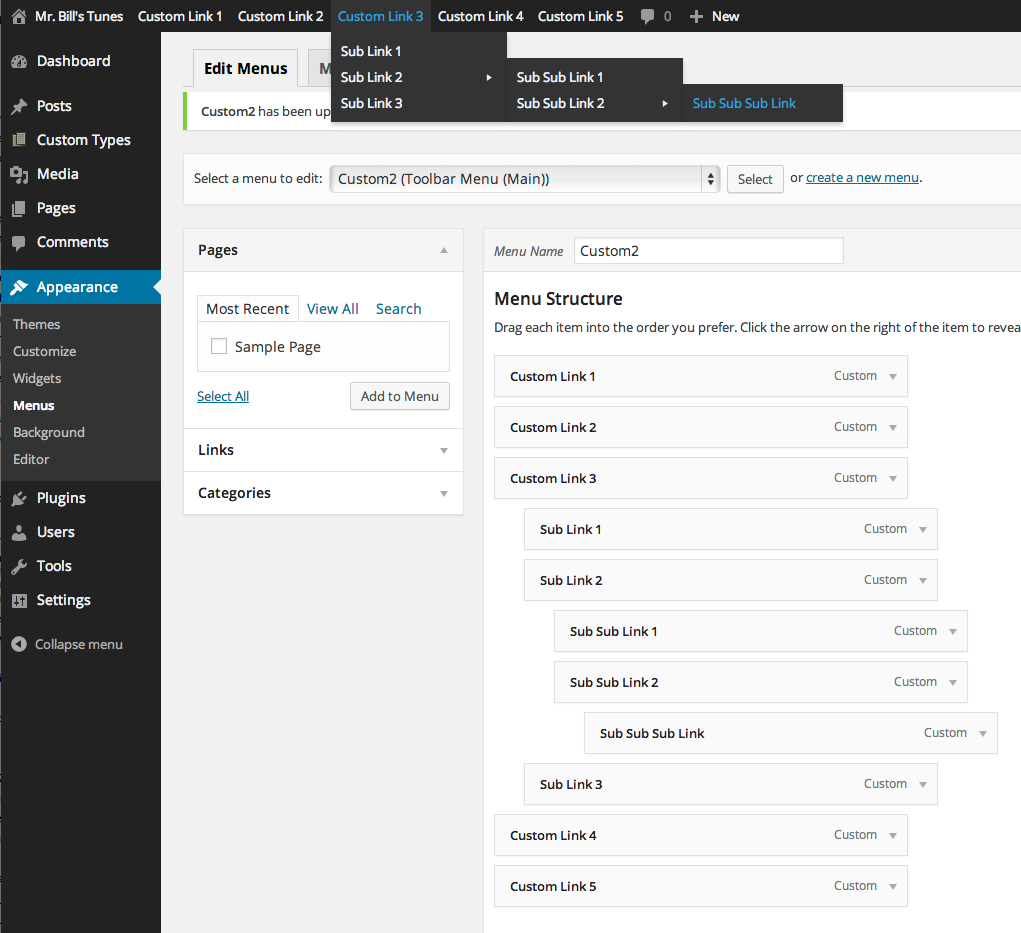
Example main toolbar menu with multi level flyout (you can also see how it was created) 
Example menu under the 'My Account' section. Great for membership sites! 
Example menu under the 'My Site' menu, viewed from backend. 
Example menu under the 'My Site' menu, viewed from frontend.
安装
To install this plugin:
via FTP
- Upload folder
admin-toolbar-menusto the/wp-content/plugins/directory - Activate the plugin through the ‘Plugins’ menu in WordPress
- Visit the menus page under ‘Appearance’ > ‘Menus’ to create your new menus
Or
via wp-admin
- Upload the compressed version
admin-toolbar-menus.zipthrough ‘Plugins’ > ‘Add New’ > ‘Upload’ - Click ‘Activate Plugin’
- Visit the menus page under ‘Appearance’ > ‘Menus’ to create your new menus
常见问题
-
The menus created will be visible to anyone logged in.
-
Can you make it show only to admins?
-
You could quite easily but you would need to know a little php. You simply need to add a conditional statement to the plugin to make sure only the admin user role can see the menus.
-
Nope! If you don’t assign a menu to the locations, they simply won’t show up.
评价


贡献者及开发者

更新日志
1.0.4
- FIX: “Trying to get property of non-object” PHP notice.
1.0.3
- Bug Fix – Swapped out the if statement around Site Name menu location, so it didn’t disappear.
- Uncommented the WP Logo menu removal again – just to keep it consistent for users until there is the option to turn on and off in the admin.
1.0.2
- Removed the default WP logo menu removal – settings page coming in next release.
- Clean up code for compatibility with next release and new features.
1.0.1
- Cleaned up readme.txt file a bit to look nicer in the repository.
- Modified a screenshot to display the plugin’s features more prominently.
1.0
- Initial Release.