Title: Gallery Slice
Author: honza.skypala
Published: 2014 年 5 月 17 日
Last modified: 2016 年 8 月 18 日
---
搜索插件
**该插件尚未通过WordPress的最新3个主要版本进行测试**。 当与较新版本的WordPress一起
使用时,可能不再受到维护或支持,并且可能会存在兼容性问题。
# Gallery Slice
作者:[honza.skypala](https://profiles.wordpress.org/honzaskypala/)
[下载](https://downloads.wordpress.org/plugin/gallery-slice.1.3.3.zip)
* [详情](https://cn.wordpress.org/plugins/gallery-slice/#description)
* [评价](https://cn.wordpress.org/plugins/gallery-slice/#reviews)
* [安装](https://cn.wordpress.org/plugins/gallery-slice/#installation)
* [开发进展](https://cn.wordpress.org/plugins/gallery-slice/#developers)
[支持](https://wordpress.org/support/plugin/gallery-slice/)
## 描述
The standard gallery in WordPress has one limitation — it always shows all the pictures
in the gallery. I know there are alternative galleries available, which support
pagination, but I never thought this is a good approach. The reader never wants
to see n-th page of the gallery — if the first page got his attention, then he wants
to see all of the rest, not split into pages anymore. At least, this is how I see
it.
So, if you run a blog, on which you publish huge galleries with many many many pictures,
maybe you want to show only preview of the gallery on archive pages (homepage, categories,
archives etc.), so the individual posts are not too long. The gallery-preview then
contains a link, which loads the rest of the gallery if the reader wishes so, via
Ajax. Well, this plugin brings exactly that, all with standard WordPress gallery.
Single posts are untouched, they still show full galleries, at least for now.
You can reach similar functionality just by creating two galleries and putting the
tag in between them — and the archive page shows only the first gallery,
while single post shows the whole gallery. But, this plugin has several advantages:
it can be set and forget, and then the plugin automatically applies it for every
post/gallery published. If the gallery is followed by another text, then this text
is still displayed on the archives page. Loading of the rest of gallery is handled
by Ajax (with fallback to single-post URL if Ajax fails).
In options, you specify two values: first one threshold — amount of images, if the
gallery exceeds this many, it is sliced into a preview. This is the second value,
how many images should be shown in a preview. This allows to have 2 different values
for that, e.g. 9 images for preview, but 12 images for threshold, which makes some
flexibility, that if the gallery is 10 images big, then it is not shortening by
jsut one image. Anyway, you can also specify the same values, if you wish.
These two values are specified on three levels: global (per blog), per post and
per gallery tag. You can also specify not to slice a gallery in specific post, resp.
not to slice a specific gallery.
Plugin supports several lightbox implementations.
### 授权
WTFPL License 2.0 applies
```
DO WHAT THE FUCK YOU WANT TO PUBLIC LICENSE
Version 2, December 2004
Copyright (C) 2004 Sam Hocevar
Everyone is permitted to copy and distribute verbatim or modified
copies of this license document, and changing it is allowed as long
as the name is changed.
DO WHAT THE FUCK YOU WANT TO PUBLIC LICENSE
TERMS AND CONDITIONS FOR COPYING, DISTRIBUTION AND MODIFICATION
0. You just DO WHAT THE FUCK YOU WANT TO.ToDo's
* enable plugin to work in opposite manner - do not automatically slice down galleries, but only on posts / tags where the downto attr is set
```
* re-check WP-Minify on possibility to use the compiled JS files (internal)
* enable
slicing w/ Ajax loading on single posts
## 屏幕截图
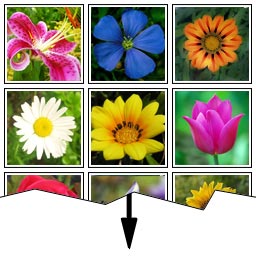
[⌊Gallery of many pictures sliced-down to only 9 thumbnails. Link "Full gallery ](https://ps.w.org/gallery-slice/assets/screenshot-1.jpg?rev=916151)
Gallery of many pictures sliced-down to only 9 thumbnails. Link “Full gallery ”
added via which the user can get the rest of gallery, using Ajax
[⌊Plug-in settings⌉⌊Plug-in settings⌉[
Plug-in settings
## 安装
1. Upload the full directory to wp-content/plugins
2. Activate plugin Gallery Slice in plugins administration
3. You can modify the settings of the behaviour in Settings Media
## 常见问题
You can specify the options on three levels — globally, per post or even per individual
gallery.
For global options, please go to Settings Media, section Gallery Slice
For per post options, when you create a new post, there will be a new block Gallery
Slice, usually displayed in the bottom right. The settings you specify here apply
only to the actual post, not to the other ones.
For specifying options per individual gallery, you use new attributes in the gallery
shortcode:
* sliceto — the amount of thumbnails, to which the gallery should be sliced to
* noslice — do not slice down this gallery (even if threshold reached). Attribute
without value
* link2full — text for the hyperlink to load rest of the gallery
Examples:
```
[gallery noslice]
[gallery sliceto="6" link2full="Show the rest"]
```
## 评价
此插件暂无评价。
## 贡献者及开发者
「Gallery Slice」是开源软件。 以下人员对此插件做出了贡献。
贡献者
* [ honza.skypala ](https://profiles.wordpress.org/honzaskypala/)
[帮助将「Gallery Slice」翻译成简体中文。](https://translate.wordpress.org/projects/wp-plugins/gallery-slice)
### 对开发感兴趣吗?
您可以[浏览代码](https://plugins.trac.wordpress.org/browser/gallery-slice/),查看
[SVN仓库](https://plugins.svn.wordpress.org/gallery-slice/),或通过[RSS](https://plugins.trac.wordpress.org/log/gallery-slice/?limit=100&mode=stop_on_copy&format=rss)
订阅[开发日志](https://plugins.trac.wordpress.org/log/gallery-slice/)。
## 更新日志
#### 1.3.3
* Bug-fix
#### 1.3.2
* Bug-fixes and warning-fixes
#### 1.3.1
* Fix for compatibility with PHP 5.3
#### 1.3
* Support for slicing of galleries created by my other plugin [rajce-embed](https://wordpress.org/plugins/rajce-embed/)
#### 1.2.1
* Compatibility with [JetPack](https://wordpress.org/plugins/jetpack/) plugin [Mobile Theme](http://jetpack.me/support/mobile-theme/)
#### 1.2
* Loading animation option integrated with WordPress Media Library
* Added some missing strings to i18n
* Smaller fixes and optimizations
#### 1.1
* Loading animation added; user can specify his own loading gif in the options
#### 1.0
* Initial release
## 额外信息
* 版本 **1.3.3**
* 最后更新:**10 年前**
* 活跃安装数量 **20+**
* WordPress 版本 ** 3.9 或更高版本 **
* 已测试的最高版本为 **4.6.30**
* 语言
* [English (US)](https://wordpress.org/plugins/gallery-slice/)
* 标签
* [ajax](https://cn.wordpress.org/plugins/tags/ajax/)[gallery](https://cn.wordpress.org/plugins/tags/gallery/)
[image](https://cn.wordpress.org/plugins/tags/image/)[images](https://cn.wordpress.org/plugins/tags/images/)
* [高级视图](https://cn.wordpress.org/plugins/gallery-slice/advanced/)
## 评级
尚未提交反馈。
[Your review](https://wordpress.org/support/plugin/gallery-slice/reviews/#new-post)
[查看全部评论](https://wordpress.org/support/plugin/gallery-slice/reviews/)
## 贡献者
* [ honza.skypala ](https://profiles.wordpress.org/honzaskypala/)
## 支持
有话要说吗?是否需要帮助?
[查看支持论坛](https://wordpress.org/support/plugin/gallery-slice/)
## 捐助
您愿意支持这个插件的发展吗?
[ 捐助此插件 ](http://www.honza.info)