Title: LaTeX2HTML
Author: Van Abel
Published: 2013 年 1 月 23 日
Last modified: 2026 年 5 月 19 日
---
搜索插件
**该插件尚未通过WordPress的最新3个主要版本进行测试**。 当与较新版本的WordPress一起
使用时,可能不再受到维护或支持,并且可能会存在兼容性问题。

# LaTeX2HTML
作者:[Van Abel](https://profiles.wordpress.org/van-abel/)
[下载](https://downloads.wordpress.org/plugin/latex2html.2.6.3.zip)
* [详情](https://cn.wordpress.org/plugins/latex2html/#description)
* [评价](https://cn.wordpress.org/plugins/latex2html/#reviews)
* [安装](https://cn.wordpress.org/plugins/latex2html/#installation)
* [开发进展](https://cn.wordpress.org/plugins/latex2html/#developers)
[支持](https://wordpress.org/support/plugin/latex2html/)
## 描述
LaTeX2HTML使得您写博客就像写LaTeX文档一样. 你可以将tex源代码直接复制粘贴到WP编辑
器中, 新的Post看起来就像`amsart`格式的文档一样. 它支持很多latex原命令, 包括定理类
环境以及BibTeX风格的引用.
### 主要功能
* 启用 [MathJax](https://www.mathjax.org)以排版数学公式.
* 将LaTeX命令(几乎支持所有的amsart类命令)转换为HTML+CSS代码.
* 几乎所有的东西都可以设置, 但同时默认设置也能良好的工作. 例如, 支持\newcommand
### 版权
好消息, 这个插件完全免费! 由于它的发布遵循GPL2协议, 你可以将其用于个人或商业博客
而不用支付任何费用.
## 屏幕截图
* [[
* MathJax 设置
1. LaTeX 设置
* [[
* BibTeX设置
* [[
* 支持
* [[
## 安装
1. (推荐:自动安装)如果你从WP插件页安装, 可以搜索`latex2html`并点击安装.
2. (手动安装)解压zip(你会得到目录`latex2html`)并将其丢进WordPress安装目录中的`wp-content/
plugins/`路径下.
3. 从插件页激活该插件.
4. (可选)做[测试例子](https://wordpress.org/extend/plugins/latex2html/faq/) (参考
FAQ).
## 常见问题
任何问题可以反馈到这里(跳转到 `support` 面板)
1. After you updating to WordPress 5.0 or higher, in the new new block editor, you
can switch to HTML code mode from Visual mode by `Ctrl+Shift+Alt+M`. Or you can
use the [Classical Editor](https://wordpress.org/plugins/classic-editor/).
### User’s Manual (included in the LaTeX2HTML’s setting page)
完整的用户手册包括:
```
1. How to Write the Basic Information of Your Post
2. How to Write Section, Subsection and Subsubsection
3. Itemize and Enumerate: How to List Stuffs
4. The Footnote
5. The Color Scheme: How to Colorize You Content
6. The Figure Environment
7. How to Write a Theorem
7.1. Definition, Lemma, Proposition, Theorem, Corollary, Remark, Proof
7.1.1. Basic Usage of Environments
7.1.2. Assign a Name for Your Theorem
7.1.3. The Proof Environment
7.1.4. More Examples of Environments
7.2. The Problem, Answer Environments
7.3. The Exercise Environment
7.4. The Quote Environment
8. Auto Numbering and Referring Back
8.1. Auto Numbering and Referring Back to Equations
8.1.1. How to Refer back to Equation Number
8.1.2. My Suggestion on “How to Write Equations”
8.2. Auto Numbering and Referring Back to Environments
8.2.1. Auto Numbering of Environments
8.2.2. Referring Back to Environments
8.3. Referring Back to Section
9. BibTeX Citations
9.1. How to Add BibTeX Data
9.2. How to Cite
10. Last Words and Feed Back
10.1. How to Jump Between Links
11. How to Get it?
```
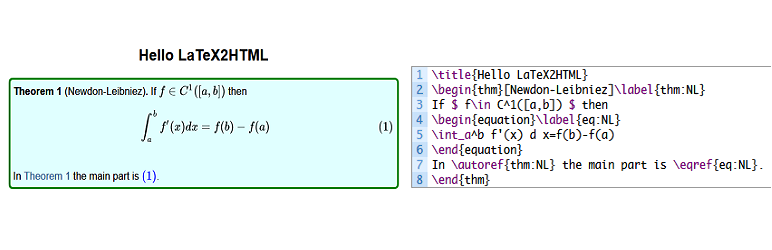
### 一个测试例子
作为测试, 您可以:
```
\title{Hello LaTeX2HTML}
\begin{thm}[Newdon-Leibniez]\label{thm:NL}
If $f\in C^1([a,b])$ then
\begin{equation}\label{eq:NL}
\int_a^b f'(x) d x=f(b)-f(a)
\end{equation}
In \autoref{thm:NL} the main part is \eqref{eq:NL}.
\end{thm}
```
新建一个post(需要使用`HTML`源码模式而非`可视化`模式), 将下述代码粘贴到post中, 然后
预览即可.
事实上, 稍后你会发现写博客和写`TeX`文档没有区别!
### How can I report security bugs?
You can report security bugs through the Patchstack Vulnerability Disclosure Program.
The Patchstack team help validate, triage and handle any security vulnerabilities.
[Report a security vulnerability.](https://patchstack.com/database/vdp/latex2html)
## 评价

### [Плагин удаляет любой текст после символа %](https://wordpress.org/support/topic/%d0%bf%d0%bb%d0%b0%d0%b3%d0%b8%d0%bd-%d1%83%d0%b4%d0%b0%d0%bb%d1%8f%d0%b5%d1%82-%d0%bb%d1%8e%d0%b1%d0%be%d0%b9-%d1%82%d0%b5%d0%ba%d1%81%d1%82-%d0%bf%d0%be%d1%81%d0%bb%d0%b5-%d1%81%d0%b8%d0%bc%d0%b2/)
[slavaaaaa](https://profiles.wordpress.org/slavaaaaa/) 2026 年 5 月 16 日 2 回复
Всё бы хорошо, но… этот Плагин удаляет любой текст после символа “%”, несмотря на
то, что в строке нет формул! Весь контент сайта получается нужно переделывать под
это ограничение, заменять обычный процент на что-то другое…

### [This is one of the best plugins ever](https://wordpress.org/support/topic/this-is-one-of-the-best-plugins-ever/)
[gene172](https://profiles.wordpress.org/gene172/) 2023 年 11 月 3 日
This is one of the best plugins ever for both LaTeX and WordPress users. While the
LaTeX part is close to perfection, references still need some refinements to match
the quality of the main part.

### [Very straightforward](https://wordpress.org/support/topic/very-straightforward-2/)
[ellankavi](https://profiles.wordpress.org/ellankavi/) 2019 年 1 月 3 日
I tried a couple of LaTeX plugins for my version of WP (v5), none of which worked
as expected (I didn’t try very hard to find out why). But this one worked straight
out of the box. Very intuitive and easy to use. Kudos!

### [The best LaTeX plugin in WordPress I’ve seen](https://wordpress.org/support/topic/the-best-latex-plugin-in-wordpress-ive-seen/)
[guiqiqi](https://profiles.wordpress.org/guiqiqi/) 2018 年 11 月 16 日
Awesome! Thanks author of this plugin. You can just copy your LaTeX code into your
new article without any edition, and this plugin will help you to generate a beatiful
output.

### [真的很棒的一个插件!](https://wordpress.org/support/topic/%e7%9c%9f%e7%9a%84%e5%be%88%e6%a3%92%e7%9a%84%e4%b8%80%e4%b8%aa%e6%8f%92%e4%bb%b6%ef%bc%81/)
[XZYQvQ](https://profiles.wordpress.org/konnyakuxzy/) 2018 年 1 月 13 日 1 回复
我找了很多的数学公式的插件 基本上没有哪个支持这种格式的行内公式: $E=mc^2$ 唯独那个
qicklatex支持,但那个只能图片显示公式,速度慢 突然发现这个插件,特别好!完美支持!
谢谢作者!

### [Some suggestions for improvment](https://wordpress.org/support/topic/some-suggestions-for-improvment/)
[cding](https://profiles.wordpress.org/cding/) 2017 年 12 月 25 日 2 回复
A nice plugin! [ link redacted ] And I have some suggestions for improvement: (1)
The reference cannot be download; (2)I know that you have develop functions for
preview latex codes, why not share it as another plugin or integrate them into this
plugin; (3)Add a option: A blank line for new line.
[ 阅读所有9条评价 ](https://wordpress.org/support/plugin/latex2html/reviews/)
## 贡献者及开发者
「LaTeX2HTML」是开源软件。 以下人员对此插件做出了贡献。
贡献者
* [ Van Abel ](https://profiles.wordpress.org/van-abel/)
「LaTeX2HTML」插件已被翻译至 2 种本地化语言。 感谢[所有译者](https://translate.wordpress.org/projects/wp-plugins/latex2html/contributors)
为本插件所做的贡献。
[帮助将「LaTeX2HTML」翻译成简体中文。](https://translate.wordpress.org/projects/wp-plugins/latex2html)
### 对开发感兴趣吗?
您可以[浏览代码](https://plugins.trac.wordpress.org/browser/latex2html/),查看[SVN仓库](https://plugins.svn.wordpress.org/latex2html/),
或通过[RSS](https://plugins.trac.wordpress.org/log/latex2html/?limit=100&mode=stop_on_copy&format=rss)
订阅[开发日志](https://plugins.trac.wordpress.org/log/latex2html/)。
## 更新日志
#### 2.6.3
* Line comments now start only at `%%` (double percent); a single `%` is kept in
plain text (e.g. percentages like `95%`).
* Still protects `%` in URLs, escaped `\%`, and HTML attributes when removing `%%`
comments; `\documentclass`/`\usepackage` optional trailing comments use the same`%%`
rule.
#### 2.6.2
* Improved LaTeX-style comment handling (`%`) to ignore content after `%` in plain
text while preserving it inside HTML tags.
* Fixed handling of `%` inside URLs, escaped `\%`, and HTML attributes like `style
="..."`.
#### 2.6.1
* Resolved an issue where the MathJax configuration was breaking the formula display
by outputting it as raw text.
* Applied proper sanitization using wp_kses to ensure safe and correct rendering
of MathJax formulas.
#### 2.6.0
* This version includes important improvements to file handling, caching, and security.
It is recommended to back up your bibtex data before upgrading. After upgrading,
check the plugin settings to ensure everything is configured correctly.
* Improved file handling for bibtex data by utilizing the WordPress filesystem
API, which enhances compatibility and provides better error handling compared
to direct file operations.
* Implemented caching for bibtex queries to improve performance by reducing the
number of database queries and speeding up the retrieval of bibtex items.
* Enhanced security measures by sanitizing and validating user inputs more thoroughly,
including the use of nonces for form submissions and verification of user permissions.
* Updated the plugin’s version number to 2.6.0 and changed the last update date
to 01/10/2025.
* Modified the bibtex data writing process to append data to the bibtex.bib.txt
file using the WordPress filesystem API, ensuring proper file permissions and
error handling.
* Added support for PHP 8.0 by adjusting callable syntax in the l2h_bibtex_item_cleanup
function.
* Improved the handling of LaTeX commands and styles by escaping output to prevent
potential security vulnerabilities.
* Enhanced the parsing of footnotes in LaTeX content, including better handling
of nested braces and LaTeX references.
* Updated the LaTeX2HTML settings page to include nonce verification for added
security and to ensure that only authorized users can access the settings.
* Improved the display of error messages and notifications on the settings page
by using WP_Error objects and displaying user-friendly messages.
* Updated the plugin’s localization support by using esc_html__ and other escaping
functions to ensure that translated text is properly sanitized.
* Made various code improvements and optimizations, such as using prepared statements
for database queries and simplifying conditional statements.
#### 2.5.5
* Security Fix: Patched a Cross-Site Scripting (XSS) vulnerability related to unsanitized
user inputs in URL parameters.
* Sanitized and validated `$_GET['status']` and `$_GET['message']` parameters to
prevent potential XSS attacks.
* Implemented prepared statements for database queries to enhance security and
prevent SQL injection risks.
* Escaped output of user-supplied data to ensure safe display in the admin interface.
#### 2.5.4
* Fixed issue with the “%” character where it was replaced with “%” instead of
being ignored, leading to unintended replacements.
* Adjusted behavior to correctly preserve occurrences of “%” and ignore content
after “%” until the end of the line.
#### 2.5.3
* Fixed erroneous replacement of “\partial” with “tial”.
* Corrected processing limitation for figure environments, ensuring all occurrences
are processed correctly.
#### 2.5.2
* Fix the bug: “linebreak in matrix”.
#### 2.5.1
* Fix the `%` bug, ensuring that it is not ignored when using `\%`.
#### 2.5.0
* Improved the process of title/author/address/date
* Fix the abstract formart
* Add support fot `\textit`
* Support more fixable figure environment
* Support `wrapfigrue` environment
* Support `\pageref`
* Support `flushright`, `flushleft` environment
* Support `description` environment
* Improved the clean up of preamble
* Improve the process of `$bibitem` is empty
* Add new css for default options
#### 2.4.2
* fix the figure caption bug
#### 2.4.1
* fix the figure process bug
* improve the clean of preamble
* fix the unable to uninstall bug
#### 2.4.0
* fix the Error: Non-static method l2h_bibtex_class::l2h_bibtex_keychecker() cannot
be called statically
* fix the Warning: Undefined variable $footnotelist
#### 2.3.9
* I forgot to update the tag of version.
#### 2.3.8
* Test compatibility with php 7.4, please note that php8 or upper will not work
* Fix the `includegraphics` function, where the url of media is fixed
#### 2.3.7
* Compatibility test upto wordpress 5.1
* Fix the `\footnote` command bug
* Add thumbnail for plugin
#### 2.3.6
* Compatibility test upto wordpress 5.0
#### 2.3.5
* Add the support of `\href{link}{text}` `\url{link}`
* Update the default setting for mathjax cdn:`https://cdnjs.cloudflare.com/ajax/
libs/mathjax/2.7.5/MathJax.js?config=TeX-AMS-MML_SVG.js`
* Update the default setting for latex css by adding QED symbol at the end of proof:
```
.latex_proof::after{
content: "\220E";
color: gray;
text-align: right;
display: block;
font-size: 1.2em;
}
```
* Update the user’s manual
#### 2.3.4
* 修复了设置页面的链接错误
#### 2.3.3
* 升级翻译模板文件
#### 2.3.2
* 小修复手册的css样式表
#### 2.3.1
* 小修复:手册里的一些错误
#### 2.3.0
* 修复嵌套列表的样式表
* 在设置页面增加用户手册
* 增加本地化说明
#### 2.2.1
* 测试与最新版的WordPress(目前4.9.1)的兼容性
#### 2.2.0
* 移出不必要的升级流程, 现在用户只有在从低于1.2.3版本升级到新版本时需要确认
* 移出`lang/`下的语言文件, 只保留`latex2html.pot`, 因为我们可以使用wordpress的在
线翻译功能
* 更新在线翻译指南(在 `支持与贡献` -> `如何本地化`下)
#### 2.1.4
* 小修复: 更正打字错误Excise->Exercise 以及 infomation->Information
#### 2.1.3
* 小修复: 修复标签``
* 升级兼容至Wordpress4.8
#### 2.1.2
* 增加: 支持数学与文本环境里的脚注
* 升级用户手册
* 增加FAQ: 怎样翻译插件到你的母语
#### 2.1.1
* 修复: 插件头文件中错误的tex-domain申明: 它应该和插件名字一致而不是val2h
* 新增: 增加对定理等环境头名字的西班牙语支持, 由S. Ching建议
#### 2.1.0
* 修复翻译中缺失tex-domain的标签
* 增加对图环境的支持
#### 2.0.11
* 在写入bibtex数据之前检查bibtex.bib.txt是否存在
#### 2.0.10
* 移动bibtex.bib.txt到uploads根目录
#### 2.0.9
* 重命名bibtex.bib到bibtex.bib.txt使得浏览器可以自动预览
#### 2.0.8
* 修复升级前bibtex备份问题
#### 2.0.7
* 新的打印(A4纸张)css样式
#### 2.0.6
* 修复清理%的bug
#### 2.0.5
Bug修复:
* mathjax默认在主页不加载
* mysql创建数据表语法错误
* 添加:
* 希尔bibtex原始数据到bibtex.bib
#### 2.0.4
* 修复[Cloudfare](https://www.cloudflare.com/)用rocket.js加速MathJax的问题
#### 2.0.3
* 修复数据库升级错误: 方法可能不存在
#### 2.0.2
Bug修复:
* 检查函数/方法是否存在;
* 修复内容中的翻译错误;
* fix the unable to delete plugin error;
* 更新用户手册: 添加BibTeX引用支持
#### 2.0.1
* 修复用`\ref{secnum}` 以及 `\autoref{secnum}`节时的错误
* 添加用户手册
#### 2.0.0
* 基于最新Wordpress的函数完全重建
* 新增BibTeX风格的引用功能
#### 1.2.3
* 去掉自动编号功能, 因为这在MathJaX2.1以后可以由MathJaX本身支持
* 更改默认的MathJaX排版风格为`svg`
#### 1.2.2
* 修复`自定义LaTeX样式表` 的位置错误
#### 1.2.1
* 与`Simple MathJaX`兼容
#### 1.2.0
* 将”只在Single Post加载LaTeX2HTML”写成一个选项
* 自定义LaTeX CSS样式表
* 修复导言文章错误
* 增加中文语言支持
#### 1.1.0
* 新增[LaTeX2HTML LaTeX演示文档](http://wamath.sinaapp.com/?p=2374)
* 在post中清理 `\documentclass...` 以及 `\usepackage...`, 这使得你从tex文档创建
新的博客更方便
* 增加示例TeX文件`LaTeX2HTML_TeX_Demo.tex`以及由 `latex LaTeX2HTML_TeX_Demo.tex`
产生的PDF文件
* 在`LaTeX2HTML 设置页`的导言选项中增加 \newcommand命令
* 更新`LaTeX2HTML 设置页`的说明
#### 1.0.2
* 解决与 `simple mathjax`兼容问题(原来需要在启用 `LaTeX2HTNL`前禁用 `simple mathjax`
会导致`重复申明`的函数错误)
* 在`插件|激活` 页新增设置页
#### 1.0.1
* 更新readme.txt
#### 1.0.0
* 将`simple mathjax` 整合到 `LaTeX2HTML`
* 只在有数学公式(用 $ 和 $ 或者 \[ 和 \]包含起来)`single page` 加载MathJaX
#### 0.0.5
* 原始版本
## 额外信息
* 版本 **2.6.3**
* 最后更新:**2 周前**
* 活跃安装数量 **300+**
* WordPress 版本 ** 5.0 或更高版本 **
* 已测试的最高版本为 **6.7.5**
* 语言
* [Chinese (China)](https://cn.wordpress.org/plugins/latex2html/) 、 [English (US)](https://wordpress.org/plugins/latex2html/)
和 [Portuguese (Brazil)](https://br.wordpress.org/plugins/latex2html/).
* [翻译成简体中文](https://translate.wordpress.org/projects/wp-plugins/latex2html)
* 标签
* [html](https://cn.wordpress.org/plugins/tags/html/)[latex](https://cn.wordpress.org/plugins/tags/latex/)
[MathJaX](https://cn.wordpress.org/plugins/tags/mathjax/)
* [高级视图](https://cn.wordpress.org/plugins/latex2html/advanced/)
## 评级
4.8 星(最高 5 星)。
* [ 8 条 5 星评价 ](https://wordpress.org/support/plugin/latex2html/reviews/?filter=5)
* [ 0 条 4 星评价 ](https://wordpress.org/support/plugin/latex2html/reviews/?filter=4)
* [ 1 条 3 星评价 ](https://wordpress.org/support/plugin/latex2html/reviews/?filter=3)
* [ 0 条 2 星评价 ](https://wordpress.org/support/plugin/latex2html/reviews/?filter=2)
* [ 0 条 1 星评价 ](https://wordpress.org/support/plugin/latex2html/reviews/?filter=1)
[Your review](https://wordpress.org/support/plugin/latex2html/reviews/#new-post)
[查看全部评论](https://wordpress.org/support/plugin/latex2html/reviews/)
## 贡献者
* [ Van Abel ](https://profiles.wordpress.org/van-abel/)
## 支持
有话要说吗?是否需要帮助?
[查看支持论坛](https://wordpress.org/support/plugin/latex2html/)
## 捐助
您愿意支持这个插件的发展吗?
[ 捐助此插件 ](https://www.paypal.me/abelvan)