
描述
LAZY SIGN-IN lets you easily create a login and sign-up page for your website. It also offers the required field and unique field verification features. It powers you to add fully customizable AJAX powered responsive signup and login form for your website.
LAZY SIGN-IN lets you create custom sign-up and login form with a single installation. You can easily create sign-up and login page using the shortcode [kwt_ajax_signup_form] and [kwt_ajax_login_form]. It also lets you add the custom fields in the sign-up form. You can add n number of sign-up fields and redirect users to specific page after sign-up from the back-end.
This plugin also auto-generates the username and password for the users who signup. What you have to do is just tick mark the ‘Auto-generate username’ and ‘Auto generate password’ boxes in the signup setting in the backend. It generates fully responsive sign-up page that uses AJAX.
You can add as many fields as you want in the signup form from the plugin settings. The best feature of the plugin is that you can keep the form fields ‘required’ as well as ‘unique’. Having ‘unique form fields’ is the biggest advantage of LAZY SIGN-IN plugin. Users can also modify the information they have provided while registering from User Meta Information in the profile page. What they need to do is update the information and save it. The system will automatically update the information in the database and consider the latest info from the next interaction.
You can also assign a specific role from the backend to the users who sign-up. Users will also be able to change their profile information after signing up.
Plugin Features
- Easy installation
- Separate login and signup pages
- Easy customization of login and signup forms
- Ability for add/remove fields in the signup form
- Ability to redirect users to specific page
- Can keep the form fields ‘required’ and ‘unique’
- Ability to assign roles to the users
- AJAX verification
- Free support
- Multi-lingual support
- Translation ready (Gujarati, Hindi)
PRO Plugin Features
- Customizable login form
- Link to Sign up page in login form
- Terms and condition checkbox
- CSS and JS inclusion on the shortcode applied pages only
- Minified CSS and JS to improved page speed
- Action hook on the successful registration
Buy Lazy Sign-in Pro on Codecanyon :
https://store.krishaweb.com/product/lazy-sign-in-pro-wordpress-plugin
屏幕截图

You can manage the login settings from WP-Admin panel from here. It lets you name the login page and set the redirection destination once user successfully sign-in. 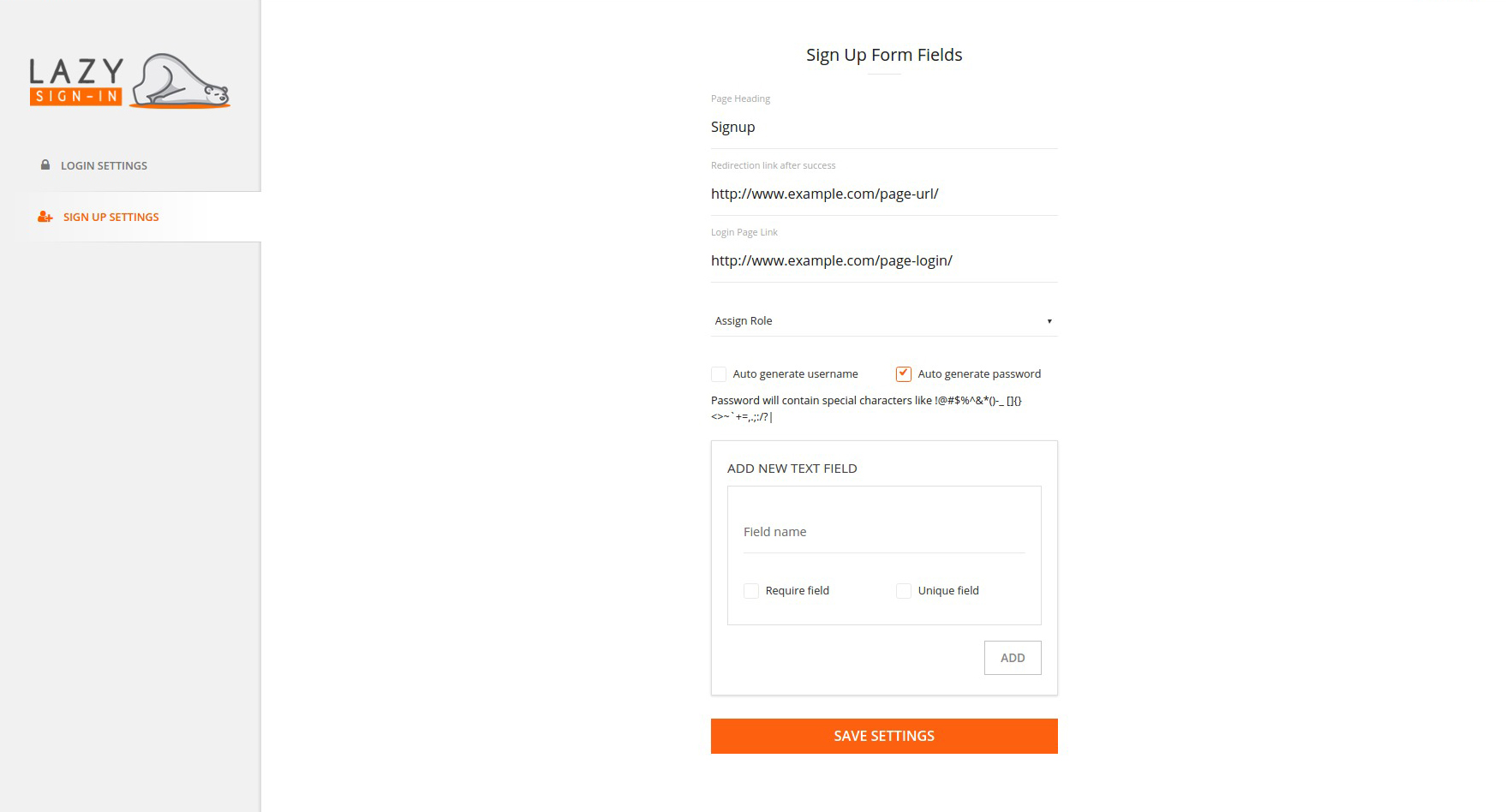
You can customize the sign up form fields from sign up settings in admin. It lets you setup login page, assign role, auto-generate the password and customize the sign-up form fields. 
Sign-up form on the front-end will contain all the fields you have included while customizing it. It will get updated in real time when you will make any change in the backend. 
It is the default login page for the already registered users. Users need to write registered username or email and password to sign in. There is also an option to remember the user for future access. 
You can create a custom design of the form like this applying your CSS style. 
You can create a custom design of the form like this applying your CSS style. 
You can create a custom design of the form like this applying your CSS style. 
You can create a custom design of the form like this applying your CSS style.
安装
This section describes how to install the plugin and get it working.
e.g.
- Install the plugin via WordPress or download and upload the plugin to the /wp-content/plugins/
- Activate the plugin through the ‘Plugins’ menu in WordPress
- Use the shortcode [kwt_ajx_login_form] or [kwt_ajax_signup_form].
常见问题
-
How to redirect users to a specific page after sign up?
-
You can add the specific destination page URL from the Lazy Signup settings. Go through Lazy Sign In settings-> SIGN UP SETTINGS-> Redirection link after success. Add the link and save the changes.
-
How to add/remove/customize the signup form field?
-
Go to the Lazy Sign In settings-> SIGN UP SETTINGS. Add the field name in the ADD NEW TEXT FIELD section. If you want the new field as require, check the require field checkbox. If you want the new field as unique, check the unique field checkbox. Save the changes
-
How to change the registered user’s role?
-
Go to the Lazy Sign In settings-> SIGN UP SETTINGS. There is a drop-down menu named Assign Role. It will have the list of the roles in your site. Select the role you want to apply to the new registered user.
-
How unique field verification works?
-
The unique field will check for the registered user’s field if the same value found it would not allow the new user to register. For example, If I have the phone number field as unique, it won’t allow more than one user to register via the same phone number.
-
I have an idea for a great way to improve this plugin.
-
Great! I’d love to hear from you at support@krishaweb.com

