跳至内容
WordPress.org

China 简体中文

  • 主题
  • 插件
  • 新闻
    • 文档
    • 论坛
  • 关于
  • 获取 WordPress
获取 WordPress
WordPress.org

Plugin Directory

ShareThis Follow Buttons

  • 提交插件
  • 我的收藏
  • 登录
  • 提交插件
  • 我的收藏
  • 登录

ShareThis Follow Buttons

作者:ShareThis
下载
  • 详情
  • 评价
  • 安装
  • 开发进展
支持

描述

ShareThis Follow Buttons helps you grow your audience by making it easy for visitors to connect with your social profiles across the web.

Display clean, responsive follow buttons anywhere on your WordPress site with a simple setup process and flexible customization options. The plugin is mobile friendly, lightweight, and designed to work seamlessly with modern WordPress themes.

With just a few clicks, you can add social follow buttons that encourage visitors to engage with your brand across popular social platforms.

Features

  • Fast and simple installation
  • Mobile responsive design
  • Easy configuration inside WordPress
  • Connect to existing ShareThis properties
  • Lightweight and optimized for performance
  • Compatible with modern WordPress themes
  • Gutenberg block support
  • Supports a growing list of social networks

Supported Social Networks

  • Facebook
  • Twitter / X
  • LinkedIn
  • Pinterest
  • Instagram
  • YouTube
  • TikTok
  • Bluesky
  • Mastodon
  • Truth Social
  • Gettr
  • Parler
  • Strava
  • ResearchGate
  • Google Scholar
  • And more

Better Together with Share Buttons

Increase engagement even further with the ShareThis Share Buttons plugin:
https://wordpress.org/plugins/sharethis-share-buttons

Share Buttons and Follow Buttons work seamlessly together and provide a complete social engagement solution for your website.

Existing ShareThis User?

If you previously installed ShareThis manually using embedded JavaScript, remember to remove any hardcoded ShareThis scripts and follow button containers after activating the plugin.

Privacy

By creating an account with ShareThis, you agree to our Terms of Use:
https://sharethis.com/publisher-terms-of-use/

ShareThis may collect interaction data related to button usage and engagement.

Read our Privacy Policy here:
https://sharethis.com/privacy/

屏幕截图

  • Set up your Follow Buttons
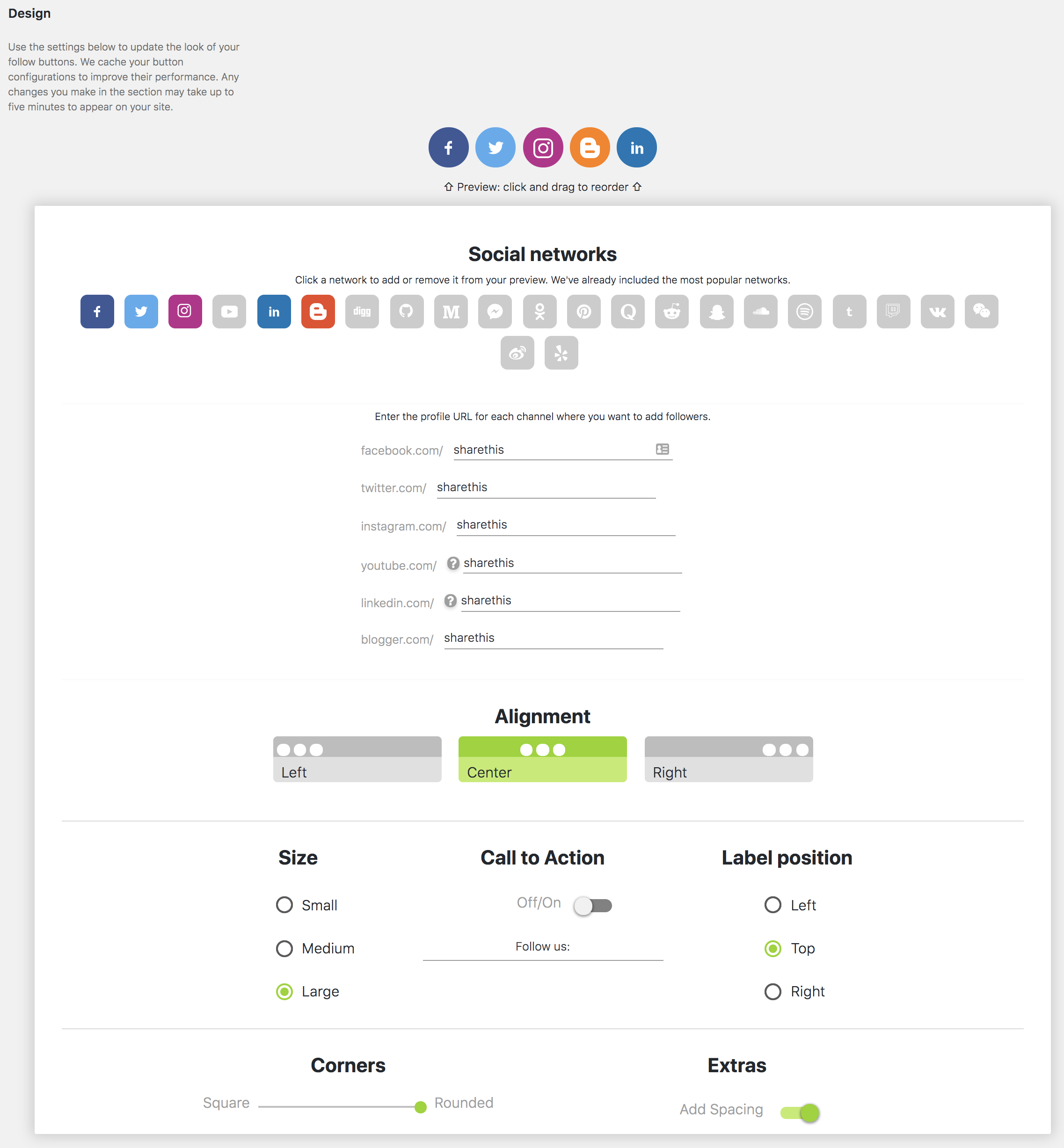
  • Configure Follow Button settings
  • Mobile responsive Follow Buttons

区块

该插件提供了 1 个区块.

  • Inline Follow Buttons

安装

  1. Download and install the plugin from the WordPress Plugin Directory or upload the plugin zip file manually.
  2. Activate the plugin through the WordPress Plugins menu.
  3. Open the ShareThis Follow Buttons settings page.
  4. Configure your social networks and button preferences.
  5. Save your settings and your Follow Buttons will appear on your site.

常见问题

Do Follow Buttons work on mobile devices?

Yes. ShareThis Follow Buttons are fully responsive and optimized for mobile devices, tablets, and desktops.

Do I need the Share Buttons plugin for this plugin to work?

No. ShareThis Follow Buttons works as a standalone plugin.

Can I connect an existing ShareThis account?

Yes. During setup you can connect to an existing ShareThis property and automatically sync your settings.

Does the plugin support Gutenberg?

Yes. The plugin includes Gutenberg block support for adding Follow Buttons directly inside posts and pages.

What should I do if I previously installed ShareThis manually?

Remove any manually embedded ShareThis JavaScript snippets and hardcoded Follow Button containers after activating the plugin to avoid duplicate buttons.

评价

FIRST REVIEW! Amazing plugin.

Orbem Order® 2021 年 1 月 19 日 1 回复
I’m surprised there are more reviews of this plugin, but if you’re looking for a quick, beautiful and simple follow button plugin this is the one to use! It had all the networks I needed and integrated into my footer easily with the provided template code. I use the white color theme to work best with my site. I’ve used a few plugins from ShareThis now and this is definitely on par with their high quality work. Great job!
阅读所有1条评价

贡献者及开发者

「ShareThis Follow Buttons」是开源软件。 以下人员对此插件做出了贡献。

贡献者
  • ShareThis
  • scottstorebloom
  • Scott Weaver

帮助将「ShareThis Follow Buttons」翻译成简体中文。

对开发感兴趣吗?

您可以浏览代码,查看SVN仓库,或通过RSS订阅开发日志。

更新日志

1.4.7

  • Add truthsocial, gettr, parler, strava, google scholar, mastodon, research gate
  • Remove skype.
  • Refresh readme.

1.4.6

  • Test wp ver 6.9.
  • Sanitize settings.
  • Fix text domain.

1.4.5

  • Fix text domain error.
  • Test with wp ver 6.8.2

1.4.4

  • Add bluesky network

1.4.3

  • test wp ver 6.7.1.

1.4.2

  • Fix deprecation errors.
  • test wp ver 6.5.2.

1.4.1

  • Fix admin enqueue

1.4.0

  • Add new social networks
  • Fix menu loading issue.

1.3.2

  • Fix style enqueue.

1.3.1

  • Test with WordPress 6.1.1.

1.3.0

  • Remove registration.

1.2.4

  • Add source.

1.2.3

  • Tested with WordPress 6.0.2.

1.2.2

  • Tested with WordPress 5.9.1.
  • Sanitize inputs/outputs and make sure code is up to standard.

1.2.1

  • Tested with WordPress 5.8.

1.2.0

  • Fix config functionality in register and admin.

1.1.4

  • endpoint update fix.

1.1.3

  • Replace api endpoint.

1.1.2

  • Fix is_plugin_active error

1.1.1

  • Add: Brand new gutenberg block to insert follow buttons in a post.
  • Test: Tested functionality in new WordPress 5+.

1.0.1

  • Add: Added Flipboard and Google+ buttons to network list.

1.0.0

  • Brand new plugin submission.

额外信息

  • 版本 1.4.7
  • 最后更新:1 周前
  • 活跃安装数量 400+
  • WordPress 版本 5.9 或更高版本
  • 已测试的最高版本为 6.9.4
  • 语言
    English (US)
  • 标签
    follow buttonssharethissocial buttonssocial followsocial media
  • 高级视图

评级

5 星(最高 5 星)。
  • 1 条 5 星评价 5 星 1
  • 0 条 4 星评价 4 星 0
  • 0 条 3 星评价 3 星 0
  • 0 条 2 星评价 2 星 0
  • 0 条 1 星评价 1 星 0

Your review

查看全部评论

贡献者

  • ShareThis
  • scottstorebloom
  • Scott Weaver

支持

有话要说吗?是否需要帮助?

查看支持论坛

  • 关于
  • 新闻
  • 主机
  • 隐私
  • 陈列窗
  • 主题
  • 插件
  • 区块样板
  • 学习
  • 支持
  • 开发者
  • WordPress.tv ↗︎
  • 参与
  • 活动
  • 捐赠 ↗
  • 未来五分计划
  • WordPress.com ↗
  • Matt ↗
  • bbPress ↗
  • BuddyPress ↗
WordPress.org
WordPress.org

China 简体中文

  • 关注我们的 X(原 Twitter)账号
  • 访问我们的 Bluesky 账号
  • 关注我们的 Mastodon 账号
  • 访问我们的 Threads 账号
  • 访问我们的 Facebook 公共主页
  • 关注我们的 Instagram 账号
  • 关注我们的 LinkedIn 主页
  • 访问我们的 TikTok 账号
  • 访问我们的 YouTube 频道
  • 访问我们的 Tumblr 账号
代码如诗
The WordPress® trademark is the intellectual property of the WordPress Foundation.