
描述
Secure Private Files allows you to securely manage and share private files with selected users or user roles in WordPress.
Files are protected using unique token-based URLs, ensuring they cannot be accessed without proper permission. You can define who can download each file, set an expiry date, and track download activity.
YouTube Tutorials | Free Support
This plugin is ideal for:
– Membership sites
– Client portals
– Secure document sharing
– Restricted downloads
– Private resources for logged-in users
Key Features
- Secure token-based file access (no public URLs)
- Assign files to specific users
- Allow access by user roles
- Optional expiry date for each file
- Logged-in user verification
- Download activity logging (user, IP, date)
- Dedicated Private Files custom post type
- Media library integration for file selection
- AJAX-powered user search (Select2)
- Frontend shortcode to list accessible files
- Works with any WordPress theme
- No third-party dependency required
How It Works
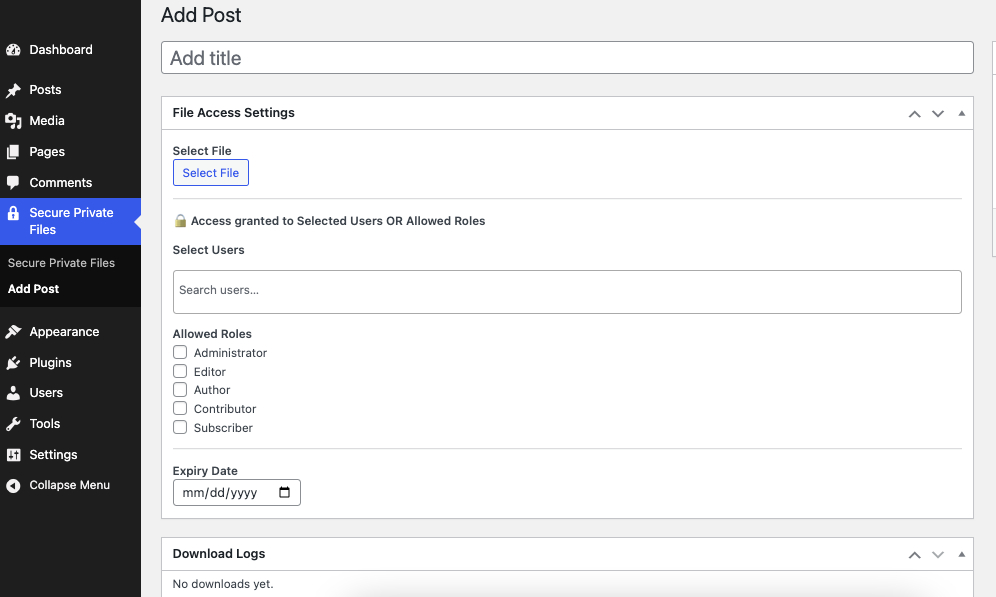
- Admin creates a Private File post
- Uploads or selects a file from Media Library
- Assigns allowed users and/or roles
- (Optional) Sets an expiry date
- Plugin generates a secure download token
- Authorized users can download the file using the secure link
Shortcodes
List logged-in user’s available private files
[secure_files]
Displays only files the current user is allowed to access.
屏幕截图
安装
- Upload the plugin folder to
/wp-content/plugins/ - Activate Secure Private Files
- Go to Private Files in the admin menu
- Add a new Private File
- Select file, users, roles, and expiry
- Use the shortcode on any page if needed
常见问题
-
Is login required to download files?
-
Yes. Only logged-in users with permission can access files.
-
Can I restrict files by user role?
-
Yes. You can allow access by user roles and/or specific users.
-
Are files accessible via direct URL?
-
No. Files are protected using secure token-based URLs.
-
Does the plugin log downloads?
-
Yes. Each download logs the user, IP address, and date.
-
Will this work with any theme?
-
Yes. It works independently of themes and page builders.
-
Is WooCommerce required?
-
No. WooCommerce is NOT required.
评价
此插件暂无评价。
贡献者及开发者


更新日志
1.0.7
- Added a Docs page under Secure Private Files with shortcode instructions
- Improved [secure_files] frontend layout with responsive file cards
- Added file type, size, expiry information, and secure Download buttons
- Expired files are hidden from the frontend list
- Added secure, sanitized dynamic frontend display fields to the Docs page
- Added customizable eyebrow, title, description, available count, download label, and empty-state text
- Dynamic display settings affect presentation only and never bypass file access controls
1.0.6
- Compatibility : WordPress 7.1
1.0.5
- Security fix: protected files were previously stored as normal media
attachments under wp-content/uploads/, making them directly downloadable
via their public URL and enumerable via the unauthenticated
/wp/v2/media REST endpoint, bypassing all login/role/expiry checks.
Protected files are now relocated on save into a dedicated directory
that is denied at the web-server level (.htaccess / web.config), are
excluded from REST API media responses, and existing sites are
migrated automatically on upgrade.
1.0.4
- Compatibility : WordPress 7.0
1.0.3
- Short Code Impovements
- Few minor bugfix and improvements
1.0.2
- Code Impovements
- Language POT
- Few minor bugfix and improvements
1.0.1
- slug update
1.0
- Initial release
- Secure token-based downloads
- User and role-based access control
- Expiry date support
- Download logs
- Frontend shortcode support