
描述
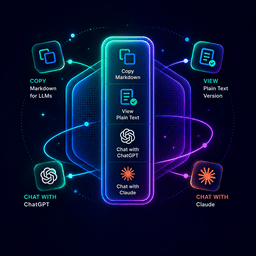
AJW — AI Markdown Page Widget adds a polished floating action panel to your WordPress pages, letting readers instantly interact with your content using AI tools.
What it does:
- Copy as Markdown — Copies the full page as clean Markdown to the clipboard. Auto-generates on first use and caches for speed.
- View as Markdown — Every enabled page gets a plain-text URL at
yoursite.com/page-slug/md/ready for AI tools. - Ask in ChatGPT — Opens ChatGPT pre-loaded with a prompt to read and discuss the page.
- Ask in Claude — Opens Claude pre-loaded with a prompt to read and discuss the page.
- Custom actions — Add your own AI tools with custom icons, labels, and URL templates.
Key Features:
- Full admin settings page — position (left/right), enabled post types, all actions
- Drag-and-drop action reordering
- Custom icons via WordPress media library
- Dynamic URL placeholders:
[md_url]and[page_url]auto-update per page - Markdown meta box on every post/page editor — generate, edit, or regenerate
- Auto-regeneration — when page content changes, Markdown updates automatically on save
- Clean
.md/endpoint — serves plain text with noindex headers, generates on first visit if not cached [ajwa_widget]shortcode to embed inline anywhere- WordPress Widget support for any widget area
- Animated gradient border on the widget to draw user attention
URL Templates
In action link fields, use these placeholders:
[page_url]— replaced with the page permalink[md_url]— replaced with the Markdown URL
Example: https://chatgpt.com/?q=Read [md_url] so I can ask questions about it
屏幕截图


安装
- Upload the
ajw-ai-markdown-page-widgetfolder to/wp-content/plugins/ - Activate via Plugins Installed Plugins
- Go to Settings AJW Widget to configure
- Go to Settings Permalinks and click Save Changes to activate the
.md/endpoint
常见问题
-
The /md/ URLs return 404
-
Go to Settings Permalinks and click Save Changes to flush rewrite rules.
-
How is the Markdown generated?
-
The plugin converts HTML content through a custom converter handling headings, bold, italic, links as
[text](url), ordered and unordered lists, blockquotes, code blocks, and tables. Images are replaced with alt text. All HTML tags are stripped safely usingwp_strip_all_tags(). -
Can I manually edit the Markdown content?
-
Yes. The meta box textarea on each post/page is fully editable. If the page content changes on save, the field auto-regenerates.
-
Can I add tools beyond ChatGPT and Claude?
-
Yes. In Settings click Add Action, set type to External Link, and use
[md_url]in the URL field. -
Does it work with custom post types?
-
Yes. Any public post type appears in settings and can be enabled.
-
Does it work in the block editor (Gutenberg)?
-
Yes. The meta box appears at the bottom of the block editor screen.
评价
此插件暂无评价。
贡献者及开发者

更新日志
1.0.0
- Initial release