
描述
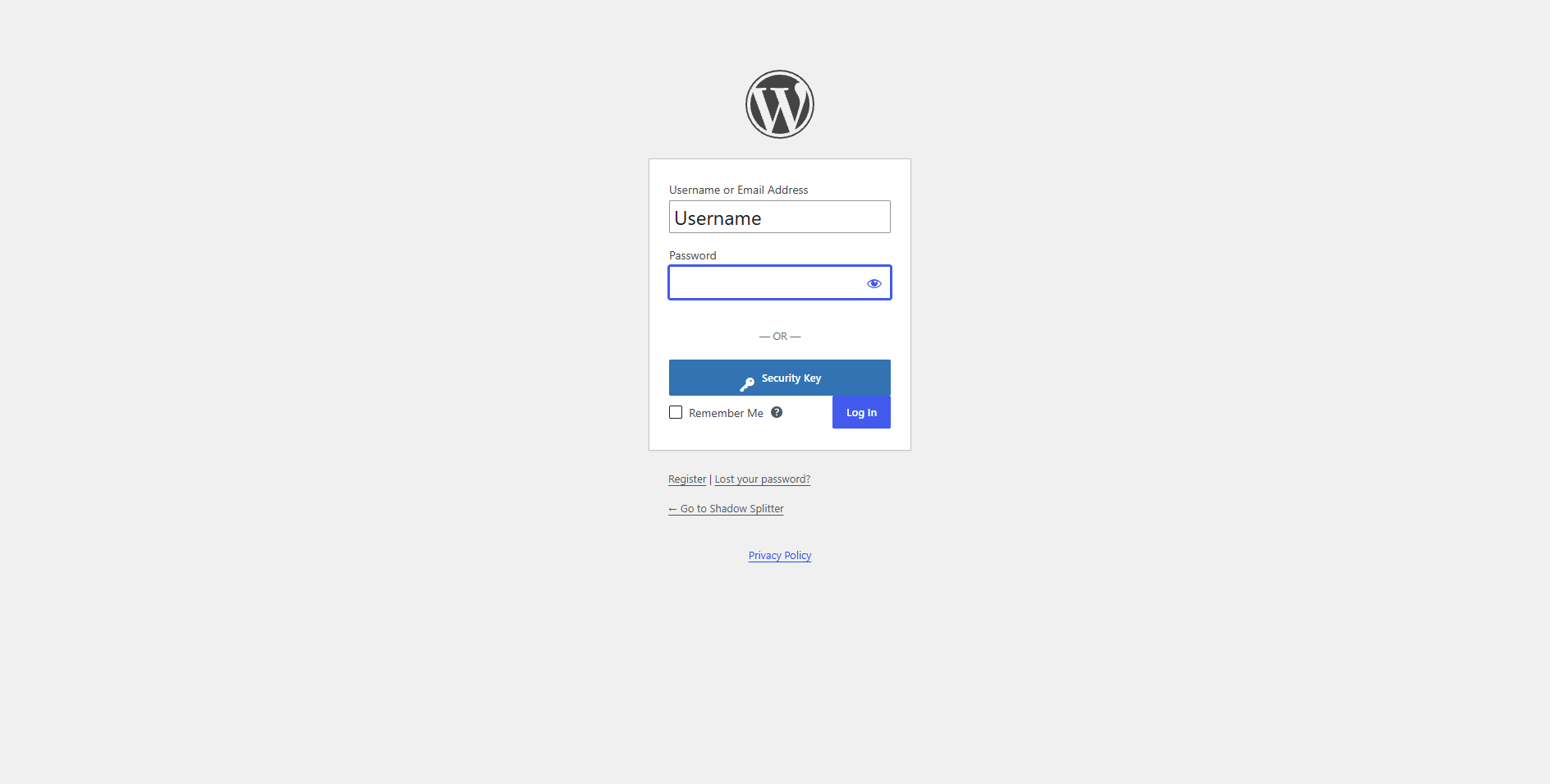
Lock and Key adds a Security Key button to your WordPress login page. Users register a hardware security key on their profile, then sign in by entering their username, clicking Security Key and confirming on the key. There’s no password to steal, and phishing sites can’t reuse the login.
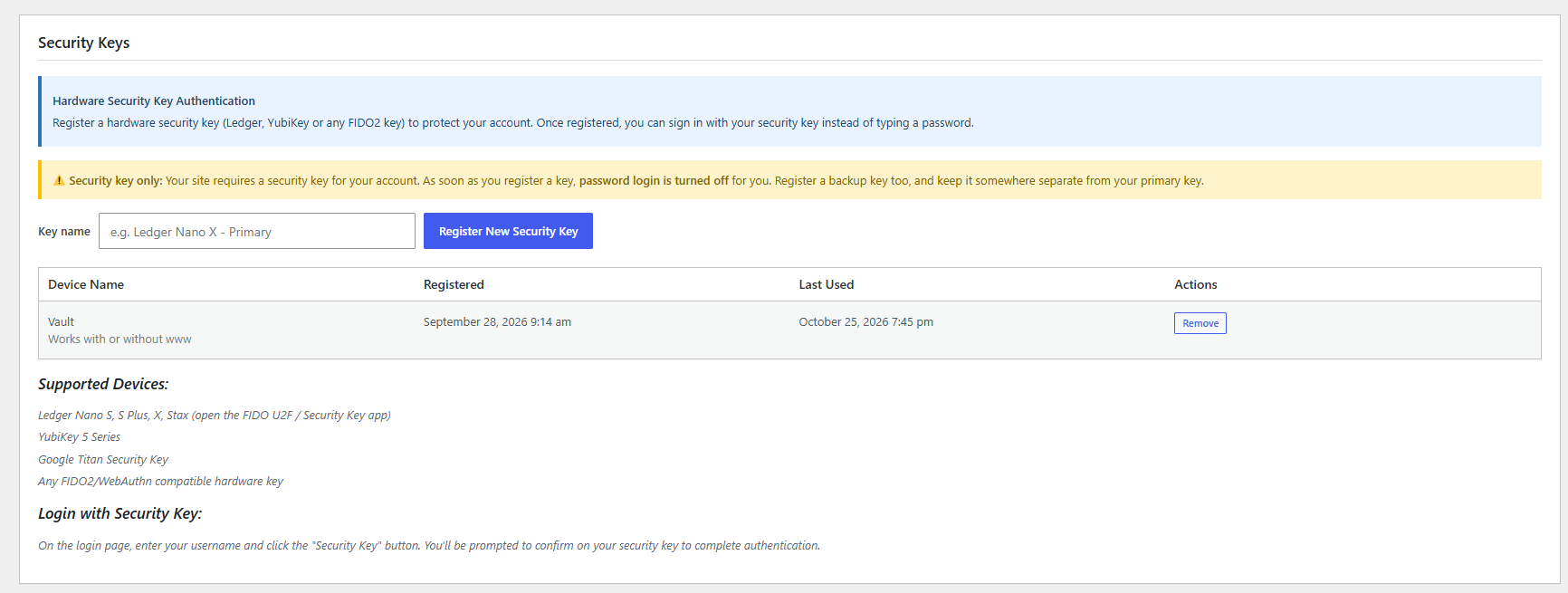
Works with Ledger Nano S, S Plus, X and Stax (FIDO U2F / Security Key app), YubiKey, Google Titan, and any FIDO2/WebAuthn hardware key.
Features
- Security Key login button on the WordPress login page
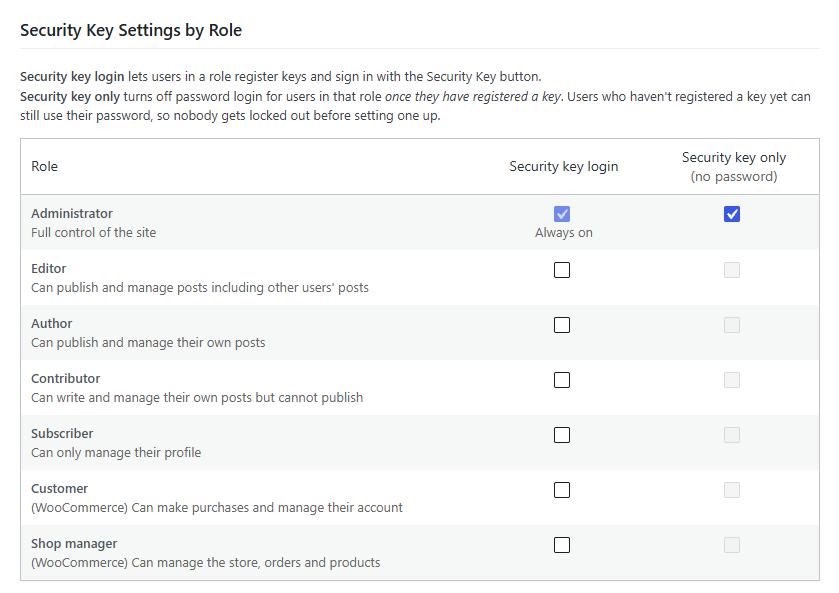
- Choose which roles can use security keys: administrators, editors, authors, contributors, subscribers and custom roles
- Security key only mode for each role: turns off password login for users who have registered a key
- Clear “Use security key only for access” message when someone tries a password on a key-only account, whether the password was right or wrong
- Users register and manage their own keys, including backup keys
- Dashboard warning listing administrators who haven’t registered a key yet
- Admins can remove a user’s lost key from their profile
- Overview of who has registered keys and when they last used them
- Full server-side verification of every login: signature (ES256 / RS256), origin, challenge and relying party
- Cloned-key detection via the signature counter
- Throttling of repeated failed key logins
- Logins go through WordPress’s own login process, so other security plugins keep working
- Works behind Cloudflare, load balancers and other proxies, with protection against faked addresses
Security key only mode
For roles set to Security key only, password login is refused on the login page and XML-RPC once the user has registered a key. Users who haven’t registered a key yet can still use their password, so nobody is locked out before setting one up.
If a user loses their key, an admin removes it from the user’s profile and their password works again. If you’re locked out, adding define( 'LOCKANDKEY_DISABLE_KEY_ONLY', true ); to wp-config.php allows passwords again.
Lock and Key Pro
Lock and Key Pro is a separate plugin that adds monitoring: a login activity log (logins, failed logins and security key changes, with IP address and browser), IP address blocking, XML-RPC attack blocking, manual and automatic IP blocking, 3-strike blocking for admin accounts, custom messages or pages for blocked visitors, email alerts for administrators and for each user about their own account, and WooCommerce support.
Privacy
Lock and Key doesn’t contact any external service. Registered keys (a public key, a key ID, the name the user gave it, and when it was created and last used) are stored in your own WordPress database.
屏幕截图
安装
- Install the plugin from Plugins Add New, or upload the ZIP under Plugins Add New Upload Plugin.
- Activate it.
- Go to Settings Lock and Key and choose which roles can use security keys. Administrators are always enabled.
- Each user registers a key under Users Profile Security Keys.
- Optionally, tick Security key only for roles that should stop using passwords.
Your site must use HTTPS. Browsers only allow security keys on secure sites.
常见问题
-
Which security keys work?
-
Any FIDO2 or U2F hardware key: Ledger (open the FIDO U2F / Security Key app), YubiKey, Google Titan, Feitian, SoloKeys and others.
-
Which users can use security keys?
-
Any role you enable on Settings Lock and Key. Administrators are always enabled.
-
Can I stop users from logging in with a password?
-
Yes. On Settings Lock and Key, tick Security key only for a role. Once a user in that role has registered a key, password attempts show “Use security key only for access” and are refused.
-
What if someone loses their key?
-
An admin opens the user’s profile and removes the lost key under Security Keys. If that was their last key, their password works again and they can register a new one. Encourage everyone to register a backup key.
-
I’m locked out. What now?
-
Add
define( 'LOCKANDKEY_DISABLE_KEY_ONLY', true );towp-config.php. Passwords then work again. Remove the line once you’ve sorted out your keys. -
What happens to the keys if I delete the plugin?
-
They’re kept, along with your settings, so nothing is lost when you reinstall. To remove everything when deleting the plugin, tick Delete all registered security keys and settings when the plugin is deleted in the plugin’s settings first.
-
My site is behind Cloudflare or another proxy. Does that matter?
-
Yes. Choose your proxy under Settings Lock and Key Visitor IP Addresses. Otherwise every visitor appears to come from the proxy’s address, so the failed-login limit would apply to everyone at once. The proxy’s header is only believed when the request really comes from the proxy (Cloudflare’s address ranges are built in), so visitors can’t fake their address.
-
Does it affect application passwords?
-
No. Application passwords (used by apps and the REST API) are managed separately under each user’s profile.
评价
此插件暂无评价。
贡献者及开发者

更新日志
3.2.2
- Security key login and registration now work with caching plugins such as W3 Total Cache, and with object caches (Redis, Memcached). The one-time code is signed and checked directly instead of being read back from the database.
- Log in with your email address even when it contains “+”.
3.2.1
- Security keys now work at both the www and non-www address of a site (for example example.com and www.example.com). Keys registered before this version keep working at the address they were registered on; register them again to use both.
- One-time security key codes are stored in the database, so registration and login work on sites with an object cache (Redis, Memcached).
3.2.0
- First release on WordPress.org.