

描述
When people ask ChatGPT, Perplexity, Google AI Overviews, Gemini or Claude for a business like yours, the answer is built from what those AIs can read about you. Nurevo AEO makes sure they can read your facts correctly: who you are, what you sell, where you are and how to reach you.
This is AEO (Answer Engine Optimization), also called GEO (Generative Engine Optimization). Nurevo AEO checks your site, tells you what is missing, and publishes the missing pieces in the formats AI crawlers read: schema.org structured data, llms.txt and AI crawler rules. All of it is rendered on your own server, so crawlers that never run JavaScript still see it.
Built for three kinds of sites
- Local businesses – shops, salons, clinics, restaurants, hotels and offices: address, phone, opening hours, services and FAQ.
- Online shops – an OnlineStore with your product catalogue, prices and stock where known, and your return policy. Works with WooCommerce without duplicating its product markup.
- B2B, SaaS and professional services – an Organization with the services or software you offer, plus your pricing, case study and FAQ pages in llms.txt.
Keep your SEO plugin. Nurevo AEO adds the facts Yoast SEO, Rank Math, All in One SEO or Slim SEO leave out, inside the structured data they already publish. One graph, one business, no duplicates.
In your language. The plugin and its dashboard are available in 59 locales.
Ready for AI agents. On WordPress 6.9 and later it offers read-only abilities through the WordPress Abilities API, so AI assistants connected with the official MCP Adapter can read your AEO status and business facts.
Free, and genuinely complete
Everything below runs on the free plan. No license key, no trial period, no feature timer.
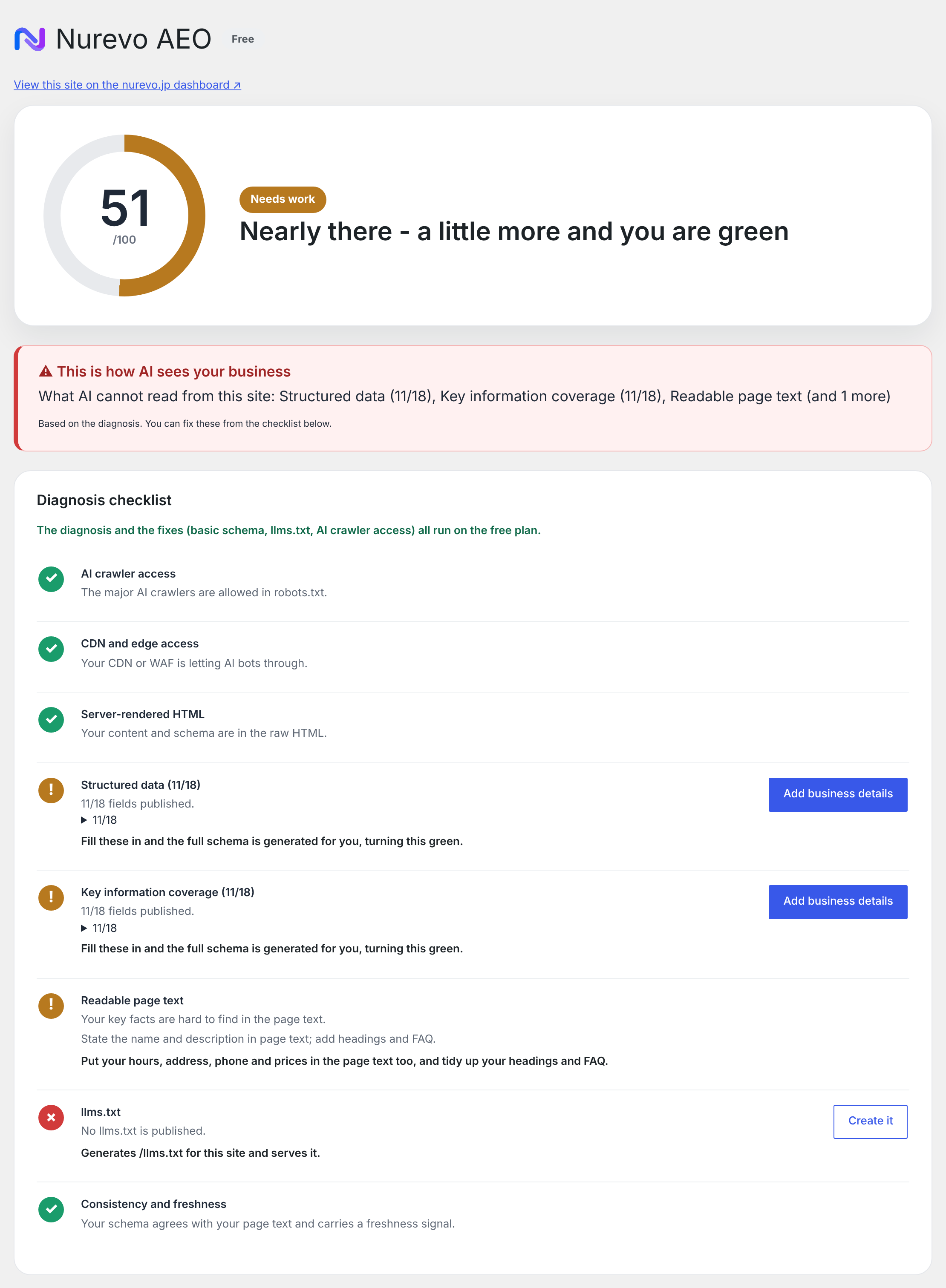
- AEO score — a 0 to 100 score with traffic-light alerts and a concrete checklist of what to fix.
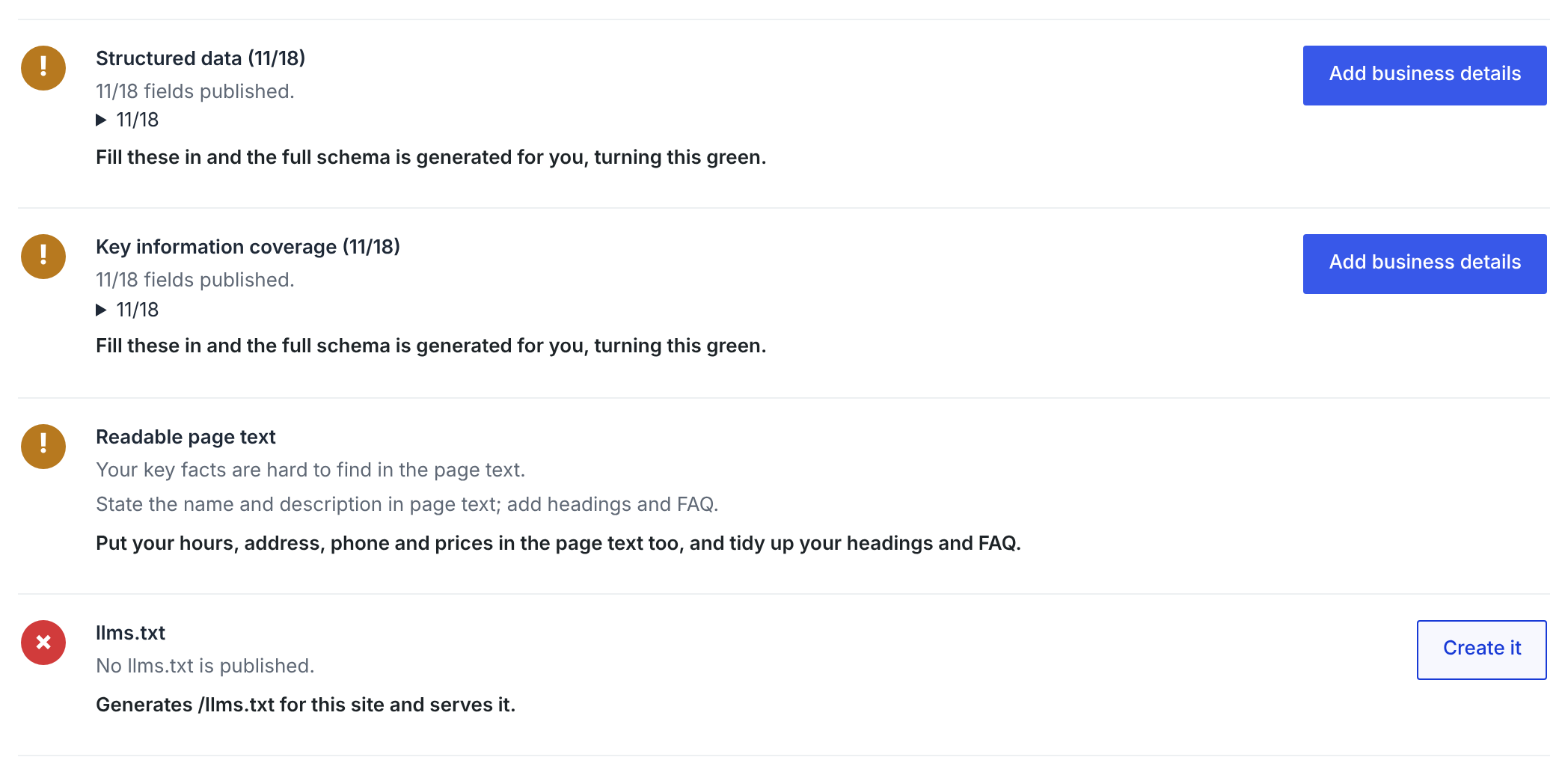
- One-click fixes — basic schema.org structured data, llms.txt and AI crawler access are fixed from the admin screen.
- Server-rendered schema.org JSON-LD — emitted into the page HTML, so crawlers that never run JavaScript still read it.
- llms.txt — served at
/llms.txt. Generated inside the plugin from your WordPress content, so it works with no site key and no network access. - AI crawler rules — robots.txt entries that allow the crawlers AI search uses to read and cite your pages: OAI-SearchBot and ChatGPT-User (ChatGPT), Claude-SearchBot and Claude-User (Claude), PerplexityBot and Perplexity-User (Perplexity). Your existing robots.txt rules, such as /wp-admin/, keep applying to them.
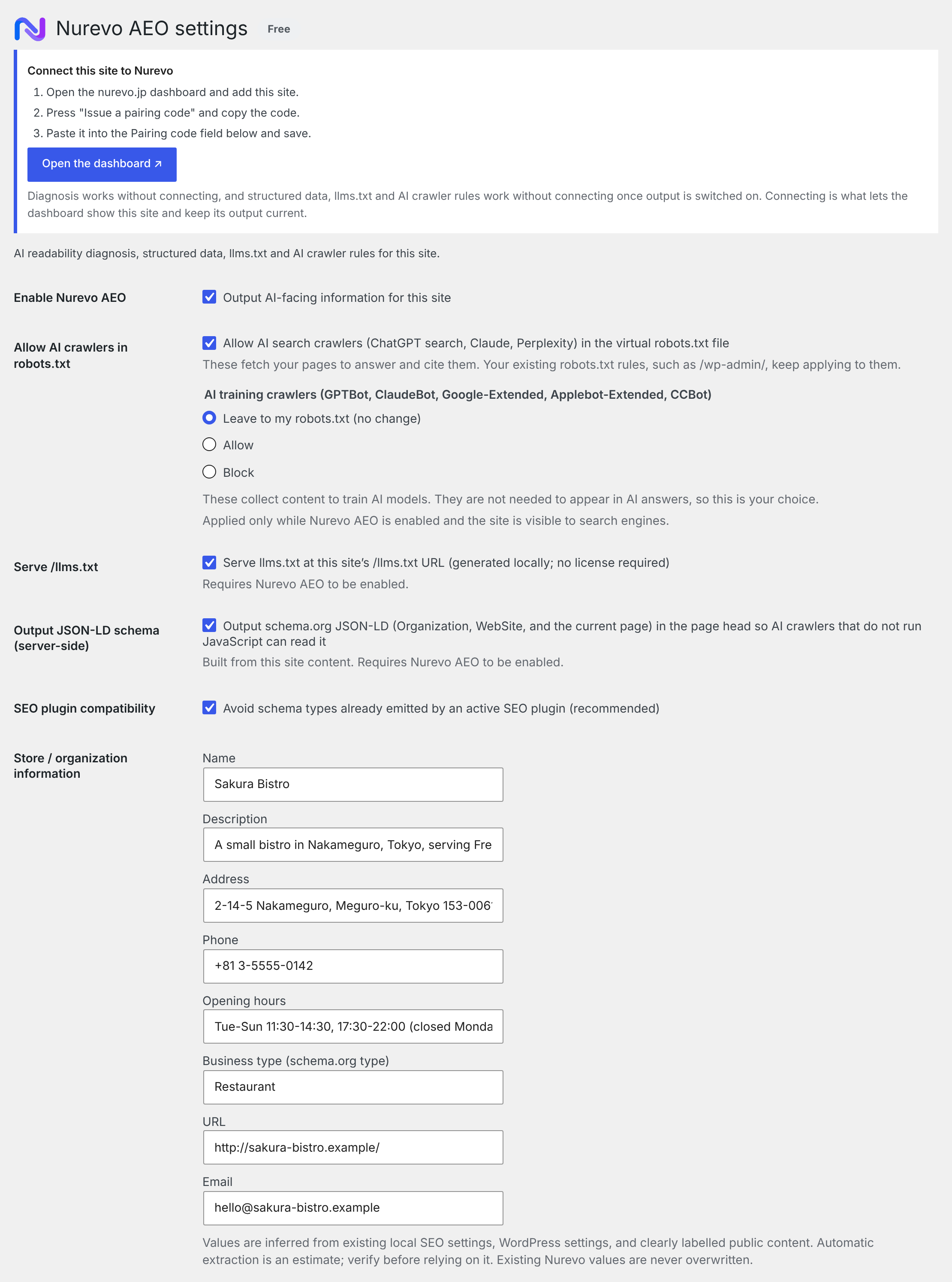
- Your choice on AI training — crawlers that collect content to train AI models (GPTBot, ClaudeBot, Google-Extended, Applebot-Extended, CCBot) are left to your robots.txt by default. You can allow or block them in one click. Blocking them does not affect AI search or your AEO score.
- Business data extraction — reads your existing SEO plugin settings, WordPress options and clearly labelled public content to fill in blank fields only. Values you have typed are never overwritten. The WordPress administrator email is never used as your business email.
Works alongside Yoast SEO, Rank Math, All in One SEO and Slim SEO
Keep your SEO plugin. The two jobs are different: your SEO plugin handles search ranking, Nurevo AEO handles whether an AI can read your facts.
Nurevo AEO does not publish a second set of structured data next to your SEO plugin’s. It adds the missing facts to the one your SEO plugin already publishes.
With Yoast SEO, Rank Math, All in One SEO or Slim SEO, Nurevo AEO hooks the filter each of them uses to build its JSON-LD graph (wpseo_schema_graph, rank_math/schema/validated_data, aioseo_schema_output, slim_seo_schema_graph) and adds only what is missing:
- Your business node gets the address, telephone, opening hours, description and email it lacks, and a more specific type such as HairSalon or Dentist. Values your SEO plugin already sets are never overwritten.
- FAQ questions you entered in Nurevo are added to the page’s existing FAQPage, skipping any question it already answers, or as an FAQPage of their own where the page has none (Slim SEO publishes no FAQPage) – only on the page where you placed the Nurevo FAQ block or the
[nurevo_faq]shortcode. - Services you entered are added, linked to your business node.
- WebSite, WebPage, Article and breadcrumbs stay exactly as your SEO plugin publishes them.
The page ends up with one graph, from your SEO plugin, describing one business.
That matters because the free tiers of these plugins usually publish an Organization with a name, a URL and a logo, but not the address, telephone or opening hours an AI needs to describe a local business. In Yoast SEO and AIOSEO those belong to paid local-SEO add-ons; Rank Math’s free version can publish one location if you fill in its Local SEO settings; Slim SEO publishes an Organization with your site name and URL (and logo, if set). Nurevo AEO fills whatever is still missing, without overwriting what is already there.
Slim SEO prints its graph at the end of the page rather than in <head>, so with Slim SEO Nurevo AEO waits until then. If Slim SEO’s schema is turned off (Settings > Slim SEO > Features), Nurevo AEO publishes its own graph, as with any other setup.
With any other setup – SEOPress, The SEO Framework, a theme’s own schema, or no SEO plugin – Nurevo AEO prints its own graph at the end of <head>. It leaves out what your other plugins already publish and puts the business facts under their business @id, so the two describe one business rather than two.
Plans
- Free — 0 JPY. Everything listed above, in full.
- Standard — 3,000 JPY/month (USD 20 outside Japan). “Always current”. AEO criteria keep changing. Licensed sites receive the current central ruleset from the Nurevo service and get a notice in wp-admin when the criteria change. Free sites keep running on the ruleset bundled with the plugin.
- Pro — from 14,800 JPY/month (USD 99 outside Japan). AI visibility measurement: how often your business appears in AI answers, with competitor comparison and history. This is a beta feature and the numbers should be read as indicative. AI answers change from day to day, so no plugin can guarantee that an AI will mention you.
No paid PHP is bundled in this plugin and nothing in the download is locked. The only difference a license makes is which ruleset the Nurevo service returns and whether the measurement screen is enabled. Paid plans require an account at https://nurevo.jp/ and are billed there, not through WordPress.
External services
This plugin relies on the Nurevo service, operated by Bestie. LLC. It is not required for the free output described above.
Nothing is sent from your public pages by default. Installing and enabling the plugin adds no third-party script to your site and transmits no visitor data. The structured data, llms.txt and AI crawler rules are all produced by the plugin itself, on your own server.
The browser tag is opt-in and off by default. Settings has an optional “Load the Nurevo browser tag on public pages” checkbox, unchecked unless you tick it. While it is off, no script is enqueued and nothing about your visitors reaches the service. If you turn it on, a script is loaded from the configured service URL (by default https://nurevo.jp/tag.js) on every public page view, carrying your public site key. It reports public form structure — field names, types, labels, selectors and option counts — and privacy-safe submission outcomes. It is designed not to transmit values a visitor typed: no names, email addresses, phone numbers, message bodies or payment details. Unticking the box stops it immediately. You do not need it for AEO.
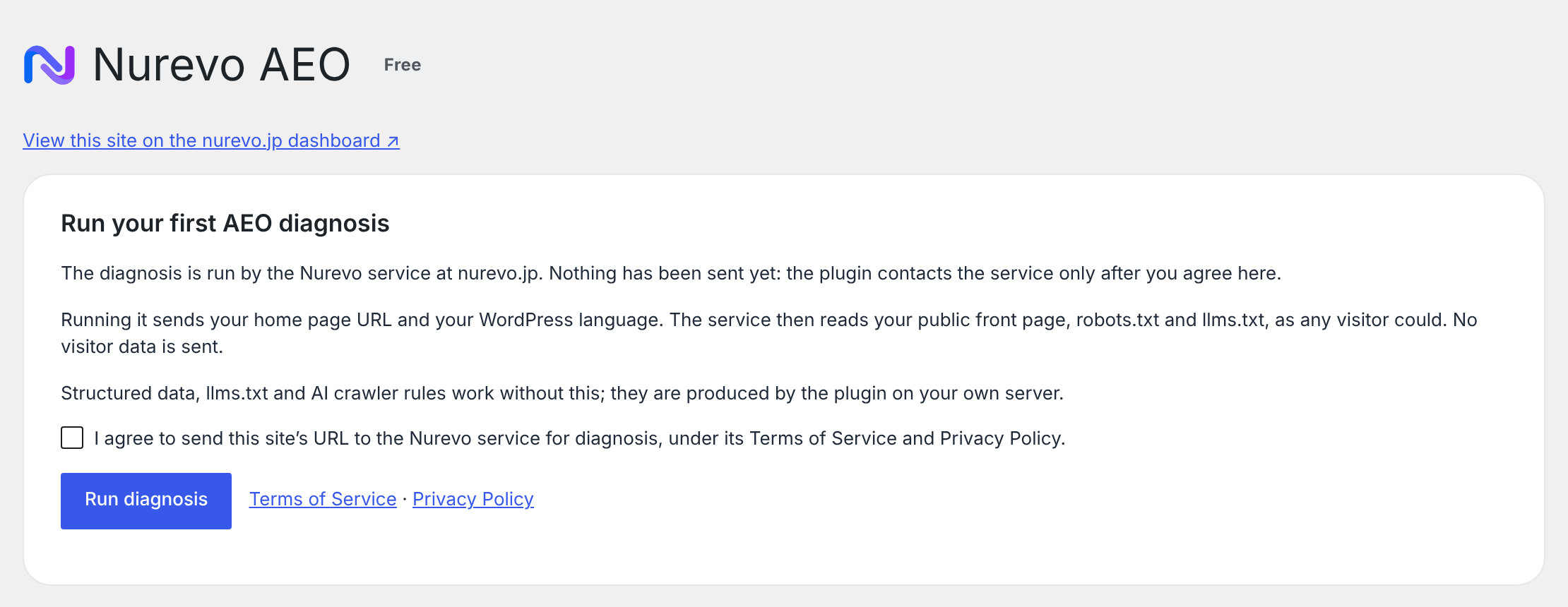
Nothing is sent until you agree. Activating the plugin makes no request at all. The first time you open the AEO screen it explains what the diagnosis sends and asks you to tick a consent box and press “Run diagnosis”. Until you do, or until you pair the site with a pairing code (which is itself an explicit request to connect), the plugin does not contact the Nurevo service. Your consent is stored as a WordPress option and removed when the plugin is uninstalled.
Requests the plugin makes, and when. All of them go to the Nurevo service URL in Settings (by default https://nurevo.jp). None of them carries visitor data.
After you agree (Run diagnosis), without a key:
- AEO diagnosis — when you press “Run diagnosis”, and afterwards when you open the AEO screen, press “Check again” or apply a one-click fix. Sends your home URL and your WordPress language. The service then fetches your public front page,
/robots.txtand/llms.txt. Endpoint:/api/aeo/score.
When you connect the site (pairing code or licence key) — connecting counts as consent:
- Pairing — sends the pairing code you entered and your home URL. Endpoint:
/api/pair. - Licence — sends the licence key you entered and your home URL. Endpoint:
/api/license/bind. - Site key management — sends your home URL and the owner email from Settings. Endpoints:
/api/site-key,/api/site-key/regenerate,/api/site-key/disable.
Once the site is connected (site key or site ID present), in wp-admin and from WP-Cron twice a day:
- Diagnosis history — sends the site key, site ID and language. Endpoint:
/api/sites/{id}/aeo-score. - Business profile — reads and updates the profile the service holds. Sends the business details from Settings: name, description, address, telephone, opening hours, business type, website URL and business email. Endpoint:
/api/sites/{id}/profile(GET and PUT). - Catalogue — sends what the site offers so the service can publish the same facts: WooCommerce product names, URLs, SKUs, prices, currency, stock status and categories; the services, FAQ questions and answers entered in Settings; and the titles and URLs of your 30 most recently updated published posts and pages. Endpoint:
/api/sites/{id}/catalog(PUT). - Ruleset — sends the site key and receives the current output criteria and plan. When the service suggests changes (for example turning on llms.txt), they are shown in wp-admin and applied only when an administrator clicks Apply. Endpoint:
/api/tag/config. - Site insights — sends the site key and host. Endpoint:
/api/site-insights. - AI visibility measurement (Pro, beta) — sends the site key and site ID. Endpoint:
/api/sites/{id}/sov. - Change record (learning events) — a compact record of changes to this plugin’s own settings, sent with the sync above in small batches, each with an id so a resend is stored once; while the service cannot be reached they wait in a WordPress option (at most 200, oldest dropped first). Each event says which output was switched on or off (structured data, llms.txt, AI crawler rules, the browser tag), which business fields were filled in or cleared (the field names, never what was entered), the site type, which SEO plugin is active (Yoast SEO, Rank Math, AIOSEO, Slim SEO or none), the plugin version, the number of FAQ entries, services and products, and which one-click fix was applied. Nothing is recorded before the site is connected. Nurevo uses these records, together with the diagnosis scores and AI search measurements (including one baseline measurement taken when the site is added in the dashboard, before the plugin is connected), in aggregate across sites to learn which changes help businesses appear in AI answers; no score is changed automatically by it. Endpoint:
/api/sites/{id}/events(POST). - Free AI check (Free and Standard) — reads this month’s result with the site key and site ID; “Check now” sends the site ID with the profile token. Endpoint:
/api/sites/{id}/sov/free-check(GET and POST). Once a month the Nurevo service itself puts three questions a customer might ask, built from your business type and area (never your business name), to Perplexity (https://www.perplexity.ai/, terms: https://www.perplexity.ai/hub/legal/terms-of-service, privacy: https://www.perplexity.ai/hub/legal/privacy-policy) and stores whether the answers named your business or cited your site. The plugin itself never contacts Perplexity.
The plugin also requests your own front page once a day (a loopback request to your own server, not to Nurevo) to see which structured data your other plugins already publish.
The site key is a public identifier. It appears in markup served to browsers, so never put a server secret in it. The license key is separate and is never printed into public pages.
The plugin suggests matching text for your site’s privacy policy under Settings > Privacy (Policy Guide).
By using these features you agree to the service’s terms. Please read them before entering a key:
- Privacy Policy: https://nurevo.jp/privacy
- Terms of Service: https://nurevo.jp/terms
屏幕截图


区块
该插件提供了 1 个区块.
- Nurevo Faq
安装
- Upload the plugin folder to
/wp-content/plugins/, or install the zip from Plugins > Add New > Upload Plugin. - Activate Nurevo AEO on the Plugins screen. The setup wizard opens once: four short steps for the kind of business, its basic facts, what to publish for AI, and an optional diagnosis. You can skip it and come back from Nurevo AEO > Setup.
- Or set it up by hand: open Nurevo AEO > Settings and enable it.
- Check the business information the plugin extracted automatically and correct anything wrong. It only fills blanks, so nothing you typed was replaced.
- Open Nurevo AEO > AEO Score, read what the diagnosis sends, tick the consent box and press Run diagnosis. Then apply the free fixes.
- A site key and a license key are optional. They are only needed for diagnostics history held by the service and for the Standard “always current” ruleset.
常见问题
-
How do I publish my FAQ?
-
Enter the questions and answers under Nurevo AEO > Settings, then add the Nurevo FAQ block (or the
[nurevo_faq]shortcode) to the page where they should appear. The questions are shown there as expandable items and published as FAQPage structured data on that page only. Search engines accept FAQ markup only for questions a visitor can read, so nothing is published for an FAQ that is not on any page. -
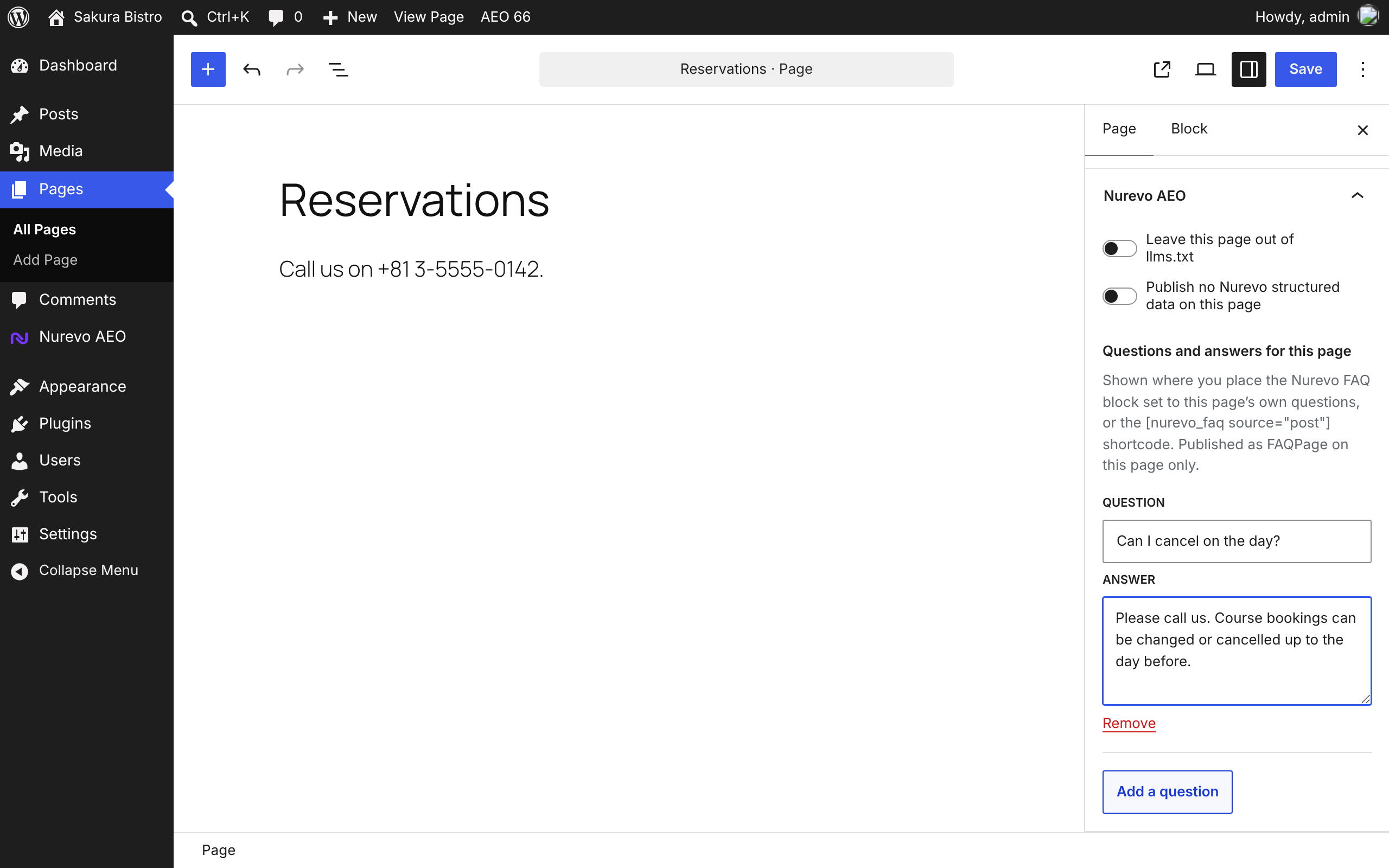
Can I leave a page out, or give a page its own FAQ?
-
Yes. In the block editor, open the Nurevo AEO panel in the post sidebar; in the classic editor, use the Nurevo AEO box. You can leave the page out of
/llms.txt, stop Nurevo publishing structured data on it, and enter questions and answers for that page alone. A page’s own questions are shown where you place the Nurevo FAQ block set to “This page’s own questions” (or the[nurevo_faq source="post"]shortcode), and published as FAQPage on that page only. -
Can I copy the settings to another site, or script them?
-
Yes. Nurevo AEO > Settings > Tools exports the settings (output switches, business details, FAQ and services) as a JSON file and imports one. Keys, tokens, the plan and the connection are never exported or imported, and a file containing them is refused. With WP-CLI:
wp nurevo status,wp nurevo diagnose,wp nurevo exportandwp nurevo import <file>. Administrators can also read the output state from the REST routeGET /wp-json/nurevo/v1/status. -
Does the AI integration cost anything?
-
No. The AI integration runs inside your own WordPress, and the AI that uses it is your own assistant. Nurevo AEO makes no calls to any AI API, so there is no usage fee behind it. On WordPress 6.9 and later it offers read-only abilities through the WordPress Abilities API: your status, the last stored AEO score, what is left to fix, and the business facts you already publish. They change nothing and run no new diagnosis.
-
What is AEO?
-
AEO (Answer Engine Optimization) is about being quoted correctly inside AI answers from ChatGPT, Perplexity, Google AI and others. Classic SEO is about where you rank in a list of links. AEO is about whether a machine can read your facts at all.
-
What is GEO? Is it different from AEO?
-
GEO (Generative Engine Optimization) and AEO (Answer Engine Optimization) are two names for the same goal: being read and cited correctly by AI that writes answers. Nurevo AEO covers both.
-
Does it work for online shops and B2B or SaaS sites?
-
Yes. In the setup wizard or under Settings, choose Local business, Online shop or B2B / SaaS. That decides what is published for AI, what the diagnosis checks and which questions the AI visibility measurement asks. Online shops and B2B sites do not need an address or opening hours.
-
Can I use this with Yoast SEO, Rank Math, All in One SEO or Slim SEO?
-
Yes, and you should. Keep your SEO plugin for search ranking and let Nurevo AEO handle the AI-facing output. With Yoast SEO, Rank Math, All in One SEO and Slim SEO it adds the missing facts into the graph your SEO plugin already publishes; with others it looks at what your site actually publishes and only suppresses what your SEO plugin already covers completely. Either way you get neither duplicate schema nor a gap.
-
My SEO plugin already outputs schema. Will this duplicate it?
-
No. Nurevo AEO checks the structured data your pages actually serve. Where your SEO plugin publishes a complete business entity it publishes nothing of its own; where that entity is missing an address, telephone or opening hours – which is the normal case on the free tiers – it adds those under the same @id, so search engines and AI read one business, not two.
-
How much works without paying?
-
All of it, except the two things listed under Plans. The score, alerts and checklist, the one-click fixes, server-rendered JSON-LD, llms.txt, AI crawler rules, data extraction and SEO plugin coexistence are free and unlimited.
-
What does “always current” actually mean?
-
What counts as good AEO keeps moving. On Standard, the service returns the current central ruleset and wp-admin tells you when the criteria changed so you can re-run the diagnosis. On Free the plugin keeps using the ruleset it shipped with; your existing output does not stop working or degrade.
-
No. There is no locked or encrypted PHP in this plugin. A license changes which ruleset the service returns and unlocks the measurement screen. Nothing else.
-
Does llms.txt work without the external service?
-
Yes. The plugin always builds
/llms.txtfrom your WordPress content and serves it itself, connected to the service or not. A request for/llms.txtnever waits on the service. -
Does this replace my SEO plugin?
-
No. Keep using a traditional SEO plugin for ordinary search. Nurevo AEO adds AI-facing diagnosis, llms.txt, crawler rules and structured data that coexists with it.
-
Does the plugin put anything on my public pages that talks to your servers?
-
Not unless you ask it to. The optional browser tag is off by default, and with it off no third-party script is loaded and no visitor data is sent anywhere. The AEO features do not use it. The requests the plugin does make are listed under “External services”: none on activation, none before you agree on the AEO screen or pair the site, then in wp-admin and from WP-Cron once a site is connected. None of them includes visitor data.
-
Does it send what my visitors type into forms?
-
No. Even with the optional browser tag turned on, it reads public form structure and privacy-safe outcomes only. It is designed not to transmit entered values such as names, email addresses, phone numbers, message bodies or payment details.
-
Is the site key a secret?
-
No. It is a public identifier that appears in markup sent to browsers. Never use a server secret as a site key. The license key is a different value and is never output to public pages.
-
How accurate is the AI visibility measurement?
-
It is a beta feature. It samples AI answers rather than observing every response, so treat the figures as a direction of travel rather than an exact share. This is why the screen is labelled beta.
评价
此插件暂无评价。
贡献者及开发者

更新日志
0.9.0
- Change record for learning: once the site is connected, the plugin sends a compact record of changes to its own settings (which outputs are on, which business fields are filled in – names only, never the values – the site type, SEO plugin, version and item counts) with its twice-daily sync, so Nurevo can learn across sites which changes help businesses appear in AI answers. Queued locally while the service is unreachable. See “External services”.
- Site types: choose Local business, Online shop or B2B / SaaS in the setup wizard or Settings. The type decides what is published for AI (an OnlineStore with your product catalogue and return policy, or an Organization with its services and software), what the diagnosis checks and which questions the AI visibility measurement asks. Online shops and B2B sites no longer need an address or opening hours. WooCommerce sites get Online shop suggested; nothing changes until you save. Existing sites stay Local business.
- Free AI check: once a month, connected Free and Standard sites ask Perplexity three questions a customer might ask and show whether your business was named or your site cited, and who appeared instead. Shown on the AEO screen after you have agreed to the diagnosis; “Check now” runs this month’s check early.
- Slim SEO support: like Yoast SEO, Rank Math and All in One SEO, Nurevo AEO now adds the missing business facts, services and FAQ into Slim SEO’s own graph (
slim_seo_schema_graph) instead of printing a second one, without overwriting Slim SEO’s values. With Slim SEO’s schema turned off, Nurevo AEO publishes its own graph as before. - Clearer wordpress.org listing and readme: what the plugin does for local businesses, online shops and B2B sites, and how it works with Yoast SEO, Rank Math, AIOSEO and Slim SEO.
0.8.1
- First-run setup wizard (Nurevo AEO > Setup): the kind of business, the name, address, phone, opening hours and description, what to publish for AI, and the optional diagnosis, in four short steps. It opens once after you activate the plugin on a site that is not set up yet, never after a bulk, network or WP-CLI activation. Skip it at any step and resume later; the opening hours are read back to you as they will be published.
- WordPress Abilities API (WordPress 6.9+): four read-only abilities for administrators,
nurevo/get-status,nurevo/get-aeo-score,nurevo/get-fixesandnurevo/get-business-profile, so an AI assistant you use can read your setup. They change no settings, return no keys or tokens, and contact no service; the score is the last stored one. Documented in docs/developers.md. Nothing changes on older WordPress.
0.8.0
- Nothing is sent to the Nurevo service until you agree. Activating the plugin no longer runs a diagnosis or makes any request. The AEO screen explains what the diagnosis sends and runs it when you tick the consent box and press “Run diagnosis”. Pairing the site with a code also counts as agreeing.
- The “Nurevo AEO is off” notice is now informational. On the Plugins screen it can be dismissed, and stays dismissed for you.
- Per-page settings in the block editor sidebar and the classic editor: leave a page out of llms.txt, publish no Nurevo structured data on it, or give it its own questions and answers. A page’s own FAQ is shown by the Nurevo FAQ block set to “This page’s own questions” or by
[nurevo_faq source="post"], and published as FAQPage on that page only. - Tools: export and import the settings as JSON. Keys, tokens, the plan and the connection are never exported or imported.
- WP-CLI commands
wp nurevo status|diagnose|export|import, and a read-only REST routenurevo/v1/statusfor administrators. - Filters for developers, documented in docs/developers.md:
webmcp_canary_schema_graph,webmcp_canary_business_node,webmcp_canary_llms_txt,webmcp_canary_llms_txt_lines,webmcp_canary_robots_search_agents,webmcp_canary_robots_training_agentsandwebmcp_canary_excluded_post_ids. - llms.txt is cached and refreshed when posts or settings change, and is served with
Cache-Control: public, max-age=300. - Multisite: network activation schedules the twice-daily sync on every site, new sites get it too, and network deactivation clears it everywhere.
- The privacy policy guide (Settings > Privacy) now suggests text describing what is sent to nurevo.jp and when.
- Connection error messages are written for site owners instead of developers.
- New settings to hide the AEO score in the admin bar and the Dashboard widget. Both stay on unless you turn them off.
- The Nurevo FAQ block title is translated.
0.7.4
- AI crawlers are now split by purpose. Crawlers that read and cite pages for AI search (OAI-SearchBot, ChatGPT-User, Claude-SearchBot, Claude-User, PerplexityBot, Perplexity-User) are allowed. Training crawlers (GPTBot, ClaudeBot, Google-Extended, Applebot-Extended, CCBot) are left to your robots.txt unless you choose to allow or block them. Blocking them no longer lowers the AEO score.
- The robots.txt groups Nurevo adds now repeat your site’s own rules, such as Disallow: /wp-admin/. Before, a crawler named in its own group skipped those rules.
- The Nurevo service can no longer switch your robots.txt to Disallow, or change your settings, on its own. Its suggestions appear in wp-admin with an Apply button. Applying no longer empties the whole object cache.
- The WordPress administrator email is no longer filled in as the business email. Sites where 0.7.3 or earlier filled it in automatically have it removed from JSON-LD and llms.txt on upgrade; an address you typed yourself is kept.
- Addresses are published as a schema.org PostalAddress on every plan.
- /llms.txt is always the file the plugin builds from your site, with your pages, products and services, in your site’s language. Connected sites used to receive a shorter hosted version with Japanese headings.
- Translations for 59 languages are bundled.
- Opening hours written in common Japanese or English forms (“10:00-19:00, closed Tuesdays”, “Tu-Su 11-20”, “Mon-Fri 9:00-18:00 / Sat 10:00-15:00”, including Japanese day names, wave dashes and full-width digits) are now published as schema.org openingHoursSpecification. Hours the plugin cannot read with certainty are still published exactly as you typed them, never guessed.
- On a Japanese site, a Japanese telephone number such as 03-1234-5678 is published in international form (+81-3-1234-5678) in structured data. The number you entered is not changed.
- FAQ: add the new “Nurevo FAQ” block or the [nurevo_faq] shortcode to a page to show your questions and answers there. FAQPage structured data is now published only on a page that shows them, because search engines accept FAQ markup only for questions visitors can read. If you relied on the front page or the chosen page ID, place the block or shortcode on that page. Services are published where they were before.
- additionalType is published only when it is a URL.
0.7.3
- No more parallel structured data. With Yoast SEO, Rank Math or All in One SEO, Nurevo AEO now adds the missing facts – address, telephone, opening hours, a specific business type, FAQ questions and services – into the graph your SEO plugin already publishes, instead of printing a second graph beside it. Your SEO plugin’s own values are never overwritten.
- SEOPress and The SEO Framework are now recognised, so their business node is completed under its own @id rather than duplicated.
- Fixed: saving the settings no longer re-sends a pairing code that was already used. On 0.7.2 an unrelated save could get “code already used” back and show the site as Free. A licence key that is already bound is no longer redeemed again on every save.
- Uninstalling now removes everything the plugin stored – FAQ, services, diagnosis and measurement caches, catalogue, ruleset and llms.txt caches – and its scheduled task, on every site of a multisite network.
- The “External services” section now lists every request the plugin makes, when it makes it, and what it sends, including the diagnosis run on activation and the profile and catalogue sync on connected sites.
- Removed a development test file from the plugin package.
0.7.2
- Follow central schema generation, apply bounded daily repair jobs, and expose verifiable delivery versions.
- Notify owners when missing facts need confirmation; keep the existing local fallback.
0.7.1
- The settings screen now shows the three steps to connect a site – add it in the dashboard, issue a pairing code, paste it in – until the site is connected. This was only explained in small print halfway down the form.
- The AI visibility screen no longer shows a price for Pro. Measurement is in beta and not on sale yet, so the screen says so instead.
0.7.0
- “Always current” now actually changes what your site publishes. On Standard and above the plugin receives the current output criteria from the service and applies them, instead of only noting that the version number had moved. Free installs keep publishing exactly what they publish today.
- The address is published as a structured PostalAddress on Standard and above, so AI reads the street address as data rather than parsing it out of a sentence.
- The AEO score is measured against the criteria in force, so it reflects the current standard rather than the one that applied when you installed.
- A business type such as CafeOrCoffeeShop or HairSalon is no longer scored as unrecognised. Choosing a specific type was costing points; all of the types in the settings picker are now recognised.
- The schema part of the score is proportional to how many criteria you meet, rather than one of three bands, so partial progress shows up as partial progress.
0.6.2
- Fixed the “View this site on the nurevo.jp dashboard” link, which could point at a development address instead of nurevo.jp. The link was built from the service URL in Settings; it is now always the nurevo.jp dashboard, while API calls continue to follow whatever service is configured.
0.6.1
- The diagnosis is now in your site’s language. The checks are worded by the Nurevo service, and the plugin never said which language it wanted, so the checklist came back in English even on a Japanese site.
- When a diagnosis cannot be taken, the screen says so and why, with a “Check again” button. It previously showed “Checking” indefinitely, which was indistinguishable from a diagnosis still in progress.
- A site that has never been diagnosed no longer shows a score of zero. Nothing had been measured, so there was no score to show.
0.6.0
- Connect a site with a pairing code from the dashboard. Previously connecting required a licence key, and nothing in the product issued one, so a self-installed plugin could not be connected at all.
- Connecting no longer erases what the plugin already knows. A freshly registered site has an empty profile, and that empty profile was overwriting the business name, address, phone and hours already entered here.
- Hand-entered questions and answers are published as FAQPage, so an AI answering “do they have parking” can find the answer you wrote.
- Hand-entered services are published as Service with your own reservation URL, which needs no booking plugin.
- WooCommerce products now reach llms.txt and the AEO measurement, so what you sell is part of what AI reads.
- Products, services, questions and your main pages are now visible in the dashboard, each labelled with where it came from.
- Coexistence is now decided per schema type rather than all at once: a commerce plugin’s Product and Offer are left to it, while the business details it omits are still published.
- The schema ownership table now lists only the types the page actually emits.
- Links between the WordPress screens and the dashboard, in both directions.
0.5.1
- Smart coexistence: fills the business data your SEO plugin leaves out (same @id, no duplicate schema). Previously any supported SEO plugin suppressed the business node outright, so sites running the free tiers published no address, telephone or opening hours at all.
- The admin screens are now in English, and Japanese is supplied as a translation. Previously much of the interface was hardcoded Japanese and showed Japanese whatever your site language was.
- Japanese sites are unaffected: every existing Japanese wording is carried over in the bundled translation.
- Dropped the en_US catalogue, which could only repeat the English source back to itself.
- No change to behaviour, output or settings.
0.5.0
- Renamed the plugin to Nurevo AEO and refocused it on AI-search readiness.
- Added the AEO score: 0 to 100 with traffic-light alerts and a checklist.
- Added free one-click fixes for basic schema, llms.txt and AI crawler access.
- Added server-rendered schema.org JSON-LD, locally generated llms.txt and robots.txt rules for the major AI crawlers.
- Added automatic business-data extraction that fills blank fields only.
- Added Yoast SEO, Rank Math and All in One SEO coexistence with automatic duplicate-schema avoidance.
- Added the optional Standard “always current” ruleset with a wp-admin notice when AEO criteria change.
- Added the Pro AI visibility measurement screen (beta).
- The browser tag is now opt-in and off by default. A fresh install, and an upgrade from 0.4.0, load no third-party script on public pages and send no visitor data. Enable it under Settings if you need it.
- Renamed the main plugin file to
nurevo-webmcp.phpso the plugin keeps its identity across the update.
0.4.0
- Server-side LocalBusiness JSON-LD, llms.txt and robots.txt output under the Nurevo WebMCP name.