
描述
Simple Page Redirect is an easy-to-use WordPress plugin that lets you quickly redirect any post, page, or custom post type to an internal or external URL. Perfect for managing individual redirects across your site, this plugin simplifies URL redirection with a straightforward metabox on the edit screen and quick management directly from WordPress post list tables.
Free Features
- Individual Redirect Setup: Redirect any individual post, page, or custom post type to any internal path or external URL.
- Seamless Editor Integration: Works in both the Block Editor (Gutenberg) and Classic Editor with a dedicated sidebar metabox.
- List Table Column: View redirect targets at a glance directly within the WordPress Posts and Pages list tables.
- Quick Edit Support: Update or remove redirect destinations instantly via WordPress Quick Edit without opening the editor.
- Loop & Self-Redirect Protection: Automatically detects and prevents accidental redirect loops pointing back to the post’s own URL.
- Preview Safe: Does not redirect editors or administrators during WordPress post preview and editing workflows.
- Lightweight & Clean: Zero frontend scripts or styles, zero external requests, and no telemetry.
Premium Version
Need to manage redirects across a larger site or organize campaigns?
Simple Page Redirect Premium adds advanced redirect management tools on top of the free version:
- Central Redirect Dashboard – Search, filter, and manage all site redirects from one central screen.
- Redirect Hit Tracking – Monitor visit counts and last-accessed timestamps for every redirect.
- Bulk Editing – Apply, update, or remove redirects on multiple posts at once.
- Redirect Labels – Categorize and organize redirects with custom tags and labels.
- Expiration Dates – Set scheduled end dates to automatically disable temporary redirects.
- Export Options – Export redirect configurations to CSV for backups or migrations.
- Priority Support – Dedicated email support from the plugin development team.
👉 Learn more about Simple Page Redirect Premium.
Short Description
Quickly redirect any post, page, or custom post type to another URL using a simple metabox or Quick Edit.
Support & Reviews
Have questions or need assistance? Visit our support forum on WordPress.org for prompt help. If you find the plugin helpful, please consider leaving a 5-star review!
After Activation
- Edit any post, page, or custom post type.
- Enter the destination URL in the “Simple Redirect to:” metabox on the right sidebar.
- Save or update the post.
- To remove a redirect, simply blank out the field and save.
- You can also view and edit redirects directly from the Posts/Pages list tables using the Redirect column and Quick Edit.
屏幕截图
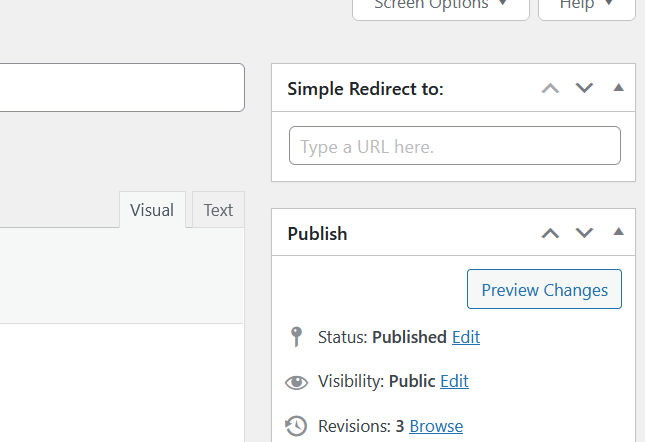
The plugin metabox with the Classic Editor
screenshot-1.png

The plugin metabox with the Gutenberg Editor
screenshot-2.png
安装
- Upload
simple-post-redirectto the/wp-content/plugins/directory. - Activate the plugin through the ‘Plugins’ menu in WordPress.
- Edit any post or page and add the destination URL to the metabox.
评价


贡献者及开发者

更新日志
1.8.1
- Fix: Enqueue block editor assets only within the editor (
enqueue_block_editor_assets) to prevent editor CSS from loading on frontend pages. - Fix: Add self-redirect loop protection to prevent redirects from targeting the post’s own permalink or the current requested URL.
- Fix: Delete redirect post meta when cleared instead of saving empty string values.
- Fix: Enhanced URL validation and sanitization for HTTP, HTTPS, and relative URLs while preserving query parameters and fragments.
- Fix: Prevent redirects during WordPress post previews and customizer previews.
- Feature: Add lightweight Redirect column to WordPress post, page, and custom post type list tables.
- Feature: Add Quick Edit support for redirect URLs on list tables.
- Feature: Add overview and feature comparison page under Settings > Simple Page Redirect.
- Compatibility: Tested up to WordPress 7.1.2.
1.8
- Maintenance update and block editor styling improvements.
1.7.4
- Compatibility checks and minor fixes.