跳至内容
WordPress.org

China 简体中文

  • 主题
  • 插件
  • 新闻
    • 文档
    • 论坛
  • 关于
  • 获取 WordPress
获取 WordPress
WordPress.org

Plugin Directory

Webknit Site Toolkit

  • 提交插件
  • 我的收藏
  • 登录
  • 提交插件
  • 我的收藏
  • 登录

Webknit Site Toolkit

作者:Webknit Digital
下载
  • 详情
  • 评价
  • 安装
  • 开发进展
支持

描述

Webknit Site Toolkit lets a site administrator:

  • Recolor the wp-admin sidebar, links, buttons, and form inputs, entered as hex codes or picked visually.
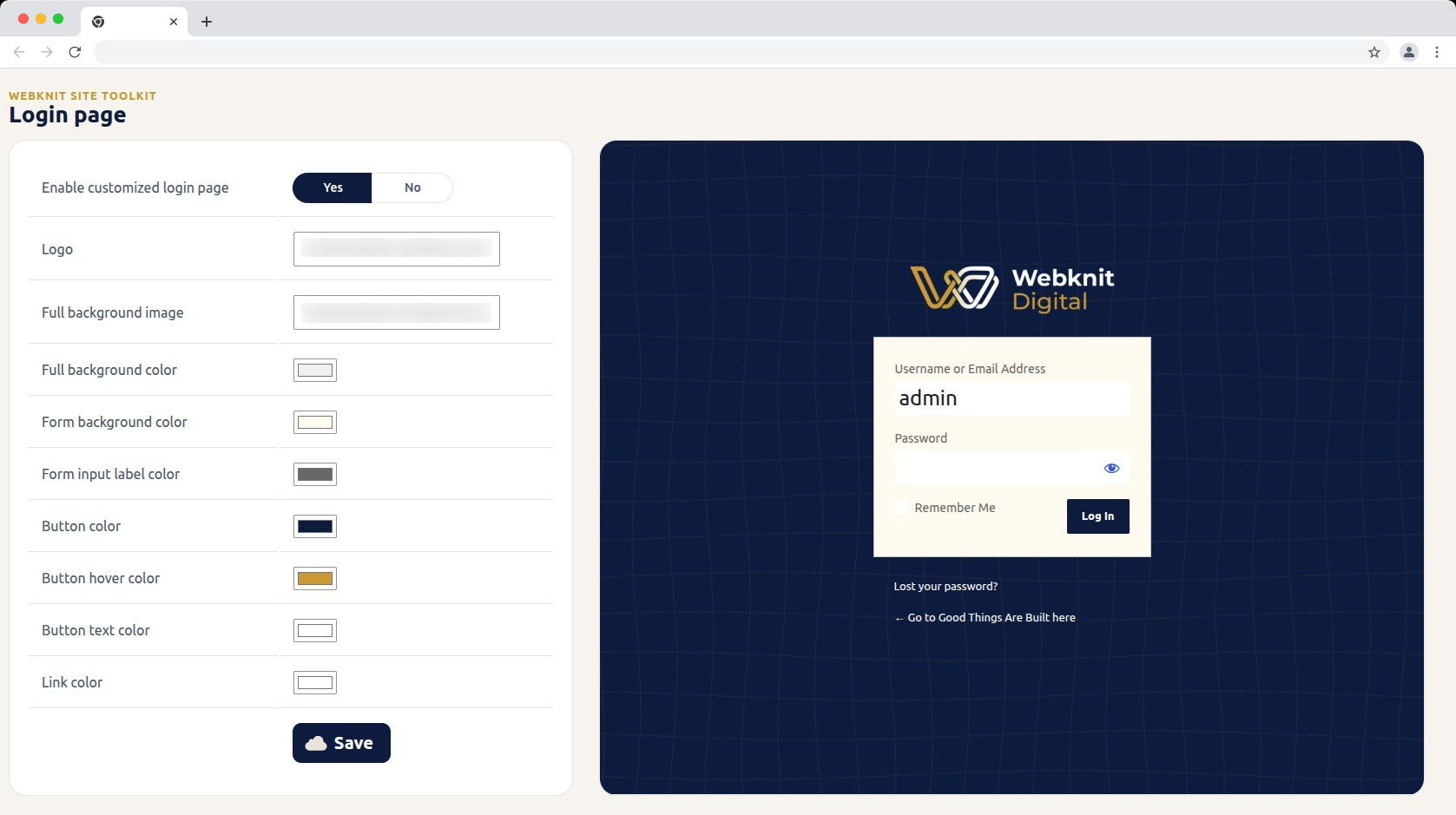
  • Customize the login screen: logo, full-page background image/color, form background/label colors, and button colors/text.
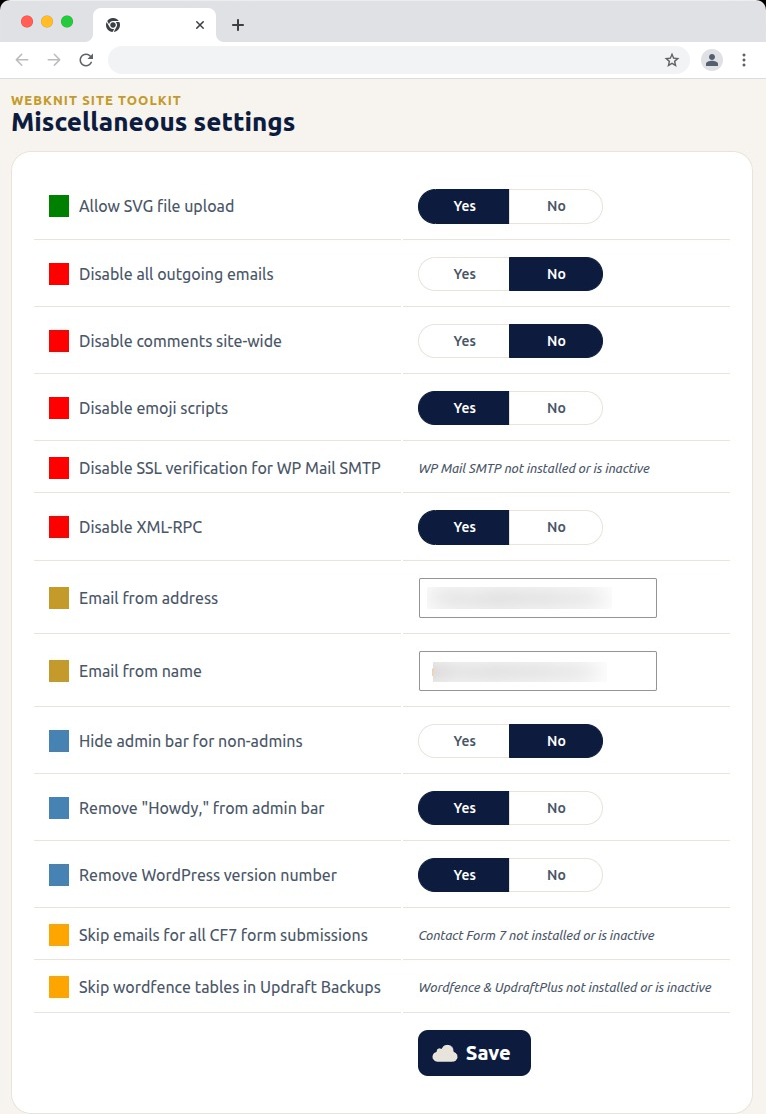
  • Toggle a set of miscellaneous settings: allow SVG uploads, disable SSL verification for WP Mail SMTP, disable outgoing emails, skip Wordfence tables during UpdraftPlus backups, skip Contact Form 7 submission emails, disable XML-RPC, remove the WordPress version number, disable emojis, hide the admin bar for non-admins, disable comments sitewide, remove “Howdy,” from the admin bar, and override the outgoing mail “from” name/address.

屏幕截图
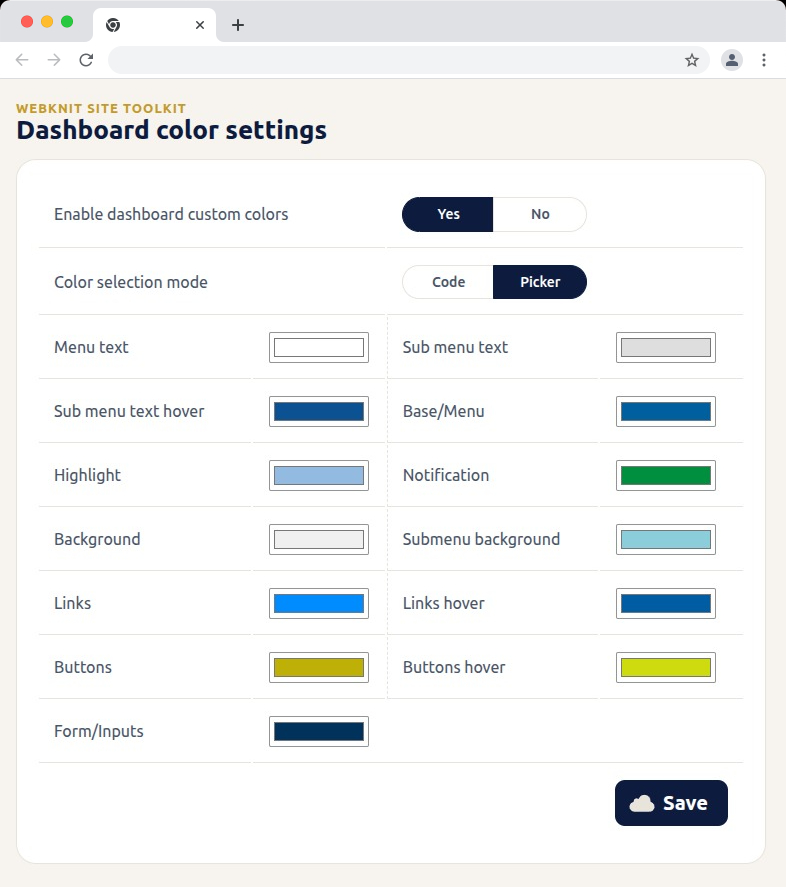
Dashboard color settings — recolor the wp-admin sidebar, links, buttons, and form inputs with hex codes or a visual picker.
Login page — customize the logo, background, form colors, and button styling, with a live preview alongside the settings.
Miscellaneous settings — toggle SVG uploads, outgoing email, comments, XML-RPC, and more; toggles for a plugin that isn't installed or active show a status message instead of a Yes/No choice.
Miscellaneous settings — toggle SVG uploads, outgoing email, comments, XML-RPC, and more; toggles for a plugin that isn’t installed or active show a status message instead of a Yes/No choice.

安装

  1. Upload the plugin files to /wp-content/plugins/webknit-site-toolkit, or install through the WordPress plugins screen directly.
  2. Activate the plugin through the “Plugins” screen in WordPress.
  3. Use the “Site Toolkit” menu in wp-admin to configure dashboard colors, the login page, and miscellaneous settings.

常见问题

Why does one of the Misc. settings toggles show a message instead of Yes/No?

That setting acts on another plugin (WP Mail SMTP, Contact Form 7, or Wordfence + UpdraftPlus) that isn’t currently installed or active, so the toggle would have no effect. The message replaces the toggle until that plugin is active; your previously saved choice is kept and reappears once it is.

I don’t see the “Site Toolkit” menu in wp-admin.

Access requires the manage_options capability, which by default only Administrators have.

I changed a color or setting and saved, but the site still looks the same.

Generated CSS is served with a cache-busting version, but browsers can still hold an old copy. Hard-refresh the page (Ctrl+Shift+R / Cmd+Shift+R) and confirm the save actually completed.

Where are the generated CSS files stored?

In wp-content/uploads/webknit-site-toolkit/. That directory must be writable by the web server, or dashboard/login color changes won’t apply.

评价

此插件暂无评价。

贡献者及开发者

「Webknit Site Toolkit」是开源软件。 以下人员对此插件做出了贡献。

贡献者
  • Webknit Digital

帮助将「Webknit Site Toolkit」翻译成简体中文。

对开发感兴趣吗?

您可以浏览代码,查看SVN仓库,或通过RSS订阅开发日志。

更新日志

1.0.0

  • Initial release.

额外信息

  • 版本 1.0.0
  • 最后更新:3 周前
  • 活跃安装数量 不到10
  • WordPress 版本 6.0 或更高版本
  • 已测试的最高版本为 7.1.1
  • PHP 版本 7.4 或更高版本
  • 语言
    English (US)
  • 标签
    admincolorsdashboardloginsettings
  • 高级视图

评级

尚未提交反馈。

您的评价

查看全部评论

贡献者

  • Webknit Digital

支持

有话要说吗?是否需要帮助?

查看支持论坛

  • 关于
  • 新闻
  • 主机
  • 隐私
  • 陈列窗
  • 主题
  • 插件
  • 区块样板
  • 学习
  • 支持
  • 开发者
  • WordPress.tv ↗︎
  • 参与
  • 活动
  • 捐赠 ↗
  • 周边商品 ↗
  • WordPress.com ↗
  • Matt ↗
  • bbPress ↗
  • BuddyPress ↗
WordPress.org
WordPress.org

China 简体中文

  • 关注我们的 X(原 Twitter)账号
  • 访问我们的 Bluesky 账号
  • 关注我们的 Mastodon 账号
  • 访问我们的 Threads 账号
  • 访问我们的 Facebook 公共主页
  • 关注我们的 Instagram 账号
  • 关注我们的 LinkedIn 主页
  • 访问我们的 TikTok 账号
  • 访问我们的 YouTube 频道
  • 访问我们的 Tumblr 账号
代码如诗
The WordPress® trademark is the intellectual property of the WordPress Foundation.