
描述
WP Category Dropdown plugin displays parent and child categories in a dropdown. You can select the parent category and display a dropdown for the child categories of the selected parent. If the selected parent category does not have a child category, you will be automatically directed to the category page.
You can use the shortcode or the widget to display the dropdown categories.
You can learn more at gcsdesign.com/wp_category_dropdown
屏幕截图

The dropdown widget 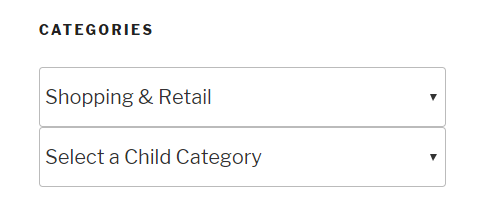
Dropdown widget display on the front end
区块
该插件提供了 1 个区块.
- WP Category Dropdown
安装
Using The WordPress Dashboard
- Navigate to the \’Add New\’ in the plugins dashboard
- Search for \’wp category dropdown\’
- Click \’Install Now\’
- Activate the plugin on the Plugin dashboard
Uploading in WordPress Dashboard
- Navigate to the \’Add New\’ in the plugins dashboard
- Navigate to the \’Upload\’ area
- Select
wp-category-dropdown.zipfrom your computer - Click \’Install Now\’
- Activate the plugin in the Plugin dashboard
Using FTP
- Download
wp-category-dropdown.zip - Extract the
wp-category-dropdowndirectory to your computer - Upload the
wp-category-dropdowndirectory to the/wp-content/plugins/directory - Activate the plugin in the Plugin dashboard
常见问题
-
Does the dropdown work with custom taxonomies?
-
Yes! It works with custom taxonomies.
评价

2023 年 6 月 14 日
1 回复
WordPress 6.22BeaverBuilder Pro 2.7.0.5
I’ve spent a considerable amount of time trying out different plugins that will give me a category dropdown with the option to choose the categories for display, that would also work with BeaverBuilder / Beaver Themer. This one does the trick! It’s better than BB’s own Categories Widget, and very stable. Great work!

2021 年 9 月 19 日
I used it on a big project of mine with Woocommerce categories. It works perfectly, it only needs an option for multiple childs selection. Hope it will be added with an update.

2019 年 11 月 11 日
Perfect plugin for search. Shows woocommerce parent and sub product category accurately.
Great customer service as well.
贡献者及开发者

更新日志
1.9
- FIxed the Cross-Site Scripting issue caused by the align parameter in the block
- Changed the name of the plugin to remove the ‘WP’ from the name
1.8
- Fixed the issue of default text going to 404 page
1.7
- Updated to work with WP 6.0
1.6
- Multiple dropdowns can be added on the same page
- The hide empty categories and the show count options now work for both parent and child category dropdowns
1.5
- Added align support to the category dropdown block
1.4
- Categories can be excluded from the dropdown
1.3
- Added a block to display the parent and child category dropdowns
1.2
- The plugin works with the custom category base in permalinks settings
1.1
- Fixed the issue of sub categories not showing up properly
1.0
- First release