
描述
Persistent Login keeps users logged into your website, limits the number of active logins allowed at one time and alerts users of new devices logging into their account.
Persistent Login: Keep wordpress users logged in forever
Persistent Login keeps users logged into your website unless they explicitly choose to log-out. It allows you to limit the number of active logins each user can have, and it alerts users of logins from new devices.
Persistent Login requires little set-up, just install and save your users time by keeping them logged into your website securely, avoiding the annoyance of forgetting usernames & passwords.
For added security, users can visit their Profile page in the WP Admin area to see how many sessions they have, what device was used and when they were last active. The user can choose to end any session with the click of a button.
Persistent Login
- Selects the ‘Remember Me’ box by default.
- If left checked, users will be kept logged in for 1 year
- Each time a user revisits your website, their login is extended to 1 year again
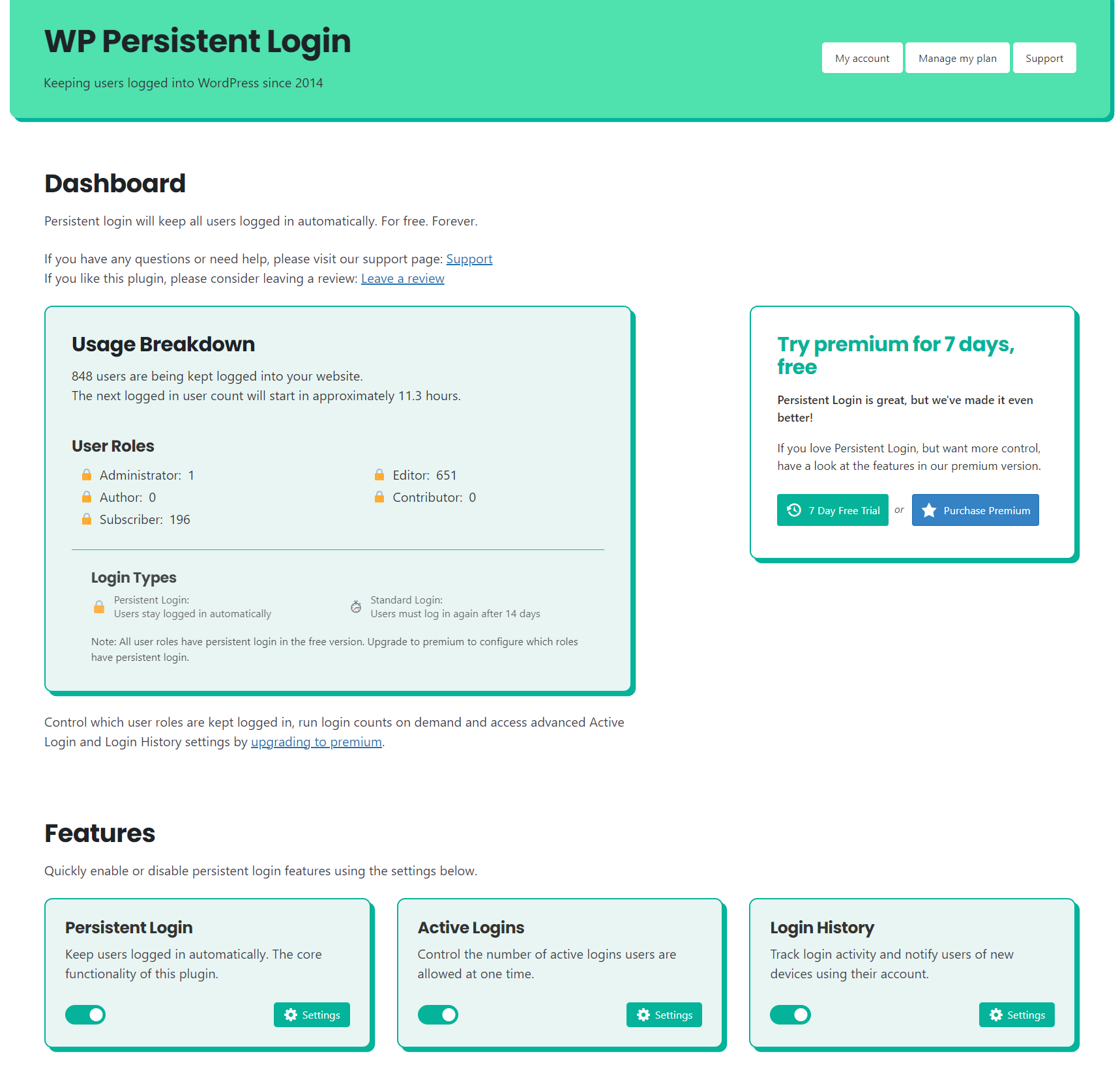
- Dashboard stats show you how many users are being kept logged in
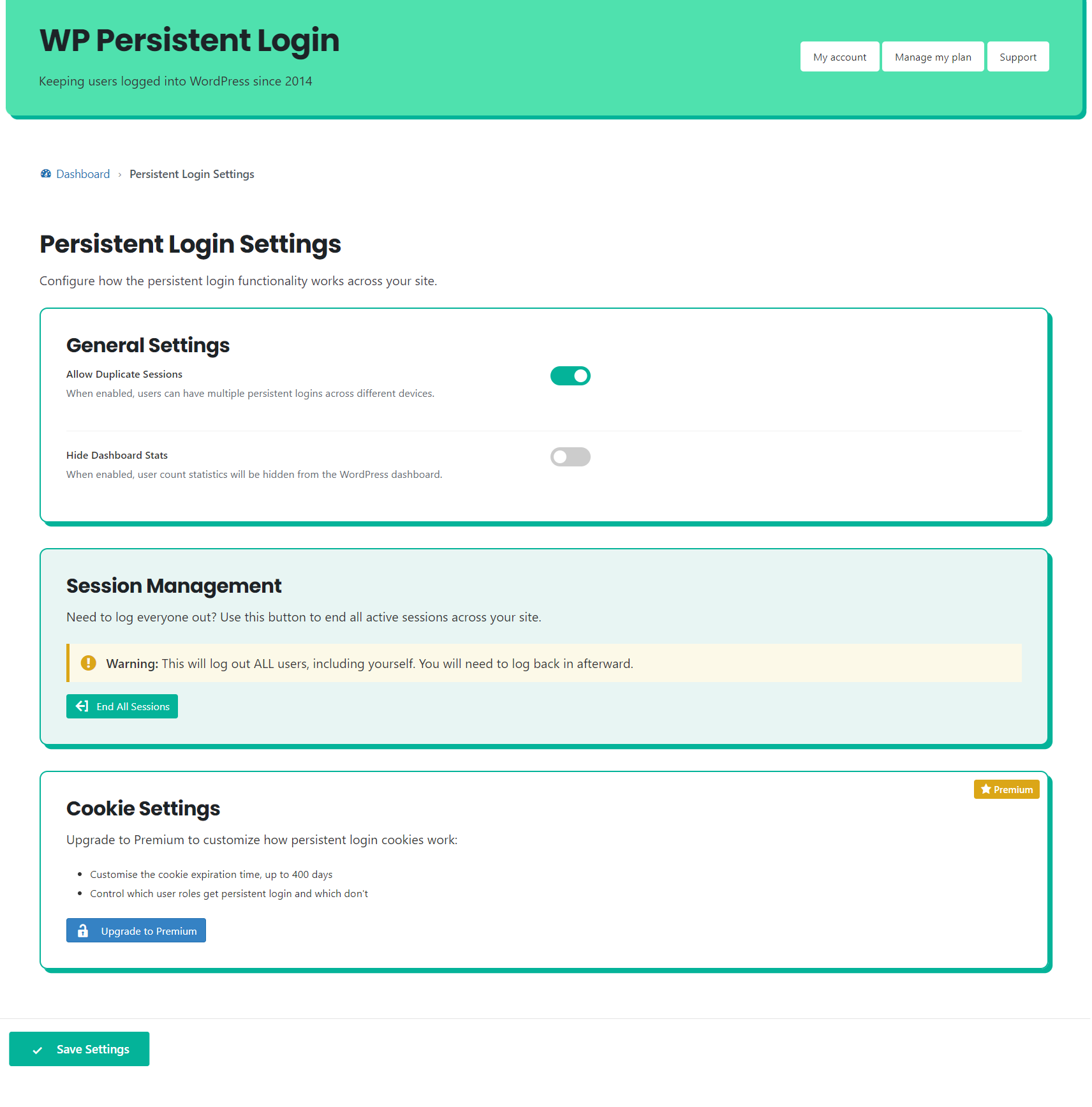
- Force log-out all users with the click of a button
- Users can manage their active sessions from the Profile page in the admin area
- Support for common plugins out of the box
- Secure, fast and simple to use!
Active Logins
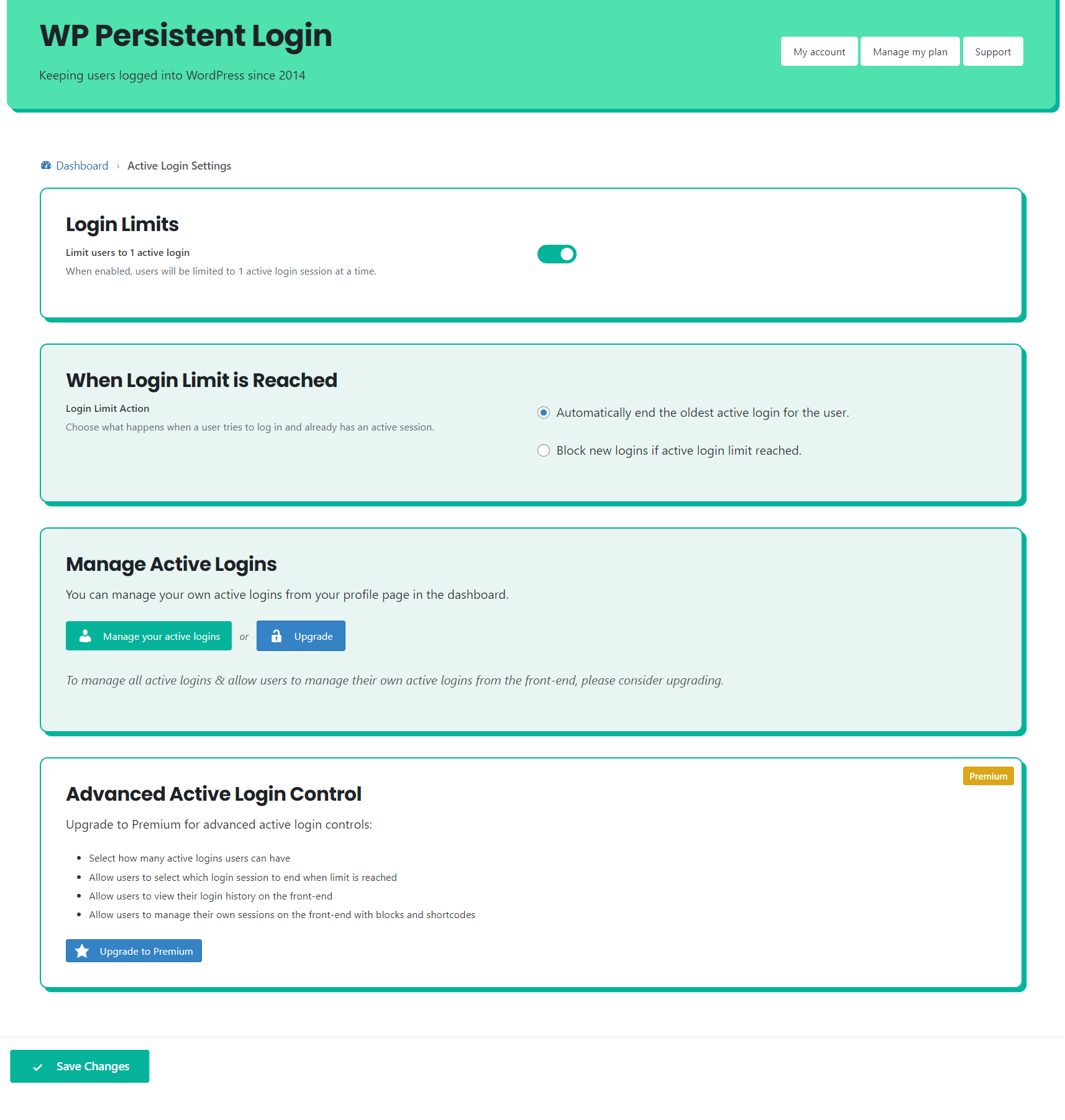
- Option to limit the number of active logins to 1 per user
- New logins can be blocked, or the users oldest login ended automatically
- Manage your own active logins from your Profile page in WP Admin
- Option to hide the Active Logins section from the WP Admin profile page
Login History
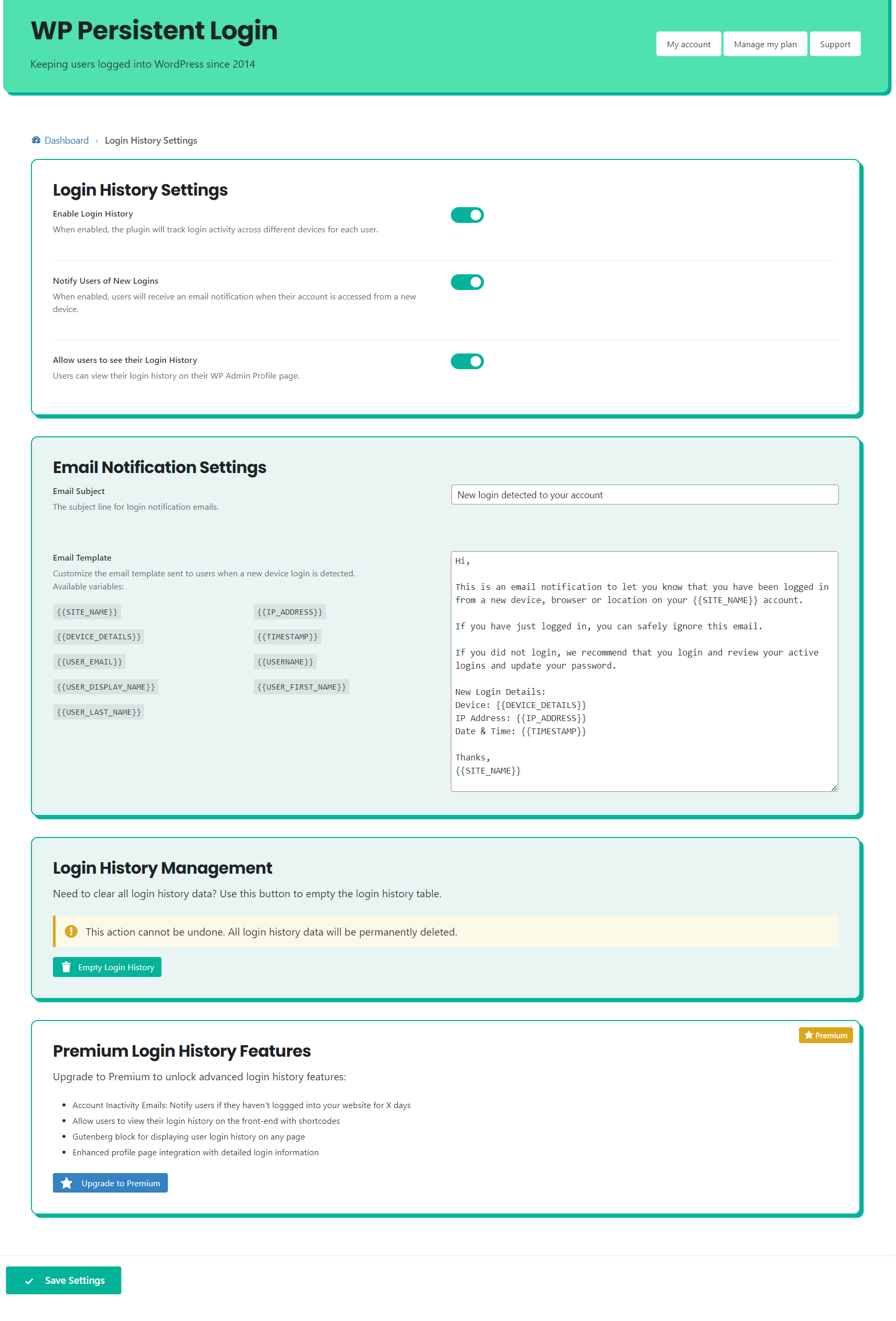
- Notify users of logins from new devices for improved security
- Set your own email notification message that is sent to users
- Allow users to see their login history from their Profile page in WP Admin
Top Tip
Once the plugin is installed, click the End all Sessions button from the Persistent Login settings page to encourage users to login again and be kept logged in forever!
Note
This plugin honours the ‘Remember Me’ checkbox. It is checked by default, but if it is unchecked the user won’t be remembered.
Premium Version
There is a premium version of the plugin for those who want more control. Visit persistentlogin.com to learn more.
The premium plan offers the following features:
Premium Persistent Login Features
- Hide the ‘Remember Me’ checkbox, so that users are always remembered
- Manage which user roles have persistent login
- Set how long users are kept logged in for (up to 400 days)
- Session management for users: Users can see all logins with Block Editor and Shortcode support
- Session management for admins: End any users session from the admin area quickly and easily
- Priority Support direct from within WP admin
Premium Active Login Features
- Control which roles have active login limits applied
- Select exactly how many active logins users are allowed
- When the limit is reached: Auto-logout oldest login, let the user decide which session to end, or block the login.
Premium Login History Features
- Allow users to see their login history on the front-end with Block and Shortcode support.
- Account inavctivity emails: Notify users after a period of time without logging in.
Stop users being logged out of WordPress
Stop users being logged out of WordPress with Persistent Login plugin. Ensure extended login sessions, reduce frustration for administrators and visitors. By keeping users active, Persistent Login improves user experience, lowers bounce rates, and prevents disruptions.
This plugin integrates seamlessly with WordPress to optimise session management without compromising security. Configure your preferences and let the plugin handle everything. You can customise durations for persistent logins and minimise repeated authentication prompts.
Ultimately, this tool streamlines WordPress operations, ensures convenience, and provides peace of mind. Stop users being logged out of WordPress by installing today and gain uninterrupted access to your website.
屏幕截图
安装
- Download and install the plugin onto your WordPress website
- Activate the plugin
- Click the End all Sessions button on the Persistent Login settings page to force all users to login again
常见问题
-
How long will it keep users logged in?
-
If a user visits your website more than once a year, they will be kept logged in forever.
The only way for them to be logged out is if they clear their cookies, click logout, or don’t return within 1 year.
-
What is an active login?
-
Sometimes called concurrent logins, this is the number of devices or browsers one user is logged into. If you limit the number of active logins, users can only be logged into your website once.
If a user logs in to a second device, the first device will automatically be logged out.
-
The Remember Me box isn’t checked
-
If the Remember Me box on a login form isn’t checked by default, please open a support request on the Plugin Directory.
It is most likely a conflict with another plugin or theme, which can usually be fixed.
-
Can I hide the Remember Me box?
-
On the free version, no. You can write your own CSS or JavaScript to remove the Remember Me box from a page if you’d like. You will need FTP access to achieve this.
The premium version has a simple setting to hide the Remember Me box by default, and it also works with supported plugins like Theme My Login!
-
I don’t stay logged in on multiple devices
-
If you’re not being kept logged in on multiple devices, try turning on ‘Allow duplicate sessions’ from the settings page.
This is most common if you’re trying to login to two machines with the same operating system and browser on the same network.
-
Can I limit the number of logins each user is allowed? Like Netflix?
-
Yes, you can now control active logins with Persistent Login. Just visit the Active Logins tab on the settings page and enable active logins.
The premium version allows you to customise the number of active logins, which user roles they apply to and whether users can select which logins they end when they reach the limit.
-
Is it compatible with WordPress Multisite
-
No. Persistent login isn’t compatible with multisite installations at the moment.
-
Is it secure?
-
You bet!
Persistent Login uses core WordPress methods to ensure that we’re logging in the right user.
-
Support
-
Support for a bug can be requested from the WordPress Plugin Directory. Premium users can request support directly from the WP Admin area.
-
Is it free?
-
Yes. The free forever version is and always will be free. All of your users will be kept logged-in when they revisit your website.
A premium version of the plugin is available if you want to:
* Manage which user roles have persistent login and active login limits
* Set how long users are kept logged in for (up to 1 year)
* Control the number of active logins users are allowed to have
* Allow users to end specific sessions when they reach their maximum login limit
* Allows you to hide the ‘Remember Me’ checkbox, so that users are always remembered
* Session management for users: Users can see all logins. Block Editor and Shortcode support
* Session management for admins: End any users session from the admin area quickly and easily
* Free localhost licence
* All future features and updates (with a valid licence)
* Priority Support direct from within WP adminVisit persistentlogin.com to learn more.
评价


贡献者及开发者


更新日志
3.1.3
- Fix: Improvement to active login limit detection, resolves issue with inactive sessions remaining in the database.
3.1.2
- Fix: Fixed security check failed message on some premium installations on dashboard feature toggle
3.1.1
- Security update: Security related changes. It is recommended for all users.
- Improvement: Detecting logged in user count transient deletion and restarting count.
- Fix: Fixed stop user count button not working.
3.1.0
- Improvement: Updated device fingerprinting to much more reliable solution. Implementing with Persistent Login, Active Login and Login History features. This helps reduce the number of duplicate sessions.
- Improvement: Retrofitting new device fingerprinting to existing sessions for a seamless transition.
- Fix (premium): Adding missing ‘end all sessions’ button from Persistent Login Premium.
- Updated Freemius SDK.
3.0.5
- Feature: Added a toggle to hide the Active Logins section from the WP Admin profile page.
- Fix: Added missing
breakstatement after the ‘manual’ case in the login limit logic, preventing unintended fall-through to the ‘block’ case. - Fix: The “Reject new login” (block) option is now correctly enforced for logins via Nextend Social Login.
- Fix: Active Login roles can now be fully cleared — previously, unchecking all roles on the settings page would not save an empty selection.
- Fix: Maximum Active Logins value is now properly sanitised on save, ensuring it is always stored as a positive integer.
- Fix: The “Redirect Page” setting for ‘manual’ mode now falls back to the home URL instead of producing an invalid redirect when no page has been configured.
- Improvement: The “Redirect Settings” section on the Active Login Settings page is now only visible when the “Let user select which session to end” option is chosen, matching the original conditional UI behaviour.
- Fix: Avoids duplicate sessions being stored on the website cluttering the user profile page.
- Improvement: Upgrade routine now performs a one-time cleanup that removes old duplicate same-device sessions across existing installs.
3.0.4
- Fix: User count role status now reflects the saved Persistent Login role settings in premium (including when no roles are selected).
- Fix: Premium Active Logins “When Limit is Reached” setting now saves correctly from the dashboard settings screen.
- Improvement: On fresh install, persistent login roles are defaulted to all available roles for consistent defaults in both free and premium.
- Improvement: Updated upgrade routine to avoid changing existing saved role settings.
3.0.3
- Feature: Added ‘Stop Count’ button to both free and premium dashboards to allow administrators to stop a running user count process.
- Fix: Resolved issue where user count could get stuck in ‘Counting…’ state if a previous count was interrupted.
- Fix: Fixed Login History settings not saving correctly when toggled from the dashboard.
- Improvement: User count handles WP_CRON_LOCK_TIMEOUT by running count at a longer interval to avoid conflicts.
- Updating Freemius SDK to latest version.
3.0.2
- Fix: Resolved feature toggle inconsistency where some users upgrading to 3.0.0+ would see features as “enabled” on the dashboard but “disabled” on settings pages.
- Fix: Fixed AJAX error “failed to update feature setting” when toggling features on the dashboard.
- Added notification to settings page when features are toggled from the dashboard.
3.0.1
- Removed all reference of ‘WP’ and ‘WordPress’ from the plugin due to legal dispute.
- Fixed 7 day free trial link on dashboard and settings page.
3.0.0
- Brand new plugin UI
- Improved logged in user count to update without page refresh
- Improved logged in user count to better handle missed updates automatically
- Improved pre-checking remember me boxes on login forms
- Improved hiding of remember me labels on login forms
- New filter to hide your own remember me boxes to support any plugin
- Updated Freemius SDK to latest version and integrated with Composer
- Numerous performance and stability improvements
- Premium: Added on-demand logged in user counts
- Premium: New filter to hide your own remember me labels to support any plugin
- Premium: New Block and Shortcode to show users their login history on the front end
- Premium: Enhanced inactivity email notifications to only send at configured intervals (e.g. every 60 days)
2.1.4
- Fix: Fixed issue with DISBALE_WP_CRON constant check causing an error on the settings page.
2.1.3
- Namespacing onMailError function to avoid conflicts with other plugins. Renamed to wppl_on_mail_error_log.
- Adding check for WP Cron to ensure it is running.
- Updating Freemius SDK to latest version.
2.1.2
- Feature: Added option to set a subject for the login history email notification.
- Premium Feature (beta): Added account inavctivity email notifications for users that haven’t logged in for a set period of time.
- Updating Freemius SDK to latest version.
2.1.1
- Updating Freemius SDK to latest version.
- Updating browser detection library.
- Fix: Removed undefined array index notice on Profile page and Manage Logins block.
2.1.0
- New Feature: Login History – Notify users of logins from new devices for improved security
- PHP 8.2 compatibility (removing warnings)
- Updating Freemius SDK to latest version
2.0.0
- Improvement: Entirely re-written plugin in OOP format for improved speed and reliability
- Improvement: Moved Peresistent Login settings to the Users menu
- Improvement: Greatly improved WP Admin interface
- New Feature: Added Active Logins to restrict the number of concurrent logins to one per user
- New Feature: Improved WooCommerce Support – persistent login is enabled by default when users register
- Fix: Security update from dependancy
- Premium Updates:
- Control the number of active logins allowed
- Control which user roles the active logins limit applies to
- Control the logic when users reach the active login limit – auto logout a session or allow the user to select which logins to end
- New Block: Maximum Logins Control lets your users decide which logins to end when they reach their limit
1.3.0
- Major update: Removed the dependancy of an additional database table & re-writing of plugin
- Big improvements to stability and performance
- New premium feature: Front end session management with Gutenberg & Shortcode support
1.2.0
- New Premium Feature: Allow admin to set maximum time persistent login lasts before the user has to login again
- New Premium Feature: Allow admin to end all persistent login sessions from the Dashboard
- New Premium Feature: Added support for “WooCommerce – Social Login” plugin
- Added usage figures to admin area: Allows admins to see how many users are logged in using Persistent Login
- Fixed issue with cookies not being set across the entire domain
- Fixed issue with removing individual users information from the database when failing to login correctly
1.1.0
- Plugin re-launch
- Updated logic to improve security
- Uninstall features to remove database table and all data correctly
- Freemium model adopted
1.0.0
- Persistent Login Plugin launch