
描述
Xtreme Forms is a modern, drag-and-drop contact form and lead capture plugin for WordPress. Build any form you need — contact forms, quote requests, event registrations, newsletter signups, multi-step lead qualification — then capture every submission into a built-in lead inbox, route email notifications to the right person, fire webhooks to your CRM, and track conversions on a clean analytics dashboard.
No upsells. No “Pro-only” features hidden inside the free download. Every feature listed below ships in the free plugin and is fully functional out of the box. The optional Pro add-on (sold separately at xtremeplugins.com) only adds advanced routing rules, retry queues, and extended analytics — it never gates or limits any feature you see on this page.
Useful Links
- Plugin homepage: https://xtremeplugins.com/plugins/xtreme-forms — overview, screenshots, live demo
- Features: https://xtremeplugins.com/plugins/xtreme-forms#features — full feature breakdown with comparison vs other form plugins
- Pricing: https://xtremeplugins.com/plugins/xtreme-forms/pricing — Pro add-on plans (free plugin stays free forever)
- Support: the WordPress.org support forum for free-version questions; Pro subscribers get priority support at xtremeplugins.com
- Source / issues: GitHub
Why Xtreme Forms?
If you’ve used the other popular form plugins (WPForms, Contact Form 7, Gravity Forms, Ninja Forms, Formidable Forms) you already know the trade-offs: free versions lock the features you actually need behind a Pro upgrade, the lighter ones don’t manage your leads after the email is sent, and the heavier ones drag down page speed with bloated assets. Xtreme Forms is built differently:
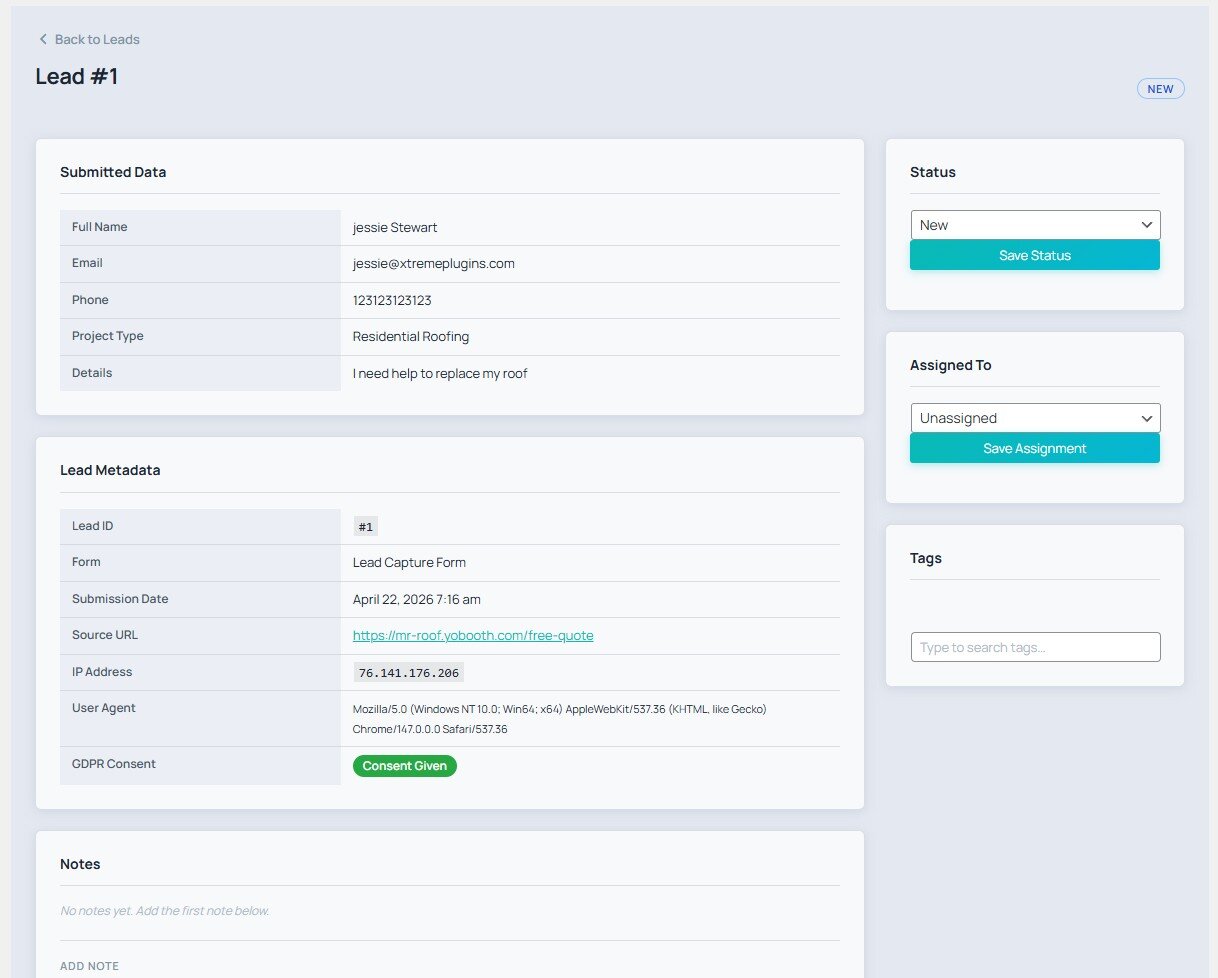
- Real lead management, not just form-to-email. Every submission lands in a searchable, filterable inbox with a full status workflow (new read contacted converted), per-lead notes, tags, assignment to team members, and an append-only audit log. Treat your leads like a pipeline, not like inbox clutter.
- Everything in the free download is actually free. Drag-and-drop builder, conditional logic, webhooks, analytics, GDPR tools, multisite, audit log, JSON import/export — no popup nag screens, no “upgrade to Pro” overlay on settings pages.
- Lightweight on the page. No jQuery dependency on the frontend, no third-party font request, no external service call unless you explicitly enable and configure one.
- Modern WordPress stack. Tested up to WordPress 7.0, requires PHP 8.1+, ships a native Gutenberg block alongside the classic shortcode, and works inside any block-theme template / Elementor / Bricks / Beaver Builder widget that accepts shortcodes.
- WordPress.org-compliant. Fully GPL, no obfuscated code, no telemetry, no auto-update side-channels, and every external-service touchpoint is disclosed below.
A solid free alternative to WPForms for site owners who want lead management built in, not an afterthought.
Built-in Form Templates
Skip the blank canvas. Xtreme Forms ships ready-to-go templates for the forms you actually need:
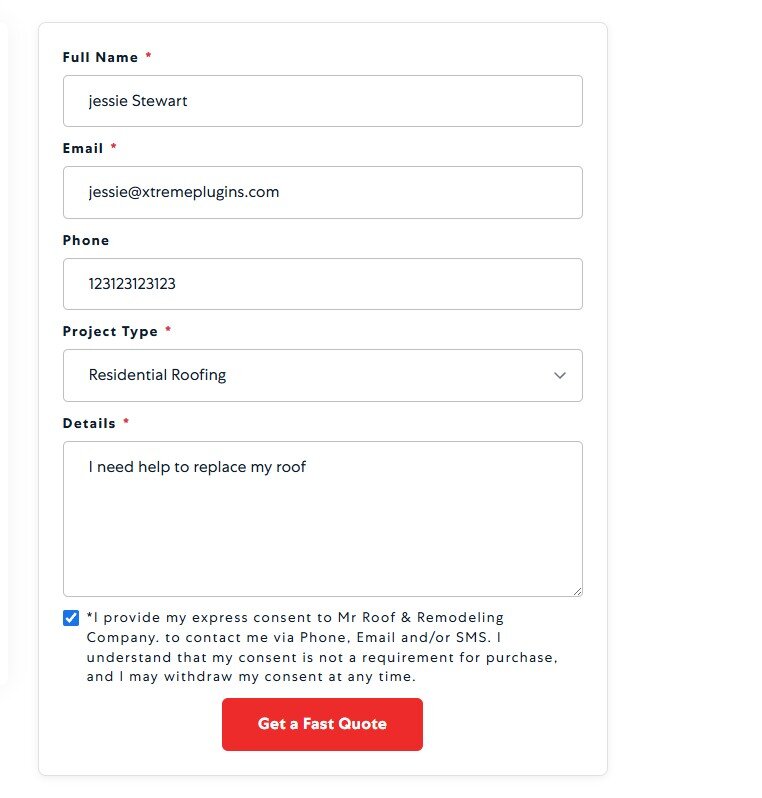
- Simple Contact Form — name, email, message — the classic WordPress contact form
- Quote Request Form — name, email, phone, project description, budget range
- Event Registration Form — full name, email, phone, company, attendee count, date picker
- Newsletter Signup Form — name, email, GDPR consent
- Multi-step Lead Qualification Form — built using the conditional-logic engine
- Booking / appointment request form — fully customizable in the drag-and-drop form builder
Works With Your Page Builder
The [xtreme_forms id="X"] shortcode and the native Gutenberg block work inside every WordPress page builder and block theme:
- Elementor — drop the shortcode in the Shortcode widget, or use the Gutenberg block in Elementor Pro’s container element
- Bricks Builder — works via shortcode element
- Beaver Builder — works via the Text/HTML or Shortcode module
- Divi — works in any Text or Code module via shortcode
- Oxygen Builder — works via shortcode element
- WPBakery Page Builder — works via the Raw HTML / Shortcode element
- Block-based themes (Twenty Twenty-Four, Twenty Twenty-Five, Frost, Blockbase) — native Gutenberg block with live preview
- Classic editor — paste the shortcode anywhere
Switching From Another WordPress Form Plugin?
If you’re moving away from a heavier or upsell-driven WordPress contact form plugin — WPForms, Contact Form 7, Gravity Forms, Ninja Forms, Formidable Forms, Forminator, Fluent Forms, Everest Forms, or Happyforms — Xtreme Forms makes the transition straightforward:
- Rebuild forms in minutes using the drag-and-drop builder + the six ready-made templates above
- Bring existing leads with you via the JSON import endpoint — map your old plugin’s CSV/JSON export to the Xtreme Forms lead schema
- Keep your email recipients and routing rules — Xtreme Forms’s email-routing engine accepts the same rule structure most form plugins use (field value recipient address)
- Shortcode parity — the
[xtreme_forms id="X"]shortcode drops into any page that was using[wpforms id="X"],[contact-form-7],[gravityform id="X"], etc., so you don’t have to touch every theme template - No vendor lock-in — your leads, forms, and audit log live in your own WordPress database, exportable as JSON at any time
Core Features (Free)
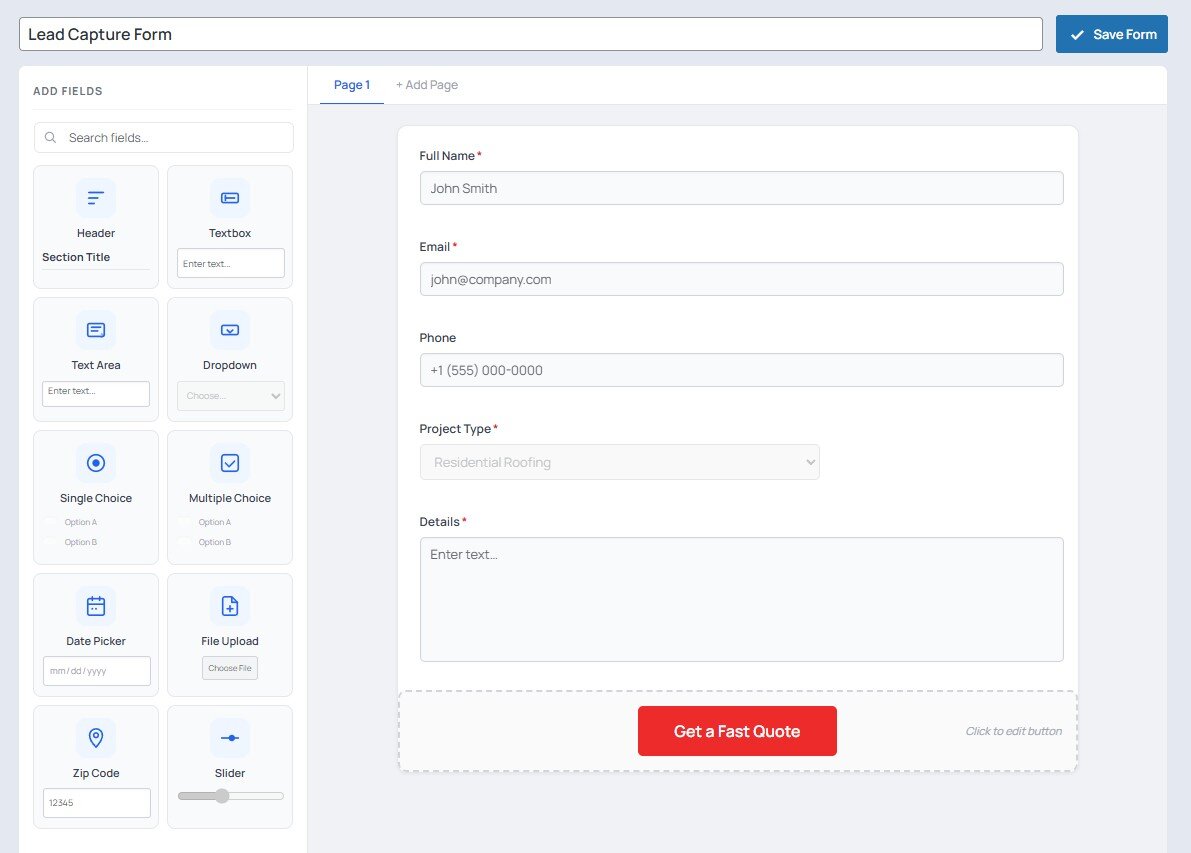
- Drag-and-drop Form Builder — text, email, phone, select, checkbox, radio, textarea, date, file, hidden fields with per-field conditional logic
- Lead Inbox — searchable, filterable lead list with status management (new, read, contacted, converted, archived, spam)
- Email Notifications — route notifications to different recipients based on form field values
- Auto-Responder — send a branded confirmation email to the lead on submission
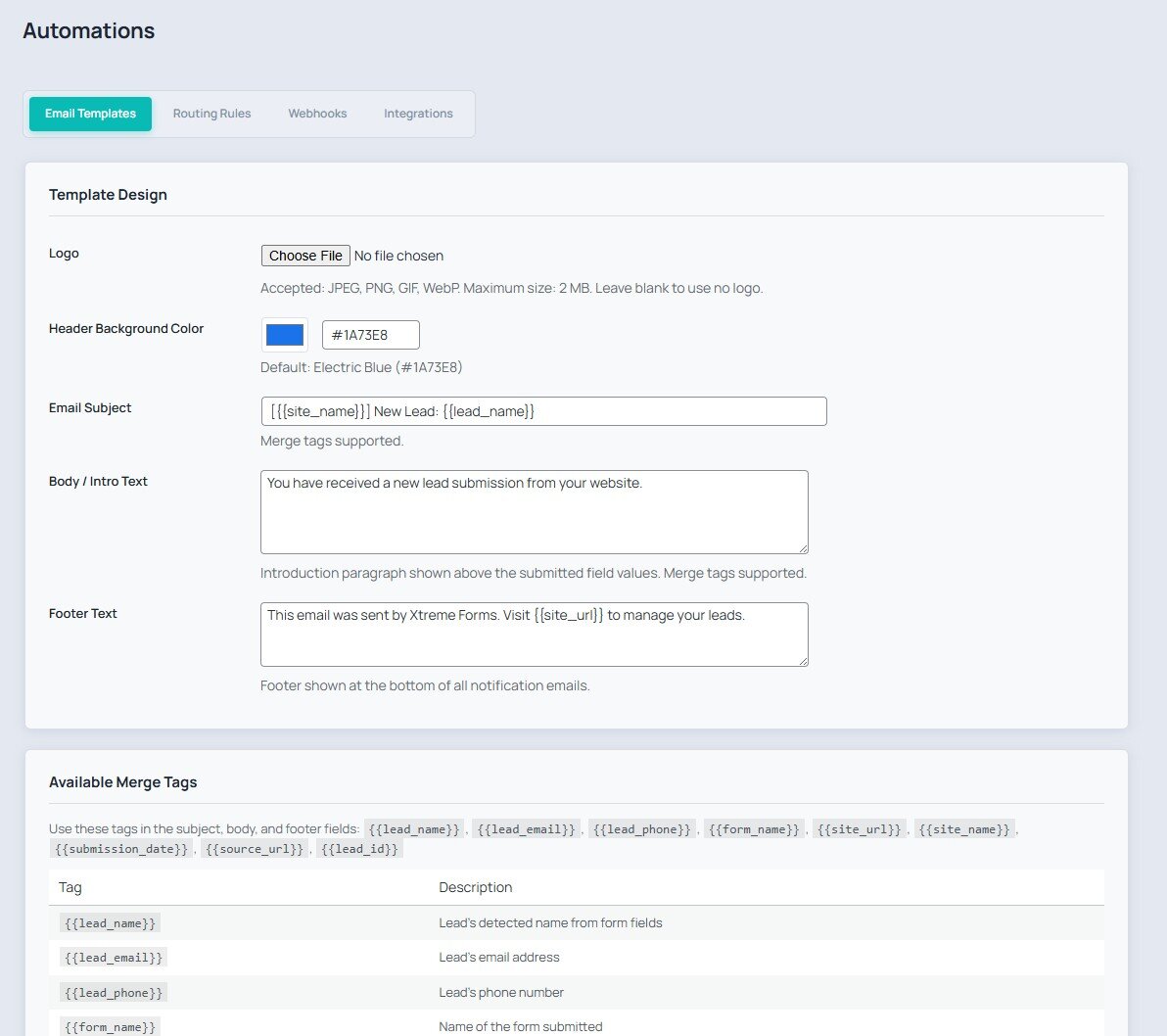
- Email Templates — reusable templates with merge tags ({{first_name}}, {{form_name}}, etc.)
- Webhooks — fire HTTP POST payloads to external URLs on lead capture with delivery logging
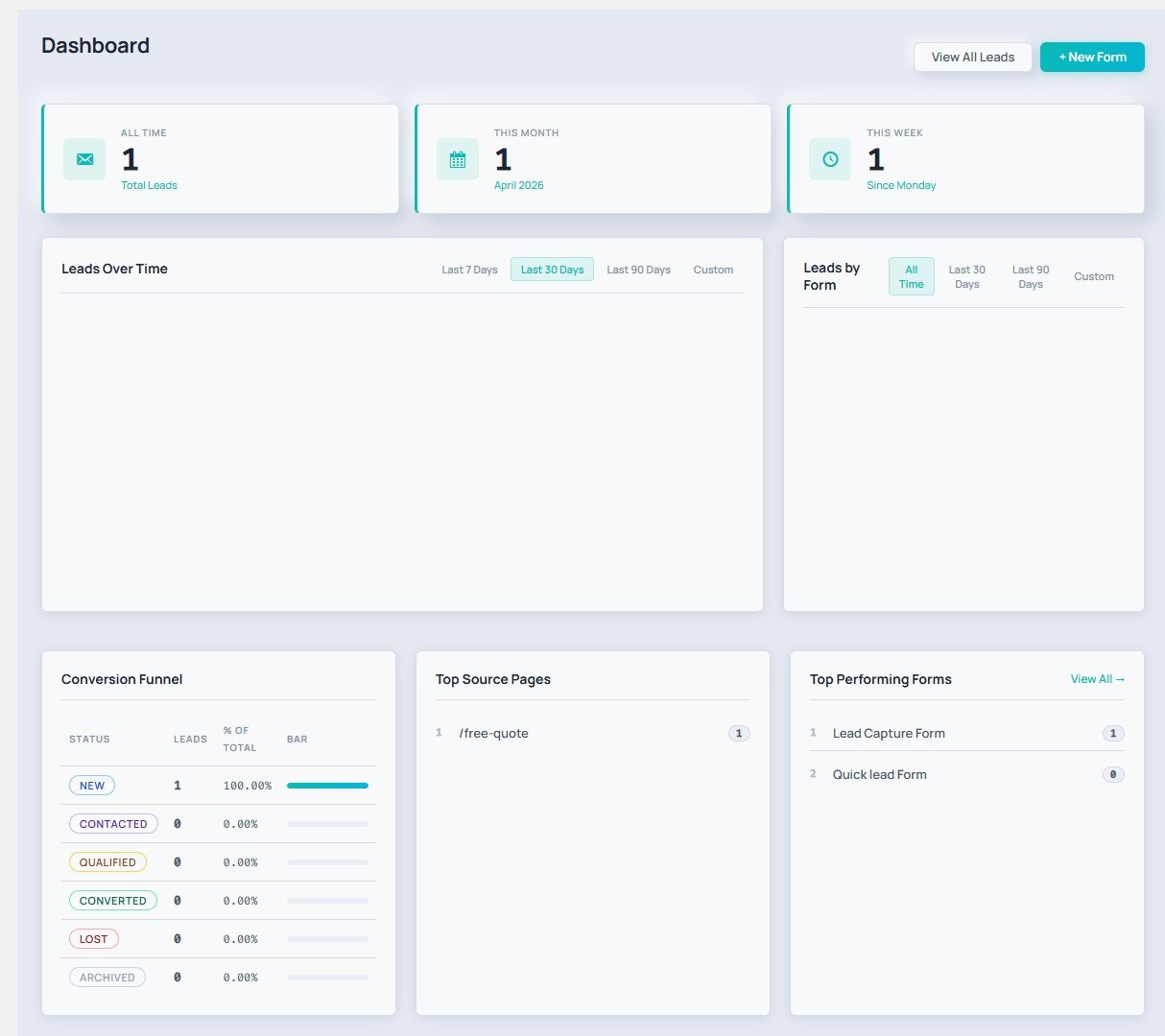
- Analytics Dashboard — submission trends, conversion rates, top forms, lead source breakdown
- UTM Tracking — automatically capture and store UTM parameters with each lead
- Duplicate Detection — configurable duplicate suppression by email/phone within a time window
- Spam Protection — honeypot, time-gate, reCAPTCHA v3, and keyword blocklist
- GDPR Tools — consent checkbox, right-to-erasure helper, configurable data retention (tools to support your own GDPR workflow; the plugin does not guarantee legal compliance)
- Activity Timeline — per-lead event history (submitted, emailed, status changes, notes)
- Notes — add internal notes to any lead
- Tags — tag and filter leads with custom labels
- Audit Log — append-only log of all admin actions
- Import / Export — full JSON round-trip export and import
- Multisite Support — per-site tables, network-aware activation
- Gutenberg Block — embed any form with the Xtreme Forms block (live editor preview)
- Shortcode —
[xtreme_forms id="X"]works everywhere
Optional Pro Add-On
An optional paid add-on is sold separately by the author. It is not required for any feature listed above and is not bundled with this plugin.
- Plugin page (overview + demo): xtremeplugins.com/plugins/xtreme-forms
- Full feature list: xtremeplugins.com/plugins/xtreme-forms#features
- Pricing & plans: xtremeplugins.com/plugins/xtreme-forms/pricing
What the Pro add-on adds on top of the free download:
- Priority routing rules with complex AND/OR conditions
- Webhook retry queue with exponential backoff
- Advanced analytics: cohort analysis, lead value tracking
- Priority email support from the developer
External services
Xtreme Forms is fully self-hosted by default. It only contacts third-party services when a site administrator explicitly enables and configures the corresponding feature. Each service below is opt-in: nothing is sent until you turn it on and provide credentials.
Google reCAPTCHA v3 (optional spam protection)
If you enable reCAPTCHA v3 in Xtreme Forms Settings Spam Protection and enter your site/secret keys, the public-facing form page loads the reCAPTCHA JavaScript from https://www.google.com/recaptcha/api.js, which executes in the visitor’s browser to generate a token. On submit, the plugin then sends a server-to-server request from your site to https://www.google.com/recaptcha/api/siteverify containing the token, your secret key, and the visitor’s IP address so Google can return a spam score.
Service provider: Google LLC.
Terms of service: https://policies.google.com/terms
Privacy policy: https://policies.google.com/privacy
reCAPTCHA-specific terms: https://www.google.com/recaptcha/about/
Cloudflare Turnstile (optional spam protection)
If you enable Cloudflare Turnstile in Xtreme Forms Settings Spam Protection and enter your site/secret keys, the public-facing form page loads the Turnstile widget from https://challenges.cloudflare.com/turnstile/v0/api.js. On submit, the plugin sends a server-to-server request from your site to https://challenges.cloudflare.com/turnstile/v0/siteverify containing the widget token, your secret key, and the visitor’s IP address so Cloudflare can validate the challenge.
Service provider: Cloudflare, Inc.
Terms of service: https://www.cloudflare.com/website-terms/
Privacy policy: https://www.cloudflare.com/privacypolicy/
Zoho CRM (optional integration)
If you enable the Zoho integration in Xtreme Forms Automations Integrations and enter your OAuth client ID, client secret, refresh token, and data-center region, then for every new lead capture the plugin makes two server-to-server requests from your site to Zoho:
- A token exchange request to
https://accounts.zoho.<tld>/oauth/v2/token(where<tld>iscom,eu,in,au, orjpbased on the region you select) containing your refresh token, client ID, and client secret. - A lead-create request to
https://www.zohoapis.<tld>/crm/v2/Leadscontaining the lead’s name, email address, phone number, and company name (only the fields that were submitted in the form).
Service provider: Zoho Corporation Pvt. Ltd.
Terms of service: https://www.zoho.com/terms.html
Privacy policy: https://www.zoho.com/privacy.html
HubSpot CRM (optional integration)
If you enable the HubSpot integration in Xtreme Forms Automations Integrations and enter a Private App access token, then for every new lead capture the plugin makes a server-to-server request from your site to https://api.hubapi.com/crm/v3/objects/contacts containing the lead’s email, first/last name, phone number, and company name (only the fields that were submitted in the form). When you click the Test button on the integrations page, the plugin also sends a single GET request to the same host to verify the token.
Service provider: HubSpot, Inc.
Terms of service: https://legal.hubspot.com/terms-of-service
Privacy policy: https://legal.hubspot.com/privacy-policy
Salesforce (optional integration)
If you enable the Salesforce integration in Xtreme Forms Automations Integrations and enter your consumer key, consumer secret, instance URL, and access token, then for every new lead capture the plugin makes a server-to-server request from your site to <your_instance_url>/services/data/v57.0/sobjects/Lead/ containing the lead’s last name, email, phone number, and company name (only the fields that were submitted in the form).
Service provider: Salesforce, Inc.
Terms of service: https://www.salesforce.com/company/legal/agreements/
Privacy policy: https://www.salesforce.com/company/privacy/
Pipedrive (optional integration)
If you enable the Pipedrive integration in Xtreme Forms Automations Integrations and enter an API token, then for every new lead capture the plugin makes two server-to-server requests from your site to https://api.pipedrive.com/v1/persons and https://api.pipedrive.com/v1/leads containing the lead’s name, email, and phone number (only the fields that were submitted in the form). The Test button sends one GET request to https://api.pipedrive.com/v1/users/me to verify the token.
Service provider: Pipedrive OÜ.
Terms of service: https://www.pipedrive.com/en/terms-of-service
Privacy policy: https://www.pipedrive.com/en/privacy
Webhooks (optional, user-defined destination)
If you create one or more webhooks in Xtreme Forms Automations Webhooks, the plugin will send the captured lead’s data as a JSON POST request to the URL(s) you configure for every new lead. These URLs are arbitrary endpoints that you (the site administrator) choose; the plugin itself is not affiliated with any particular webhook destination. Review the terms/privacy policy of whichever service you point your webhooks to.
Xtreme Plugins licensing API (optional, only for the paid Pro add-on)
The free Xtreme Forms plugin on WordPress.org is fully functional with no license required. A separately-sold Pro add-on is available from xtremeplugins.com; if (and only if) a site administrator chooses to buy it, the free plugin includes a “License” tab under Xtreme Forms Settings License that activates the Pro key.
The licensing API is only contacted when the administrator actively clicks a button on that tab:
- Clicking Activate sends a server-to-server
POSTfrom your site tohttps://xtremeplugins.com/api/v1/license/activatecontaining the license key the admin entered and your site URL (home_url()), so the licensing server can validate the key and bind a seat to this site. - Clicking Deactivate sends a server-to-server
POSTfrom your site tohttps://xtremeplugins.com/api/v1/license/deactivatecontaining the same two values, so the licensing server can release the seat.
No request is ever made on form submissions, page loads, or in the background — the endpoints are only hit on the two explicit button clicks above, and only after an administrator has typed in a license key. If you never use the License tab, the plugin never contacts xtremeplugins.com. The endpoint URLs can be overridden (for example to point at a self-hosted licensing server or a staging environment) via the xtremeforms_license_activate_url and xtremeforms_license_deactivate_url filters.
Service provider: XtremePlugins (xtremeplugins.com).
Terms of service: https://xtremeplugins.com/terms
Privacy policy: https://xtremeplugins.com/privacy
屏幕截图
区块
该插件提供了 1 个区块.
- Xtreme Forms Form Embed a lead capture form on any page, post, or Full Site Editing template.
安装
- Download
xtreme-forms.zip - In your WordPress admin go to Plugins Add New Upload Plugin
- Select the zip file and click Install Now
- Activate the plugin
- Go to Xtreme Forms Forms to build your first form
- Embed it with
[xtreme_forms id="X"]or the Gutenberg block
Alternatively, unzip the archive and upload the xtreme-forms folder to /wp-content/plugins/, then activate from the Plugins screen.
常见问题
-
Is Xtreme Forms really a free WordPress contact form plugin?
-
Yes. The free version of Xtreme Forms is the complete plugin — every feature in the list above ships in the free download with no artificial caps on the number of forms, leads, submissions, fields, or admin users. There is no “premium upgrade” overlay on settings pages, no popup nag to upgrade, and no feature gating inside the dashboard. The optional Pro add-on (sold separately at xtremeplugins.com) layers advanced routing rules, webhook retry, and extended analytics on top — it never removes or limits anything in the free plugin.
-
How is Xtreme Forms different from other WordPress form plugins?
-
Most popular WordPress contact form plugins (WPForms, Contact Form 7, Gravity Forms, Ninja Forms, Formidable Forms, Forminator, Fluent Forms) treat the form as the product — they’re “form builders” that hand off every submission as an email and stop there. Xtreme Forms treats the lead as the product. Every submission lands in a searchable inbox with a full status workflow (new contacted converted), per-lead notes, tags, assignment to team members, and an append-only audit log. So in addition to building the form you also get a lightweight CRM for the leads it captures, all for free, without an external SaaS.
-
Can I create a contact form with this plugin?
-
Yes — and you can ship one in under five minutes. Pick the Simple Contact Form template from Xtreme Forms Forms Add New From Template, drop the generated
[xtreme_forms id="X"]shortcode on any page, and the form is live. Submissions automatically land in your Lead Inbox and are emailed to the address you configure under Settings Email. -
Does Xtreme Forms work with Elementor, Bricks, Beaver Builder, Divi or Oxygen?
-
Yes. The
[xtreme_forms id="X"]shortcode works in every page builder’s shortcode element. The native Gutenberg block also works inside Elementor Pro’s container elements, Bricks’ block element, and any block-theme template. There’s no separate Elementor / Bricks / Divi addon to install. -
Is Xtreme Forms a good WPForms alternative?
-
If you’re looking for a free WPForms alternative because you don’t want to pay $99–$399/year for features like conditional logic, multi-step forms, webhooks, and form analytics — yes. Every one of those features is in the free download. The trade-off: WPForms has 20+ third-party integrations as paid Pro addons (Stripe, PayPal, etc.). Xtreme Forms ships built-in webhooks (you can send leads to any CRM yourself) plus direct Zoho / HubSpot / Salesforce / Pipedrive integrations, but doesn’t have a Stripe payment field — if you need credit-card collection inside the form itself, WPForms or Gravity Forms is the better fit.
-
Does it work without WooCommerce?
-
Yes — fully standalone. Xtreme Forms has zero external plugin dependencies. WooCommerce isn’t required, and WooCommerce isn’t required for any feature listed on this page.
-
Is Xtreme Forms multisite compatible?
-
Yes. Xtreme Forms creates per-site database tables and supports network-wide activation. Forms, leads, and settings are scoped per blog and don’t bleed across the network.
-
Does Xtreme Forms include GDPR tools?
-
Yes — it ships a per-form consent checkbox, a right-to-erasure helper for deleting a lead’s record on request, configurable data retention (auto-delete leads older than X days), and an append-only audit log. These are tools to help you build a GDPR-aware workflow; legal compliance with GDPR or any other privacy law is still your responsibility.
-
Can I export my leads from Xtreme Forms?
-
Yes. Full JSON export and import from the Xtreme Forms Import / Export admin page. The format is documented and round-trip-safe so you can also pipe leads into your own scripts.
-
Does the plugin send any data to third-party services by default?
-
No. Xtreme Forms is fully self-hosted and contacts no external service in its default configuration. Cloudflare Turnstile, Google reCAPTCHA, Zoho, HubSpot, Salesforce, Pipedrive, and outbound webhooks are all opt-in: nothing is sent until you turn them on and configure credentials. See the External services section above for the full disclosure list.
-
How do I report bugs or request features?
-
Please use the WordPress.org support forum for free-version questions, or file an issue at the GitHub repository. Pro subscribers also get priority email support at xtremeplugins.com.
评价


贡献者及开发者
「Xtreme Forms – WP Contact Form Builder, Lead Capture, Form to Email & Webhooks」是开源软件。 以下人员对此插件做出了贡献。
贡献者

更新日志
2.7.0
- New: “Blocked Submissions” panel on the dashboard — see every submission caught by spam protection, with a breakdown by reason (Honeypot, Time Gate, reCAPTCHA, Turnstile, Blocklist) and the 5 most recent, so false positives never stay hidden.
- New: a “View” dropdown on the Leads inbox lets you switch to “Blocked / Spam” and browse the blocked submissions without leaving the Leads screen.
- Fix: legitimate form submissions could be silently discarded as spam when Chrome autofill or a password manager filled the hidden honeypot field (previously named like a real “website URL” field). The honeypot now uses a neutral name and opts out of autofill/password managers, so real leads are captured while bots are still blocked.
2.6.0
- New: “Xtreme Forms — Overview” dashboard widget — shows active form & monthly lead counts, quick actions (Create Form, All Forms, Settings), a Popular Features grid, a Pro upsell, and Docs / Support / Blog / Buy links.
2.5.20
- Admin menu: “Xtreme Forms” now sits at the top of the sidebar, directly under Dashboard, for quicker access.
- Form Settings redesigned to be compact and easy to use: a tidy, centered settings panel with controls sized to their content (no more full-width date pickers), tighter spacing, and readable tab labels.
- Reorganized the Form Settings tabs into a more intuitive order — Styling, General, Email, Spam, GDPR, Schedule — with Styling now the first tab.
- Moved the “Center form on page” option into the Styling tab, alongside the other appearance controls.
2.5.19
- Fixed the plugin-row “Documentation” link to point at the current docs URL (xtremeplugins.com/docs/xtreme-forms).
2.5.18
- New “Hide field labels” option (Form Settings Styling). Hides the visible label above every field so only placeholders show — ideal for compact inline forms like newsletter sign-ups. Labels stay in the markup for screen readers, so accessibility is preserved.
- Form-builder canvas now reflects the “Hide field labels” toggle live, so the preview matches the published form.
- Reorganized the Form Settings panel so it spans the full width: every tab (General, Email, GDPR, Schedule, Spam, Styling) is now fully readable instead of clipped, with roomier spacing.
2.5.17
- Add plugin-row action links: Settings, Documentation, Get Support, Upgrade to Pro.
2.5.16
- Major readme + plugin-name SEO pass for WordPress.org discovery. Plugin name expanded from
Xtreme FormstoXtreme Forms – WP Contact Form Builder, Lead Capture, Form to Email & Webhooks(matches WP.org’s heavily-weighted title-search signal forwp form,contact form,form builder,lead capture, andform to emailqueries). Short description rewritten to lead withFree WP contact form plugin … Lightweight WPForms alternative.Tag set rebalanced from genericforms+lead generationto higher-intentlead capture+wp form. New “Switching From Another WordPress Form Plugin?” section covers migration from WPForms / Contact Form 7 / Gravity Forms / Ninja Forms / Formidable / Forminator / Fluent Forms. New “Works With Your Page Builder” section names Elementor, Bricks, Beaver Builder, Divi, Oxygen, WPBakery, block themes, and the classic editor. FAQ expanded from 7 questions to 10, each one targeting a high-volume long-tail WP.org search. No code changes.
2.5.15
- Welcome screen now actually carries the Xtreme Forms styling and brand icon. The asset enqueue check only matched hooks containing
xtreme-forms(with the hyphen used by the visible menu pages), so the welcome page’s hookadmin_page_xtremeforms-welcome(no hyphen between xtreme and forms) silently fell through and neitheradmin/css/xf-admin.cssnoradmin/js/xf-admin.jsgot loaded. The page rendered as raw HTML on WordPress’s default admin styling — no Manrope, no cards, no colors. Widened the hook match so both spellings load the assets. Also added thewrap xf-wrapclasses alongsidexf-welcome-wrapon the page wrapper so the base palette inherits correctly. - Welcome screen logo is the actual Xtreme Forms brand icon (bundled at
assets/img/xtreme-forms-icon.png, 128×128 PNG with the same design as the WP.org listing icon) instead of the placeholder envelope SVG. The logo container picked up a soft white card + subtle teal-tinted radial accent behind it and a rounded 22 px corner so the welcome screen reads as a product surface rather than a generic admin page.
2.5.14
- Fixed: welcome screen rendered as a giant unscaled SVG icon filling the entire viewport. Two-part fix: (1) the hero envelope SVG was declared without
width/heightattributes — browsers fall back to 300×150 or fill the parent if there’s no CSS sizing. Added explicitwidth="38" height="38"so it can never grow unbounded again. (2) The welcome-page CSS lived in anob_start/ob_get_clean/wp_add_inline_styleblock at the top of the partial; on hosts where late-attached inline styles get dropped, the entire welcome-screen stylesheet vanished and the SVG defaulted to the browser’s enormous fallback. Moved the ~380 lines of welcome CSS into the properly-enqueuedadmin/css/xf-admin.cssso it loads reliably (same pattern as the 2.5.6 form-builder fix).
2.5.13
- Fixed: “Sorry, you are not allowed to access this page” right after plugin activation. The submenu slug for the welcome screen was registered as
xtremeforms-welcomeinadmin/class-xf-admin.php:103, but the post-activation redirect was sending users toadmin.php?page=xf-welcome(legacy slug, line 394). WordPress couldn’t find the page fell through to the standard not-allowed error before the user could see the welcome screen on a fresh install. One-character fix to the redirect target. Existing installs are unaffected — the redirect only fires on first activation.
2.5.12
- Readme: added a prominent “Useful Links” block at the top of the WP.org listing description with direct links to the plugin homepage, the #features section, and the pricing page. Also restructured the “Optional Pro Add-On” section further down to surface the same three subpage links instead of a single generic homepage link. Source / issues link added to the GitHub repo. No code changes.
2.5.11
- Public-form Submit button now matches the canvas preview height across all themes. 2.5.9 locked padding and font-size with
!important, but themes like Astra, GeneratePress, Elementor, Bricks, Divi and most page-builder form addons also setmin-height: 50px+,line-height: 2, and (sometimes)height: auto !importantonbutton[type="submit"]— that’s what was inflating the rendered button to 2–3× the size the admin chose. Addedline-height: 1.4,min-height: 0,height: auto,text-transform: none, andborder: nonelocks on both the base.xf-btn-submitrule and everyxf-btn-size-{sm,md,lg,xl}variant. The frontend button now renders at exactly the dimensions the admin previews on the form-builder canvas.
2.5.10
- Form builder: BUTTON TEXT now updates the canvas Submit button live + persists on save. The hidden
<input name="submit_label">in the partial was missing its matchingid="submit_label"attribute, sodocument.getElementById('submit_label')in the builder JS returnednull. The live-update event listener was guarded byif (inp && labelInput)which always skipped, the canvas card never re-rendered with the new label, and the unchanged hidden input’s old value was the one saved on form submit. Net effect: typing a new label in the right-side panel did nothing on the canvas and the new label never reached the frontend after save. Fixed by addingid="submit_label"to the hidden input. (This is the root cause of the “preview shows one text, frontend shows another” report from earlier.)
2.5.9
- Form builder: the “Click to edit button” hint now sits cleanly outside the dashed Submit-card box on the right, with a small curved arrow pointing back into the button. Previously the hint was positioned
right: 14pxinside the box, which clipped or overlapped the button text whenever Width was set to 100%. Hidden automatically on narrow canvases (<980px) so it doesn’t push the canvas wider than the form card. - Public form: the four button-size variants (Small / Medium / Large / XL) and the Full-width toggle now win against theme / Elementor / Bricks button rules — the size classes were getting silently overridden by higher-specificity selectors like
.elementor-form button[type="submit"]. Scoped the variants under.xf-form-wrapand marked them!importantso they consistently produce the same dimensions on every theme. - Public form: Cloudflare Turnstile widget now sits in a flex container with a small
transform: scale(0.92)and a slight rounding, so it lines up with the form fields instead of floating sloppily off to one side. Min-height is reserved so the layout doesn’t jump when the widget finishes loading.
2.5.8
- Public form now renders in Manrope (same as the admin since 2.5.5). The font was previously “Fira Sans” with a system fallback chain. The
@font-facedeclarations point at the sameassets/fonts/manrope/bundle the admin uses, so no second copy of the font files is shipped and no request is made tofonts.googleapis.comorfonts.gstatic.com. All hardcodedfont-family: "Fira Sans"declarations inpublic/css/xf-public.css(5 of them) were swapped tovar(--xf-font)so they inherit the Manrope-first stack.
2.5.7
- Public form — phone fields auto-format as
(555) 123-4567. As the visitor types digits into a phone field the value live-formats US-style. International numbers (anything beginning with+) are left alone, so a+44 7700 900123still goes through unchanged. The field placeholder defaults to(555) 123-4567only when the form admin hasn’t configured a different one. - Public form — date fields open the picker on a single click anywhere in the field. Previously the browser’s date picker only opened when the visitor clicked the small calendar icon at the far right of the input. Now clicking anywhere on the field (or pressing Enter/Space when focused) calls
input.showPicker(). The cursor turns into a pointer and the calendar icon is enlarged + brighter on hover so it actually reads as a target. - Also added the
Save Formbutton white-checkmark fix from the previous local commit (the icon was inheriting the dashicon default blue and was invisible on the blue button).
2.5.6
- Form builder — Submit card styling now actually loads. The Submit-button preview, the “Click to edit button” hint, the width badge, and the dashed outline were all defined in a
<style>block at the bottom of the form-builder partial that was being attached viawp_add_inline_style()after the page<head>had already shipped the parent stylesheet. On some hosts the inline CSS was being dropped entirely, leaving the Submit row with default browser styling (small blue button, hint sitting flush against it). Moved the ~300 lines of builder CSS into the properly-enqueuedadmin/css/xf-builder.cssso they load with the rest of the builder stylesheet. - Form builder — preset chips refreshed. The HEIGHT (lines), WIDTH (Full / 1/2 / 1/3 / 1/4), and BUTTON SIZE (Small / Medium / Large / XL) chip buttons in the right-side field settings panel now use a cleaner light-on-white style with a clear blue-tinted “selected” state, matching the original 2.0.6 design. Active state is also wired up on first render — clicking a chip toggles the highlight and the slider (for HEIGHT) stays in sync.
2.5.5
- Restored the Manrope font on the admin UI, self-hosted. The Manrope
@importfrom Google Fonts was removed in 2.4.0 for WordPress.org compliance; the admin has been running on the system font stack since. The font is now back, bundled inside the plugin underassets/fonts/manrope/(six woff2 subset files, ~92 KB total, plus the OFL 1.1 license), with the@font-facedeclarations inlined at the top ofadmin/css/xf-admin.css. No request is ever made tofonts.googleapis.comorfonts.gstatic.com— the font ships locally so this remains compliant with the WordPress.org “no undisclosed external services” guideline. - Form builder: restored the always-visible “Click to edit button” hint on the Submit-button preview card. The hover-only
::afteraffordance introduced in 2.5.2 was too subtle in practice — users were missing that the Submit area is editable. Back to the pre-2.5.2 behavior: the dashed outline, width badge (when floated), and italic gray hint all show by default; they still hide automatically when the Submit button is floated at 1/2 / 1/3 / 1/4 width so it can sit cleanly inline with the last row of fields.
2.5.4
- Dashboard: added a one-click “Copy shortcode” button next to each form in the Top Performing Forms card. Click the clipboard icon and the shortcode (
[xtreme_forms id="X"]) lands on your clipboard — no need to open the form’s edit screen first. The icon briefly turns green ✓ on success.
2.5.3
- Dashboard: added a fourth Total Forms KPI tile to the top row, linking to the Forms list and showing how many forms are currently active. The four KPI icons now use distinct colors (teal / blue / purple / orange) so the eye can pick out a tile by color.
- Dashboard: the Leads by Form chart is now a doughnut with a side legend instead of a bar chart. The center of the doughnut shows the total leads in the selected range; the legend lists each form with its lead count and percentage share. Hovering a legend row highlights the corresponding doughnut slice.
2.5.2
- Fixed: five built-in form templates (
Quote Request,Newsletter,Integrations) shipped placeholder / option strings containing the literal characters…,–, and—instead of the intended ellipsis / en-dash / em-dash. They were typed inside single-quoted PHP strings where PHP does not interpret unicode escapes, so end users saw raw…in the Project Description placeholder of the Quote Request form, in the Budget Range dropdown options, and in two “Saving…” / “Testing…” admin labels. Replaced with the actual UTF-8 characters. - Improved: the form-builder canvas no longer renders a permanent “Click to edit button” hint next to the Submit button. The affordance is now a CSS
::afterlabel that fades in only on hover or when the submit card is selected, so the default canvas view stays clean.
2.5.1
- WordPress.org review round 4 — readme-only fix. Added the Xtreme Plugins licensing API to the External services section to disclose that the License tab’s Activate / Deactivate buttons make server-to-server calls to
https://xtremeplugins.com/api/v1/license/{activate,deactivate}(license key + site URL only, on button click only). Includes terms-of-service and privacy-policy links for xtremeplugins.com. No code changes.
2.5.0
- License tab for the optional Pro add-on. New “License” tab under Xtreme Forms Settings lets administrators paste their Pro license key, click Activate, and see status / plan / expiry. Deactivation releases the seat. Free plugin functionality is unchanged — no feature is gated by license status (per WP.org guideline 5, trialware compliance). The Pro add-on (sold separately at https://xtremeplugins.com/plugins/xtreme-forms) reads the activated license via the new
Xtremeforms_License::is_active()/get_plan()public API to decide whether to enable its own features. - New
includes/class-xf-license.php— license storage, activation/deactivation against the xtremeplugins.com licensing API (https://xtremeplugins.com/api/v1/license/*, overridable via thextremeforms_license_activate_url/xtremeforms_license_deactivate_urlfilters). - New
admin/partials/xf-admin-license.php— License tab UI with masked key display, status pill, plan code, expiry date (when returned), and an “View Pricing ” CTA linking to xtremeplugins.com when no license is active. Inline JS is registered throughwp_add_inline_script( 'xtremeforms-admin', ... )(consistent with the 2.4.0 review fix). - Two new AJAX handlers:
xtremeforms_activate_licenseandxtremeforms_deactivate_license(both requiremanage_options+ nonce).
2.4.4
- Fix duplicated “Assignment saved” text in the lead-assign feedback banner. When the assigned WordPress user has no email on file, the inline feedback used to read “Assignment saved. Assignment saved, but the notification email could not be sent…” — the JS already prepends “Assignment saved.” so the server-side warning is now just “Notification email could not be sent — the assigned user has no email address on file.” Result: “Assignment saved. Notification email could not be sent — the assigned user has no email address on file.”
2.4.3
- WordPress.org automated scan: bumped the
Tested up to:header from6.9to7.0to match the current WordPress release. No code changes.
2.4.2
- WordPress.org review round 3 — activation / DB migration fixes (
includes/class-xf-activator.php). - No more raw
ALTER TABLEqueries. The four columns previously added by conditionalALTER TABLE ADD COLUMNstatements afterdbDelta()(activate_at,expire_at,closed_messageon the forms table;consent_givenon the leads table) are now declared inline in theCREATE TABLEstrings. All schema mutation flows throughdbDelta(), which is idempotent. Resolves the reviewer report that the plugin “repeatedly tries to create existing tables/columns” during activation and update checks, reproducible on WordPress Playground. maybe_upgrade()is now an option-read fast path. On a fully-migrated site it returns after a singleget_option()+version_compare()— no schema queries at all. Adds a per-request static guard soplugins_loadedfiring more than once cannot double-invokedbDelta().PRIMARY KEYuses two spaces in everyCREATE TABLEstring (per thedbDelta()docs), eliminating a known dbDelta parsing quirk that can re-emitADD PRIMARY KEYon each run.- wpdb errors silenced around the
dbDeltablock withhide_errors()+suppress_errors(), restored on exit — activation never prints DB notices to the admin even if a host returns a benign warning.
2.4.1
- Fixed form submission validation false-positive — required Name / Email / Phone / etc. were rejected even when filled because the public form rendered inputs as
name="xf_field[ID]"while the AJAX handler read$_POST['xtremeforms_field']. Server now reads$_POST['xf_field'], matching the rendered names. Affects every form / every field type. - Fixed UTM cookie fallback never captured (server
xtremeforms_utm_cookievs JSxf_utm_cookie). - Fixed
submit_durationalways null (serverxtremeforms_submit_durationvs JSxf_submit_duration). - Fixed server-side redirect-after-submit broken on forms with a configured Redirect URL.
2.4.0
- WordPress.org review compliance round 2:
- Attribution: removed the hard-coded “Sent by Xtreme Forms” credit link from outgoing emails. The link is now strictly opt-in via a new checkbox under Xtreme Forms Email Templates Plugin Attribution and defaults to OFF.
- Third-party requests: removed the Google Fonts (
fonts.googleapis.com)@importfrom the admin stylesheet. The admin UI now uses the operating-system native font stack only — no third-party font requests are made. - Naming: renamed the short
xf_/xl_AJAX action prefixes to the uniquextremeforms_prefix across all hooks, nonces, and localized data objects (40+ endpoints) to satisfy the 4+ character prefix requirement. - Assets: moved all inline
<script>and<style>blocks out of admin partials and into properly enqueued files registered throughwp_enqueue_script()/wp_enqueue_style()/wp_add_inline_script()/wp_add_inline_style(). - Security: added explicit nonce verification (
wp_verify_nonce/check_ajax_referer) to every$_GET/$_POST/$_REQUESTread flagged by Plugin Check, in addition to the existingcurrent_user_can()capability gates. - Vendor: upgraded the bundled Chart.js library to v4.5.1 (latest stable).
- Contributors: added the plugin owner’s WordPress.org username (
loanpartnership) to the readme contributors list.
2.3.3
- WordPress.org review: documented all third-party / external services (Google reCAPTCHA, Cloudflare Turnstile, Zoho CRM, HubSpot CRM, Salesforce, Pipedrive, custom webhooks, Google Fonts) under a new “External services” section in readme.txt
- WordPress.org review: lowered admin menu position — Xtreme Forms now appears at the bottom of the admin menu rather than alongside core items
- WordPress.org review: added explicit
current_user_can()capability checks at the top of every admin partial that reads$_GET(defence in depth — the page callbacks were already capability-gated, but partials now self-guard) - WordPress.org review: renamed the short
XF_class prefix toXtremeforms_across all 23 classes (XF_FormsXtremeforms_Forms, etc.) to satisfy the 4+ character prefix requirement and prevent collisions with other plugins - PHP 8.1+: replaced
nullparent_slug with empty string in the 11 hiddenadd_submenu_page()calls — silences the “Passing null to parameter of type string is deprecated” notices that WP core emits insideplugin_basename()
2.0.5
- WordPress.org submission prep: resolved Plugin Check findings
- Security: added
wp_unslash()+sanitize_text_field()to all submit-layout$_POSTreads in the admin save handler - Repository hygiene: removed the plugin-directory
.gitignore(hidden file not allowed by Plugin Check); dev ignores moved to.git/info/exclude - Removed
phpunit.xmlfrom the shipped plugin (dev-only) - Form Builder: floated Submit button now sits inline with the last row of floated fields (width 1/2, 1/3, 1/4)
- Form Builder: when Submit is floated, the admin preview hides the dashed outline, percentage badge, and “Click to edit” hint
- Form Settings: new Styling tab with “Remove background” toggle — renders the frontend form without the white card, border, or shadow
- Fix: cleared field labels now persist through reload (empty string no longer reverts to default “Text Field”)
- Fix: Forms list, Form Metrics table, Dashboard widget, and Gutenberg block all now emit the correct
[xtreme_forms id="X"]shortcode (was[xtremeleads]in 4 places — block render was broken) - Docs: README.md, CHANGELOG.md and readme.txt updated with the corrected shortcode
2.0.3
- Stability release following the XtremeLeads Xtreme Forms rename
- Ensured all text domain references use xtreme-forms
- Minor admin UI polish
2.0.2
- Fixed hidden .gitkeep file in assets/img/ (Plugin Check compliance)
- Added .distignore to exclude dev files from WP.org SVN releases
- PHPCS compliance: fixed inline ignore comments on multi-line expressions in admin partials
- Auto-corrected 1461 code formatting issues via phpcbf
2.0.1
- Added first-activation welcome screen (appears once after activation, dismissed automatically)
- Welcome screen sections: getting started video placeholder, 8-feature grid, Pro upgrade section, testimonials
- Version bump from 1.6.7 to 2.0.1 marks the plugin rename milestone (XtremeLeads Xtreme Forms)
1.6.0
- Added full import/export with JSON round-trip (export all forms + leads, re-import on any site)
- Added multisite support — per-site tables, network-aware activation, new blog provisioning
- Added append-only audit log for all admin actions
- Improved settings page organization with tabbed layout
1.5.0
- Added webhooks with delivery logging and configurable retry logic
- Added GDPR consent checkbox (per form), right-to-erasure data deletion, configurable data retention
- Added spam protection: honeypot, time-gate, reCAPTCHA v3, keyword blocklist
1.4.0
- Added analytics dashboard: submission trends, lead source breakdown, top forms, conversion rates
- Added UTM parameter capture and storage with each lead submission
- Added duplicate detection: configurable by email/phone within a time window, with admin override
1.3.0
- Added email templates with merge tags ({{first_name}}, {{form_name}}, {{site_name}}, etc.)
- Added email routing rules: route notifications to different recipients based on field values
- Added email log: full record of all outbound emails per lead
1.2.0
- Added lead activity timeline — per-lead event history
- Added internal notes on leads
- Added tag management for filtering and organizing leads
- Improved lead inbox with bulk status updates
1.1.0
- Added auto-responder: branded confirmation email to submitter on capture
- Added lead status workflow: new, read, contacted, converted, archived, spam
- Added per-field conditional logic in form builder
- Improved admin UI
1.0.0
- Initial production release
- Drag-and-drop form builder with 10 field types
- Lead capture database with searchable inbox
- Email notifications on submission
- Shortcode
[xtreme_forms id="X"]and Gutenberg block - Clean uninstall — removes all tables and options