
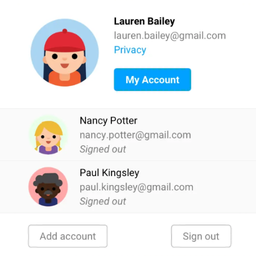
描述
Account Dock lets a signed-in user add other accounts through the normal WordPress login screen, then switch between those verified sessions from the toolbar or account manager.
It is useful for customers, store managers, support teams, editors, administrators, and developers who regularly work with more than one account on the same site.
Main features
- Add up to five accounts after each account completes the normal WordPress authentication flow.
- Switch directly from the WordPress toolbar with an avatar, display name, username, and active-account indicator.
- Return to the same path and query string after switching from the toolbar.
- Manage accounts on a responsive account page with clear switch and remove actions.
- Use the
[account_dock]shortcode to display a link to the account manager. - Show a Manage accounts link on the WooCommerce My Account dashboard when WooCommerce is active.
- Preserve the Remember Me choice for each saved account.
- Validate expiration, cookie signatures, user identity, and server-side session revocation before every switch.
- Revoke a saved session when that account is removed.
- Revoke all sessions saved by Account Dock on this browser when the user logs out.
Account Dock never stores passwords, creates custom database tables, sends telemetry, or allows switching to an account that has not authenticated on the current browser.
Only one account is active at a time across the site’s tabs. Reload other open tabs after switching. Use separate browser profiles when accounts must remain active simultaneously.
Privacy
Account Dock stores essential browser cookies only after a user explicitly adds an account. The cookies contain WordPress-signed session credentials and a signed Remember Me preference. They are HttpOnly, use SameSite=Lax, and use the Secure flag when the site is accessed through HTTPS.
The plugin does not collect analytics or send account credentials to the plugin author.
Account avatars are rendered through the WordPress get_avatar() function. Depending on the site’s avatar configuration, the visitor’s browser may request an avatar from Gravatar and disclose normal connection information, such as the IP address and browser headers. The avatar URL uses a one-way hash derived by WordPress rather than sending the email address as plain text.
Gravatar service: https://gravatar.com/
Automattic privacy policy, which covers Gravatar: https://automattic.com/privacy/
Site owners should describe Account Dock’s essential cookies and configured avatar provider in their own privacy and cookie notices where required.
Security
Account actions use POST requests and WordPress nonces. Before switching, Account Dock verifies the signed authentication cookie, expected user ID, expiration, and server-side WordPress session token. Removing an account revokes the session token saved for that account.
Account Dock is a convenience tool for authenticated sessions, not an additional authentication factor. Use HTTPS in production and follow normal WordPress account-security practices.
屏幕截图

安装
- Upload the plugin ZIP through Plugins > Add New Plugin > Upload Plugin, or install Account Dock from the plugin directory.
- Activate Account Dock.
- Sign in to the first account.
- Open the account menu in the toolbar and choose Add another account.
- Complete the normal WordPress login form for the additional account.
- Select an authenticated account from the toolbar or Manage accounts page.
Optional: add [account_dock] to any post, page, or compatible widget area to show a Manage accounts link.
常见问题
-
Can Account Dock switch to any site user?
-
No. An account appears only after it has successfully authenticated on the current browser. Knowing a user ID, username, or email address is not enough to switch to that account.
-
Does Account Dock store passwords?
-
No. Passwords are handled by the normal WordPress login flow. Account Dock stores WordPress-signed session credentials in host-only HttpOnly cookies. These credentials are sensitive and should be protected like any logged-in browser session.
-
What does Remember Me do?
-
When Remember Me is selected during login, the saved account remains available after the browser closes until its original WordPress session expires or is revoked. Without Remember Me, the saved account uses a browser-session cookie. Browser session-restore features can sometimes preserve session cookies.
-
Does switching extend the login session?
-
No. Switching reuses the authenticated session and preserves its original expiration time.
-
What happens after a password reset or session revocation?
-
WordPress invalidates the affected session. Account Dock removes an invalid saved account the next time the list is checked.
-
Does switching ask for two-factor authentication again?
-
No. Switching reuses a session that already completed authentication. Two-factor authentication, SSO, captcha, custom login, and security plugins should be tested on a staging site because some providers do not use the standard WordPress authentication hooks.
-
Anyone who can use the same unlocked browser while its sessions remain valid may switch to any saved account, including an administrator account. Do not save privileged accounts on shared devices. Use HTTPS and sign out when finished.
-
Does it merge WooCommerce customer data or carts?
-
No. Account Dock only changes the active WordPress identity. It does not merge carts, sessions, orders, addresses, subscriptions, or checkout data. Test the plugin with the store’s cart, checkout, caching, and session extensions before production use.
-
Does it support multisite?
-
Saved account lists are scoped to the current site URL and blog ID. Only members of the current site are accepted. Cross-domain and network-wide account lists are not supported.
-
What happens when the plugin is removed?
-
Account Dock creates no custom database tables or options. Sign out of saved accounts before deactivation when possible. Remaining browser cookies and WordPress sessions expire according to their normal session lifetime.
评价
此插件暂无评价。
贡献者及开发者

更新日志
1.3.0
- Initial public release.
- Add up to five authenticated accounts and switch between valid sessions.
- Add toolbar and responsive account-manager interfaces with avatars.
- Preserve Remember Me and the current path and query string when switching.
- Add WooCommerce dashboard and shortcode entry points.